Brought To You By Emily Parks
Productivity Consultant at Organize For Success, LLC...
Helping You Make Every Minute Matter!


Tuesday, August 18, 2015

11 Ways to Limit Distractions and Do Your Best Work

Stop Feeling Held Back By Distractions
Do you feel as if workday distractions are depleting your productivity? Are you getting less and less done as you're pulled in more and more different directions? If so, you are not alone. As outlined in this article, "on average, most of us experience one interruption every 8 minutes or approximately 6-7 per hour... The average interruption takes approximately 5 minutes, (and) research has shown that, for every interruption, it takes an average of 25 minutes to fully regain your cognitive focus." Wow! That could mean 210 minutes or 3.5 hours of time wasted each workday, driving you further from meeting your goals.

With the negative impact of interruptions throughout the workday, it is important to take steps to eliminate distractions. Here are 11 suggestions of easy ways to get you started:
  • Break projects into bite-sized actions. Then, you can feel empowered to complete each task in a single work session.
  • Utilize a timer. Some folks use a timer to just get started, setting it for 15 minutes and capitalizing on that momentum to keep going towards completion of the task at hand. Other folks like using a timer to stay on track, setting it for different intervals during however long the task being done should take and making certain to still be working on it at the end of each interval. With either option, it's a powerful productivity tool.
  • Wear noise-reducing headphones. Particularly when you focus on strategic thinking or creative production, wearing noise-reducing headphones can block out what's happening around you, even if not playing any sort of music at all.
  • Turn off the pings and dings of tech-related notifications. Set your smartphone to silent and remove the vibrate that goes with silent mode. Stop the pop-ups telling you when you get a new comment on social media. Deactivate previews of newly received email messages. Instead, schedule times for handling calls, social media and emails. Then, for folks that do require an immediate response, like key account clients or your direct supervisor, make them VIPs so you can utilize Do Not Disturb on iOS and Priority Mode on Android.
  • Be realistic about task management. While we all wish we were superheroes, we are humans that can only accomplish so much each day; unforeseen items are going to pop-up and need your attention. Therefore, schedule only 3-5 "must do" items each day, and make sure that each "what" which must be done is assigned a "when" for getting it done.
      • Schedule "office hours" during your day. In these blocks of time, you can focus exclusively on assigned projects while blocking out distractions... Tell others you will be available before and after these times; then, during this timeframe, send calls to voice mail, don't check emails and hold off on answering knocks at your door. It is as if you are away in a meeting, but you can attend more intently to the work that must be done.
      • Limit the impact of drivebys. If you have an extra chair in your office, make sure it has something resting in it to keep others from plopping down into it or position it somewhere more difficult to access. When someone comes into your office without an appointment, stand up and move towards your door, conveying to the visitor that it's not a convenient time. Keep an outbox near your office door so you can take those items down the hall as someone is coming to your office, always encouraging those that make unplanned visits to schedule an appointment. You want to help them, but it has to fit in your schedule such that it supports your workflows and productivity.
      • Make sure your scheduled tasks fulfill your goals. Burnout comes from actions being out of alignment with your priorities and can certainly derail your productivity, limiting focus and making you more susceptible to distractions. I find it helpful to regularly audit how my actions align with my priorities.
      • Work remotely when you most need to focus intently. While a library might help, research shows that a coffee shop can act as "white noise", enabling you to block out everything around you. New surroundings can boost your concentration.
      • Reward yourself for successes. While we live in a "do, do, do" society, it is difficult to stay motivated to keeping achieving when we fail to celebrate each achievement. No matter how small or large is the carrot you dangle in front of yourself, having something to look forward to upon competing the task at hand makes it easier to stay focused.
      • Practice mindfulness. For some, this means doing one thing at a time with complete focus. For others, this means being fully present in the moment, no matter whether in a meeting or working on the computer. Yet, for different folks, this means scheduling more intense tasks for when you have your peak energy, whether you are a morning person, a night owl or someone that uses caffeine for top focus in the mid-afternoon.
        How do you keep yourself organized, focused and productive amidst all of the distractions? With what distractions do you struggle the most? Do you use any of these tactics already?

        Monday, August 10, 2015

        10 Easy Ways to Boost Your Productivity and Stay Sane with Work-Life Integration

         I disagree with the concept of “work-life balance”. When thinking about “balance”, it often conjures up the image of a scale, which forces a perception of tradeoffs or costs necessary for success. I do not believe my “work” competes with my “life”, regularly seeing how they complement each other. Although balance would be static, life is certainly not and requires fluid solutions.

        Whether you call it “work-life integration”, “work-life harmony”, “work-life efficiency”, “work-life mash-up" or something else, it’s important to recognize how each element you choose to have in your life can add value to each of the other elements. Conflict and stress are certainly not inevitable; instead, harmony is possible.

        As explained by Lifehacker in its “How to Master Work-Life Integration and Find Harmony in Your Schedule” article, “instead of thinking ‘what work can I easily integrate into my home life’, focus on the bigger picture: Integrate all areas of your life the best way you can."

        Since 1984, Stew Friedman has been at the Wharton School of the University of Pennsylvania, where he is the Practice Professor of Management and founded the Wharton Leadership Program in 1991. Friedman has done a good deal of research related to the interactions between all the elements encompassed in life: work, home, community or society and the private realm of mind, body and spirit. I agree wholeheartedly with Friedman’s finding that “you don’t have to sacrifice, tradeoff or balance to have a sane, productive and meaningful work life and home life”. Amen!

        There are a number of well-known examples for how “work-life integration” leads to greater success:
        • Andre Agassi, tennis legend
        • Craig Cincotta, VP of Brand Communications at Porch.com
        • Barbara Corcoran, “Shark” investor
        • Jennifer Dulski, President & COO of Change.org
        • Julie Foudy, soccer champion
        • Eric Greitens, Mission Continues founder 
        • Robert Herjavec, “Shark” investor & CEO of Canada’s largest IT security provider
        • Fay Johnson, Founder & CEO of deliberateLife
        • Indra Nooyi, Chairperson & CEO of PepsiCo
        • First Lady Michelle Obama
        • Sheryl Sandberg, Facebook COO
        • Max Schireson, former CEO of MongoDB
        • rock icon Bruce Springsteen
        • businesswoman & television personality Martha Stewart
        • Tom Tierney, Bridgespan co-founder, and many, many more.
        As Dulski explains in a post on LinkedIn, “I’m still a parent when I walk into work, and I still lead a company when I come home. If my daughter’s school calls with a question in the middle of a meeting, I’m going to take the call, and, if a viral petition breaks out in the middle of dinner, I’ll probably take that call, too… I have accepted that work and life are layers on top of each other, with rotating levels of emphasis, and I have benefited from celebrating that overlap, rather than trying to force it apart."

        According to that same post by Dulski, in tech-speak, a “mashup” is a webpage or app created by combing data and / or functionality from multiple sources while, in music, a “mashup” is a piece of music combining two or more tracks into one. As Dulski explains, “one of the key concepts of a mashup is the resulting product provides value in a way that neither originally did on its own; each layer adds value to the other”, revealing why she calls handling all of life’s elements a “work-life mashup”.

        Looking at your own life, are you wondering how to make this integration, harmony and efficiency possible? Here are a few action items to consider today:

        1. Do great work. When you are good at your job, you can position doing something for yourself, your friends or your family during “normal” work hours as a complement, communicating clearly your “why” and showing how it empowers you to do even better work and better help the team.

        Per Dulski’s post, “If colleagues and managers know they can trust you to deliver high-quality results - beyond what was asked - … they’ll be less concerned with when and where you get that work done."

        2. Recognize which small changes are a good beginning. As Friedman explains, aim for “4-way wins, (where there’s) improved performance at work, at home, in the community and for yourself.” Greater productivity and satisfaction come with small changes that are under our control, and, yes, you have more control than you think.

        Turnover, absenteeism and disgruntled workers are costly; therefore, when your harmony leads to the business achieving its goals, there are options. What are activities you can do to release stress in the midst of your workday? Would working from early morning to mid-afternoon and picking back up once the kids are in bed help you produce better work by letting you attend to your children’s needs for attention?

        3. Offer your flexibility as a “temporary experiment”. When you frame how your solution benefits your team, explain how it will be evaluated and can be discarded if it just doesn’t work out as expected. Then, when you achieve enhanced productivity with greater outputs, everyone will support your tactics.

        4. Be creative in ways to achieve multiple goals with individual actions. The Lifehacker article stated, “With a clear set of general priorities, you can plan tasks to fulfill more than one priority at once”. For example, walking your dog meets your goals to live a healthier life as well as take care of your pet simultaneously; however, if you brainstorm a big pitch for work at the same time, you can accomplish even more via this “work-life integration” tactic. Attending business conferences is another excellent example for addressing multiple elements at the same time: you're learning new information, networking with other professionals and visiting great locations.

        5. Focus on outcomes over activities. Rather than doing things you think you are “supposed” to do, have specific goals mapped out for your week and incorporate actions that will drive those results. I use my Weekly Strategy Session and Daily Wrap-Ups to create a game plan and stay on track, fueling results with actual value. By focusing my actions on achieving my desired outcomes, I know whether I’m being successful.

        6. Plan for all elements of your life in the same daily, weekly and monthly game plans. With a clear awareness of your priorities, you can include actions that address goals for all of those priorities, rather than segmenting your life, and you'll be able to focus on activities that will address your needs in multiple elements at the same time. Instead of compartmentalizing activities by individual elements in your life, schedule your priorities, and figure out how to bring your priorities together so multiple goals can be accomplished simultaneously.

        7. Acknowledge how technology can help. In today’s technology-infused world, people seek a more blended, harmonious existence, but it’s important to honor your boundaries, using technology to stay connected when it boosts your desired results while disconnecting when that better meets your goals. Likewise, there are many ways technology can eliminate steps in a process to open time for other actions; can technology make you more efficient so you can better address all the elements in your life? How can technology empower you to get work done without needing to be at work so your hours can be more flexible? If a business owner, can you be more connected to the data you need?

        8. Complete a regular audit of your harmony. Experiencing burnout is usually due to a misalignment between your goals or values and your daily actions. On a daily, weekly and monthly basis, make sure your actions are consistent with your values, including an accountability partner in your efforts if needed. For example, are you attending meetings you don’t really need to be in just so you can be seen there? Verify meetings you attend have a structured agenda, a need for input from all attending and set goals. Since our individual circumstances change at different stages in our lives, the percent of each day that needs to be devoted to each element of life will vary, meaning we must keep our focus fluid.

        Corcoran has a strategy: When feeling exhausted, she makes two lists. One for “what I love” and one for “what I hate” about all that’s going on in her life. When she reflects on what she loves, she can dump the things she’s listed as what she hates.

        9. Control what you can control. Above all, only you are the boss of you and can control the fate of your week. Life will throw you curve balls, but you choose how to react and with what attitude you face those challenges. How much or how little guilt you experience in any element really is in your control, just as you control your responses.

        10. Encourage the right culture for “work-life integration” in your workplace. The growth of virtual workforces, where more people work remotely or with varying schedules, appears to be a result of the growing awareness related to how “work-life integration” boosts productivity. As Johnson explains, many people want "to live well while making a positive impact” and those businesses that respond appropriately will succeed greatest. Further, as Millennials (those born between 1982 and 1993) will make up roughly 75% of the global workforce by 2025, their desire to blur the lines between work and personal for a “healthy work-life blend” will continue to drive what businesses must provide, forcing more and more companies to focus on flexibility, outcomes and collaborative efforts. As entrepreneurs, we must celebrate how each of our employees and vendor partners brings value to our team in different ways. 

        At the Wharton School, students focus on the three core principles of the Total Leadership Approach: be real, be whole and be innovative. As Friedman explains, “To be real is to act with authenticity by clarifying what’s important to you. To be whole is to act with integrity by recognizing how the different parts of your life affect one another. All this examination allows you to be innovative."

        As you look at the relationship between all elements of your life, including work, home, community, mind, body and spirit, are you integrating layers into a mashup that drives harmony, satisfaction, enhanced productivity and greater outputs? If not, what small changes can you make now to be more real, be more whole and be more innovative for greater success in the future?

        Monday, August 3, 2015

        Proactively Stay on Track with a Daily Wrap-Up

        Successful professionals start each week with a plan, prepared to address what's important and having scheduled all priorities. Yet, then, things can get thrown off track. A client has an urgent, unexpected issue arise, desperately needing your time to get the situation fixed. Or a team member calls in sick, leaving you to help with some of his responsibilities. Maybe some of your employees need your direction on meeting a deadline, having had questions arise while working on the project. Whatever has popped up to detract from your game plan, it is vital to reboot as best you can and get back on track.

        I encourage you to end each workday with a Daily Wrap-Up, which can be imperative in getting your week back on track and helping to maintain what you created in your Weekly Strategy Session. Work through each item below to keep each day productive and help you organize for success:
          • Communications - Get end-of-day updates from appropriate team members, touching bases to drive awareness and get everyone on the same page. Verify you're up-to-date processing received emails and following up on voice mail.
            • Tasks - Review your to-do list from that day and look over the next day's to-do list. If something wasn't completed today, determine at what point in the next few days can time be allocated for completing it. 3-5 items on any given date's to-do list is realist and allows you to hit the ground running when you return to work the next day.
            • Time - Evaluate your schedule for the next day and verify that you are prepared for everything scheduled.
            • Space - Whether you're in 4 walls, an open office space, a vehicle or working from a bag, tidy up your workspace... File new items and put that day's work back into each item's home. Finally, make sure what items you will need for the next day's activities are ready and easily accessible.
            • Successes - We live in a do, do, do society, meaning we don't necessarily take time to celebrate when we achieve the goals for which we strive. When we take time to celebrate our successes, we are better motivated to keep working towards even greater accomplishments. Therefore, make sure you take time to celebrate daily successes, no matter how large or small.
            • Gratitude - While there is a vast amount of research regarding how gratitude improves productivity, you can click here for 20 such ways as shared by Lifehack. With that in mind, you can use the power of gratitude to drive your daily productivity. End each day's Daily Wrap-Up with gratitude, and make note of that for which you are grateful each day. 
            Share your story... Do you take time at the end of each day to properly wrap-up that day and plan for the next day? Alternatively, what issues have you encountered when you haven't been able to regroup and end each day by getting back on track.

            Friday, July 31, 2015

            Use a Weekly Strategy Session to Organize for Success

            It's Friday afternoon, and, as you look back on the week wrapping up, how productive are you feeling? Usually, when we come into the week with a game plan, we are able to address what's important, rather than getting caught up in putting out fires or handling what's urgent; we tackle our priorities. Yet, if we wait until we walk into the office to determine what must be done, the phone rings, we get an emergency email or someone stops by to ask for our time; then, we're pulled in totally different directions, not meeting our goals.

            I urge you this afternoon (and every Friday afternoon going forward) to take time for a Weekly Strategy Session, where you wrap up the week that's ending and properly plan for the week ahead. Going beyond prioritizing our schedules so we're scheduling our priorities can be extremely powerful. It's amazing what being proactive can do for achieving important objectives!

            Work through each item below to properly plan the week ahead:

            • Carryover Tasks - Evaluate which of the ending week's tasks were completed, determining what's left undone and to when those undone tasks must be carried forward.
            • Client Communications - If there are people with whom you've been meaning to connect, call or email to schedule a convenient time to chat in the following week. Likewise, connect with clients you've done business with previously but haven't heard from in awhile; remind them of how you enjoyed working with the in the past, suggest new ways you can help, share what's new in your organization and pass along articles you feel might be helpful to them.
            • New Tasks - Schedule time to complete any tasks moving towards their deadlines, making sure each what that must be done has a when for moving it from "to-do" to "done".
            • Time Commitments - Review next week's commitments to ensure you're prepared for related tasks and appointments, making sure there is time for preparation and travel to each.
            • Development Options - Determine opportunities for personal and professional growth, scheduling what will move you towards your goals and keep your priorities in focus.
            • Strategy - Map out a specific game plan for addressing the upcoming week's task and time commitments, empowering you to start each day with only 3-5 "must do" items.

            Especially when you first start implementing the Weekly Strategy Session, set a timer. Knowing you have a certain amount of time in which to complete this checklist will better ensure your planning doesn't run longer than necessary. Plus, shorter times lead to an extra burst of energy to get more done in less time.

            No football, basketball or baseball team would go into a game without scouting the opponent and creating a game plan. Similarly, you should never go into a week without properly planning, evaluating what's ahead and determining how you will address all that you must handle. It is with a Weekly Strategy Session that busy professionals can be organized for success.

            Share your story... Do you take time at the end of each week to properly plan the week ahead and proactively address your priorities? Alternatively, what issues have you encountered when you haven't been able to plan adequately?

            Monday, June 22, 2015

            Keep Communications in Your Preparedness Plans

            Communicate With Team & Clients
            When your business is impacted by an emergency, the normal and expected gets thrown off track; everyone must adapt amidst the new scenario. Team members want to know how they are expected to function, where to report and when they can expect payroll. Clients want to know how to reach you and how they'll obtain your products or services. These elements are crucial for your business to operate with continuity regardless of the circumstances, but no one knows the answers unless you communicate those details to them.

            First, since you'll need to notify customers, vendors and employees alike of your operation plans as well as how to interact with you during each step of the recovery process, sustain contact records so they are always up-to-date. You will want to make sure you have the most accurate phone numbers and email addresses to reach each of these partners in any emergency.

            Consider the following when creating your business' preparedness plan for any sort of emergency:

            1. Your team members need to know how to respond, including when to report to what location for work. Where should employees look for necessary directives? Will these be on a website, sent via email or text, recorded on a voice mail greeting to which they can call in or communicated in an alternative fashion?

            2. Different team members fulfill different functions for your company, meaning each employee might need different directives to continue their jobs in an emergency situation. Which team members will need to know what?

            3. Every business partners with others to function. What questions will arise from vendors about how business will continue? How can you communicate that information to those partners beforehand as well as reminding them of the details in the emergency itself?

            4. There is no business without customers, and your clients will need clarity on certain details. How will you notify them of your operating plans and the ways they can interact with you? If you have to temporarily relocate, will your contact information remain the same? How will this impact your hours of operation? Will there be a break in service or a change to how they make payments?

            5. Beyond your existing customers, there are always prospects considering your company's products or services. Is a press release necessary to alert the general public of your plans?

            Catch a summary video of these points by clicking here; then, as you contemplate each of the aforementioned details, engage your entire team in the planning process. Each employee will have a different perspective and bring new ideas to the process.

            Plan maintenance is key... Things change and evolve; therefore, make sure to review your plans and supplies every 6 months, ensuring all updates are clearly and completely conveyed to all concerned parties. Train each new hire immediately as that person joins your team. Conduct fire and emergency drills regularly for each possible scenario, including regular reviews of how to operate your fire extinguishers. Include regular training for all team members on First Aid, CPR and AED through your Red Cross or local medical facility. Test your smoke alarms monthly, changing the batteries twice a year and replacing every 10 years. Then, when disaster does strike, document how it worked for the future.

            Are you prepared with a communication plan for your customers, team members and vendor partners? What's worked well for you, and how do you maintain this plan?

            Thursday, June 18, 2015

            Honored by 40 Under 40 Leadership Award

            Holding Wake Forest University
            basketball signed by team that won
            1995 ACC Championship
            I am truly honored and humbled to be included in the Triangle Business Journal's 2015 class of "40 Under 40" Leadership Awards. Announced on Tuesday, April 21st, these "recognize outstanding professionals under the age of 40 for their contributions to their organizations and to the community". Per the announcement, "Five judges from TBJ and the local business community pored over nearly 300 nominations to come up with the final list of 40 winners"... Wow!

            Over the weeks to follow, several members of our class volunteered at a Habitat for Humanity build in Wake County, we were treated to a photo shoot with Christer Berg of Portraits with Purpose, and each winner answered a set of questions to aid the Triangle Business Journal's news team in creating content for our print and online profiles as well as introductions at the awards luncheon.

            During our celebration luncheon on Thursday, June 11th, each winner was given the opportunity to share a few words, but there was a catch to it... Triangle Business Journal used each acceptance speech for its 40 Under 40 awards to raise much needed funds to benefit Habitat for Humanity of Wake County. Winners commit to donating $25 per word of their acceptance speech with the first three words being covered by the TBJ itself. As you can see in the event highlights here, our class raised a total of $39,000, which surpassed last year's record of nearly $30,000.

            After my name was announced, I worked my way to the stage while "Celebration" by Kool & The Gang played in the background, and, then, here is what I shared with attendees:

            Attendees of 40 Under 40 Lunch
            This is an honor and a time to remember that accomplished women and men don't do things on their own. It truly takes a village: Teachers shared knowledge and inspired me; those in my athletic and automotive careers helped me learn each day; colleagues with whom I collaborate; friends and family to love and encourage me. In 2007, I created Organize for Success. Today, I endeavor to make a difference every day, running my business, raising money to cure lung cancer and making the world a better place. Like others in this room, I'm giving it everything I've got. Yet, right this moment, I'll enjoy my "15 minutes".

            While TBJ subscribers can see my write-up by clicking here, I wanted to share my questionnaire answers with everyone below:

            Name: Emily Parks 

            Company: Organize for Success, LLC

            Title: Owner, Productivity Consultant and Office Organizer

            Birthplace: Kernersville, NC

            Family members:
            I am the 6th of 7 siblings as well as favorite aunt to 3 nieces and 3 nephews.

            Education: B.A. in Psychology from Wake Forest University; Certificate from Organizing Academy Professional Organizer Training Program

            • What accomplishments are you most proud of?

            With a background in the automotive industry and college athletics administration, I am accustomed to working in team environments.  Having stepped out on my own 7 years ago, I have successfully created my own business and developed a team of clients, professional organizers and other partners across the Triangle.

            • What is your professional goal five years from now?

            Continue to have Organize for Success, LLC be well regarded and thriving by providing valuable solutions to clients with whom I have a genuine connection while making a difference in time and resources donated to local non-profits.

            Celebrating 40 Under 40 Award from TBJ
            at Prestonwood Country Club in Cary
            • What community cause or charity have you been involved in during the past year?

            Although I was unable to take away my father’s pain and suffering as he was battling lung cancer, I am passionate in supporting the Lung Cancer Initiative’s efforts at increasing awareness of the #1 cancer-killer of American women and men.  LCI is positively impacting North Carolina through lung cancer research, education and access to treatment programs. I serve on the Board of Directors as well as chair the LUNGe Forward Run, Walk and Rally in Greensboro.

            • What is the greatest obstacle you have overcome in your career?

            During my first week as a manager in the automotive industry, I had to fire one of our team members. I talked with human resources, mapped out what I would say and practiced replying to different responses. It was tough, but it was the right decision. This person was not a fit for our team, and the job was not a fit for this person, both of which are necessary for any team’s success. Learning the importance of a “right fit” for both employer and employee was both difficult as well as necessary. Based on this experience, I recommend clients think through “right fit” scenarios for their teams.

            • Finish this: What the Triangle really needs is …

            … a proactive solution for our transportation options to meet our population growth.

            • Nothing makes me madder than …

            … watching the San Antonio Spurs lose a really close game!

            • Who is your mentor?

            I have received guidance and counsel from many individuals throughout my life: Mrs. Obryant at Atkins Middle School; Rob Slater at East Forsyth High School; Jay Vidovich and Davis Whitfield in the Wake Forest University Athletic Department; Ellen Culler, Willie Scroggs and Dr. Beth Miller at UNC Chapel Hill; Tim Michael, James Berry and my father, Hubert Parks, in the automotive industry; Geralin Thomas in professional organizing; as well, throughout it all, my mother, Joellen Parks.

            They have supported me in becoming the woman I am and continue to evolve into. It truly does take a village!

            • What is your favorite Triangle restaurant?

            Winston’s Grille

            • Who would make the guest list for your dream business lunch?

            Joanna Coles, Arianna Huffington, Phil Libin, John Skipper, Kate Snow & Kerry Washington

            • What is your secret talent?
             Able to function well on very little sleep

            Awards Presented to 2015 Winners of
            40 Under 40 Leadership Awards
            In closing, let me reiterate my extreme appreciation for everyone who supports and helps me each and every day. There is no way I could achieve nearly what I do daily without those around me. Many people refer to "it takes a village" as a cliche; however, for me, it is 100% the truth and how I live my life. Whether in sports, running a business or keeping a household on track, having a team to surround you and lift you up better guarantees success.

            Monday, June 15, 2015

            Prepare Your Business For Data Issues

            Companies and individuals are more dependent on technology than ever before, and that dependence grows daily. As such, computer viruses, data leaks, system hacks and other technology-related issues can pose real emergencies. While the thought of something bad happening is difficult to consider, it is vital to take steps to protect yourself, your team, your clients and your overall business.

            Here are a few items to consider now to support your preparedness when any potential data issues arise:

            1. Make sure your business uses a hosted exchange server. Moving your exchange server offsite ensures your company email, calendar sharing and contacts directory will work, even when your physical office space is unavailable. Plus, moving it offsite removes the cost and complexity of managing the hardware yourself.

            2. Utilize hosted VoIP for your business' telephone needs. Moving the brains of your phone system to an offsite solution ensures you can still send and receive calls amidst whatever disaster impacts your area, even when your physical office space is unavailable; plus, this ensures you can transfer calls to anywhere at any time, and each team member will receive voice mail messages as emails to whichever email address he or she prefers.

            3. Download apps from the web. Applications installed to your computer by a CD or by the manufacturer of your laptop / desktop require manually upgrading to the latest version. Alternatively, using cloud-based software applications will ensure all team members are always working on the latest software from anywhere on any technological device. Plus, this option provides tools that are more reliable and more easily accessible, enabling your business to function from nearly anywhere.

            4. Save important information to a cloud storage solution. Both paper and electronic documents can be damaged by natural disasters when saved locally. An onsite server is subject to local emergencies, especially fire and flood. Having vital data saved in one place leaves you susceptible to viruses and "disappearing" content. However, when you choose a cloud storage solution, such as Backblaze, Carbonite, Crash Plan or Mozy, your information is encrypted and saved in several places, making it much safer and more secure. Convert paper documents to an electronic format and, then, store them remotely, making all your information easily accessible AND safe from harm. Here are some items to include:
            - insurance policies and contact phone numbers
            - business licenses, permits, articles of organization and EIN
            - bank account numbers and representatives' contact information
            - deeds to properties
            - service contracts for all your products / tools and the contact numbers for those overseeing their maintenance
            - inventories, both of items in office space as well as items to sell

            5. Create and implement a cybersecurity strategy. For my clients, I recommend a consultation with Bianca Montes Jones of justotech; however, no matter with whom you consult, it's important to make sure your company has appropriate virus protection, is not susceptible to hacks and maintains appropriate restrictions for team members' use of the Internet.

            A little bit of risk management up front can lead to saving a good deal of money, headaches and heartache over time. Click here for a video overview of steps you can take to prepare your business for potential data issues, and please share successes in the comments.

            What steps will you take now to boost your preparedness?

            Monday, June 8, 2015

            Prepare Your Business For Potential Fires

            An emergency is a sudden and urgent state of need for help or relief that's created by some unexpected event. Regardless of your location and the risks uniquely associated with that specific place, we are all in danger of emergency resulting from fire. Plus, it is important to note that the hazard of fire is not limited to your home; your business is equally at risk of burning down. Are you prepared for such an emergency?

            Fire can create disaster for your business at any moment, but it doesn't have to slow your business down. Take the following steps now to boost your preparedness for whenever fire might possibly strike. You'll appreciate being prepared when your business and personal safety are faced with a fire disaster.

            - Make certain you have proper insurance. Inadequate insurance coverage can lead to major financial consequences if your business is damaged or operations are interrupted for a measurable amount of time. Ask your insurance agent, broker or underwriter if you are adequately covered for potential property damage as well as what business interruptions you could possibly face. Check out Ready.gov/business for a form that can be helpful in evaluating your insurance coverage.

            - Back-up all important programs and data to an offsite location. While many rely on online file repositories, like Box, Dropbox, Google Drive, iCloud, Spider Oak and Sugar Sync, please keep in mind that these are not back-up solutions, serving instead to make your selected files available across your many devices and to make those files easier to share with others. Alternatively, I highly encourage you to consider "set it and forget it" solutions, like Backblaze, Carbonite, Crash Plan and Mozy.

            - Make an evacuation plan. The ability to evacuate your team members, customers and visitors quickly can save lives. Ensure there is a warning systems (like smoke detectors) throughout your facility that everyone can hear, and schedule maintenance of those systems, particularly marking your calendar to replace batteries and test the devices regularly. Determine at least two ways for each team member to get out of every part of each building, including ladders to come out windows of upper stories, and educate your team as to how they can use that evacuation plan. Tell everyone to crawl on the floor because smoke rises and to check doors for heat before leaving any room. Identify a location away from your facility for everyone to gather outside their building, helping you determine whoever might be missing, and share this information every year with your team, educating new hires upon their arrival. Remind everyone that, once you've left the building, everyone is to stay out and do not re-enter for any reason. Plus, don't forget to call 911 from your safe location.

            - Do what you can to limit damage before being struck by fire. When possible, prepare and maintain adequate firebreaks and green spaces around your property. Consider installing fire glass in windows and doors. Locate your sprinkler shut off valves so first responders can easily access them and prevent residual flooding; on a related note, routinely test your sprinkler systems to keep them in good working order. Likewise, know the location of major HVAC, piping, gas and water lines to aid in the domino effect of damage being done to your facility. Keep emergency exits clear and marked with plenty of signage to direct anyone in that area.

            Risk management is a way of thinking that permeates your entire organization, from the most senior manager to the newest edition to your workforce, and seeks to preserve your company's ability to continue in the face of whatever might arise. Being prepared for emergencies and natural disasters should be no exception. Click here for my video of tips and visit the Ready Business website, launched by The Department of Homeland Security and The Federal Emergency Management Agency back in 2004 to make sure businesses are prepared in the event of an emergency.

            Is your business prepared for a fire? What steps will you take to increase your preparedness?

            Tuesday, June 2, 2015

            Prepare Your Business For When Natural Disasters Strike

            As the Atlantic hurricane season is June 1st through November 30th, I find this an excellent time to revisit preparedness for your business, your home and you personally. There are many issues for which you need to be prepared, and hurricanes are just one of the options listed. According to the Insurance Service Office, the top causes of insured disaster-related losses from 1993 to 2012 are as follows:
            1. Hurricanes / Tropical Storms - $158 billion in claims
            2. Tornadoes - $141 billion in claims
            3. Winter Storms - $28 billion in claims
            4. Terrorism - $25 billion in claims
            5. Geological Events - $18 billion in claims

            When you take into account all possible natural disasters, each of us is in danger of something, no matter in which part of the world you live, work and play. Whether you face hurricanes, tornadoes, snow blizzards or thunderstorms with lightening, are you, your business and your loved ones prepared? Per Ready.gov, only 57% of people report they have readiness items set aside for use in disasters; likewise, just 34% of people have readiness supplies in their automobiles, and less than half of households have an Emergency Plan created.

            In this first post of my preparedness series, let’s talk about the steps you can take now to be ready:
            - Determine what types of disasters are possibilities for your area.
            - Decide where you will go and who you will contact for check-in should you have to evacuate.
            - Make a list of what essential equipment must be taken from the premises as evacuating.
            - Learn and practice how to turn off water, gas and electricity at the main switches or valves.
            - Locate your fire extinguisher and learn how to operate it.
            - Find out where your smoke alarms and carbon monoxide detectors are located; mark on your calendar regularly replacing their batteries and learn which sounds indicate what.
            - Establish from here employees can obtain important updates during an emergency situation, especially when and where to return to work if there is a satellite or back-up location.
            - Decide how you will facilitate payroll in a disaster scenario.
            - Keep your business’ policies and procedures in writing to be accessed from anywhere at any time.

            If it is unsafe to go out, you might be stuck at work or your home; therefore, make sure you have the necessary supplies. Visit http://www.ready.gov/build-a-kit for what should be included in a disaster supplies kit and, then, start accumulating it all, storing them somewhere easily accessible yet secure. For more about what you need, click here for a video description, and take actions to get ready now.

            As different natural disasters impact different areas of the globe in different ways, take time to peruse the details at http://www.ready.gov/natural-disasters, paying close attention to what you need in the various scenarios that potentially impact your area. With each, though, power outages are regularly a by-product of natural disasters; therefore, prepare for potential power outages with these steps:
            - Fill up your gas tank. Without power, the pumps don’t work.
            - Visit your bank's ATM for cash. Credit and debit cards won’t work during a power outage.
            - Charge your mobile devices and try steps from http://bit.ly/VcvO6u to conserve battery consumption.
            - Keep on hand extra batteries for your flashlights so you are always ready to see in the dark.

            Another excellent resource is at http://www.preparemybusiness.org/planning, from which you can obtain checklists for recovery overview, critical business functions to consider, assessing your risks, creating your emergency communications plan, phone recovery, your disaster recovery kit, winter weather preparedness, earthquake preparedness, tornado preparedness, wildfire preparedness, flood preparedness, hurricane preparedness, crisis communications to consider and much more.

            Above all, though, make a plan, prepare for possible communication gaps, have the supplies you need on hand, keep what you’ll need remotely stored in the cloud and update everything regularly.

            What natural disasters are issues where you reside? How have you prepared for those potential issues? What steps can you take now to be fully prepared?

            Tuesday, March 31, 2015

            Evernote Can Boost Your Collaboration

            Collaborate Better With Evernote
            Although Evernote provides an excellent catchall for what I need to reference or am using to complete my current projects, its usefulness goes well beyond containing content in a manner that makes it easy to find. My experience repeatedly shows that Evernote's greatest value comes from how it supports and empowers collaboration. Yes, sharing notes can aid my workflows, but sharing Notebooks, using Work Chat and pulling Context from my LinkedIn network or Notes of others in my Business' accounts can really boost my abilities.

            For example, when I'm chairing a non-profit committee or serving on a Board of Directors, Evernote enables sharing more than any online file repository. If we were to use Dropbox or Google Drive, we would be limited to Word documents, Excel spreadsheets, PowerPoint presentations and the like; however, by sharing a Notebook in Evernote, we can share those same types of documents PLUS any content included in any of that Notebook's notes, like typed text, articles clipped from the Internet, photos of handwritten notes, audio and video files created right in the app itself, checklists and much more.

            Likewise, when I'm traveling with others, Evernote enables sharing all sorts of information related to our upcoming trip. This includes a packing list of who is bringing what, our reservations for flights, airport shuttle or rental car and hotel rooms, our expected itineraries, things we want to do while visiting this destination and contact information for places we will visit or folks we will be seeing. Avoid email madness by simply sharing a Notebook.

            Whenever someone with a Premium or Business account shares a Notebook with others, they can choose what access the invitee would have for that content to be shared. If the access provided is "can edit" or "can edit and invite", voila... Collaboration is empowered! Publicity teams can share and continually update a list of press contacts. A creative services team can save design inspiration while going back and forth on production of new campaigns. Corporations can allow all employees to easily access the most up-to-date version of that company's employee handbook or any forms related to human resources, like requests for time off.

            I like using Notebooks shared in Evernote for group meetings. Via that Notebook, I can seamlessly share with all attending any related information: documents to be reviewed beforehand, meeting agenda, summary notes or minutes, who is responsible for what follow-up to be completed by when and anything requested during the meeting to be shared with others. In addition, as long as I'm on the Premium or Business version, others can add requests to the agenda or make edits to the minutes without emailing back and forth with others or awaiting someone else doing it. Click here for a video of me discussing how I use this aspect of Evernote.

            You can always change permissions or stop sharing, ensuring you aren't unnecessarily constrained by Evernote. Yet, when you can share what's needed for moving forward on the project at hand without clogging up someone's email inbox, there is definitely value. When folks can have at their fingertips what is needed for getting things done, there is value.

            How do YOU use Evernote? In which of your uses have you found Evernote's greatest value?

            Friday, March 27, 2015

            Tactics to Quickly Find What's Needed in Evernote

            Whether you are seeking your own words, images, documents, checklists or content culled from elsewhere, Evernote's powerful search and discovery features make it easy to quickly find what you need when you need it, no matter from where you are seeking it. How would you like to stop wasting time, searching for what you "know" you have?!? Well, look no further!

            Anytime you enter text in the Search field of your Evernote account, it searches all the content in your notes' titles, your notes' bodies, notebook names, tags you've used and content in your URLs for notes in your database, including text in photos that has been processed by Optical Character Recognition; plus, in Business or Premium, you can search text inside attachments, PDFs and spreadsheets. Yet, Evernote's search capabilities go well beyond a simple keyword search option.


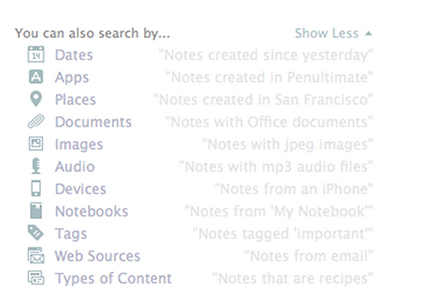
            With Descriptive Search, those using Evernote on a Mac can use plain language to describe what is being sought. You can search by location you visited on a specific trip, by dates you know you were doing whatever is being sought, by type of device you used to upload the information and more. Click here for a video overview of the Descriptive Search functionality.

            Still, within that same search field, Evernote offers codes or equations you can use to focus in on certain aspects of the content for which you are searching. Here are some examples:
            • created:20150115 finds notes created on January 15, 2015
            • updated:20150327 finds notes updated on March 27, 2015
            • intitle:"coffee" finds notes with coffee in their titles
            • resource:image/* searches for notes that include images
            • notebook:"Receipts" finds notes in the Receipts notebook
            • tag:"Mobile" finds notes tagged with Mobile
            • any:"New York" searches for notes that have New OR York in them, unlike how typing New York on its own in the search box will pull up notes that have both New AND York in them
            • todo:true finds notes with a checkbox that is checked
            • todo:false finds notes that contain an unchecked checkbox
            • todo:* searches for all notes that contain any checkbox at all
            • source:mobile finds all notes created on a mobile device

            Many of my clients extend the power of Evernote for quickly finding what's needed via the Atlas and Shortcuts. By clicking the word Atlas in your Evernote account, you see a map and can locate any note based off the location in which it was added to your database. Likewise, under word Shortcut, you can access any note or notebook you've added to the shortlist of which content you access most frequently and, therefore, want most easily accessible. It is quite simple to add content to your Shortcuts by simply dragging a note or notebook atop the Shortcuts name and, then, dropping it into that section; however, I highly encourage you to keep your list of Shortcut content short so it doesn't become cumbersome to scroll through these options.

            Above all else, though, I think Evernote's recent additions of Context and Augmented Intelligence empower me to most easily find whatever I might need quickly. If you are using Evernote Premium, it is with Context that you are given related notes from you own account, people from your LinkedIn network related to that note's content and relevant content for free from trusted news sources, like The Wall Street Journal, Fast Company, Inc Magazine, Pando Daily, CrunchBase, TechCrunch, Forbes and Lifehacker. On Evernote Business, the Context functionality adds related notes from team members, others in your company who many know more about the topic at hand and content from Factiva's web content. Context dramatically extends my ability to get work done within my Evernote workspace. Further, via Augmented Intelligence, my Evernote database is incorporating what it learns from how I use the tool to better provide me with what content it determines would be helpful, and it is quite fascinating. For example, if I've been adding content to specific notebooks, those notebooks will appear atop my list of notebook options when adding new notes on the go.

            How do you find what you need quickly in your Evernote database? Do you utilize any of these tactics or are there any you'll be incorporating in your daily work habits?

            Friday, March 20, 2015

            Evernote's Tools Empower Your Paperless Productivity

            While we do not live in a society that fully supports efforts to go paperFREE, there are plenty of strong solutions to better enable and support a paperLESS existence. Among those options, I really like what is provided by Evernote's suite of productivity apps. Today, let's take a deeper look at what's available.

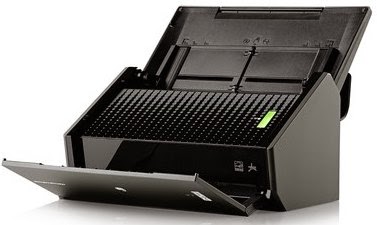
            If you like using a physical scanner, Fujitsu ScanSnap document scanners offer one-button ease of
            use, no matter whether you're scanning from the road or your desktop. Now, thanks to the partnership that Fujitsu has developed with Evernote, pushing your scan button on a Fujitsu ScanSnap device makes your documents instantly available and searchable across all your computers and mobile devices. Use any Fujitsu ScanSnap device to scan directly into Evernote, choosing your destination notebook; Evernote synchronizes your content across devices and updates your content for image recognition so you can quickly find what you need from anywhere.

            Alternatively, if you prefer the simplicity of an app, Scannable captures the paper in your life quickly, easily and clearly, transforming the content into high-quality scans to be saved or shared immediately. When you have the Scannable app open and hover over what is to be scanned, it instantly recognizes business cards, receipts, full-size documents and Post-It notes, scanning the content without you having to push any buttons; then, scans are automatically cropped and enhanced so you get crystal clear files to quickly find or share as needed. For a video demo, click here.

            Recently, I got a note from one of my clients, which I think highlights the vast usefulness of this tool. As she stated, "I thought I learned so much about Evernote from the earlier classes I took, but, when I took the workshop you presented to the National Association of Women Business Owners, you taught me about Scannable and, once again, changed my life. I have used it to scan in important documents that immediately needed to be emailed. I can scan anywhere, and the documents are permanently saved in my Evernote so I have them when and where I need them." The benefits of the Scannable app are limitless!

            Further, even without any physical scanner or additional app, you can easily utilize your mobile device's camera to upload a photo of your Post-It note, document, business card or receipt directly from within your installed Evernote app. Just like a scan from the Fujitsu ScanSnap or Scannable app, each of these photos is processed for one of Evernote's most popular features: the ability to search for text within images. When a note is sent to Evernote via synchronization, the system searches for content in the file types of PNG, JPG or GIF, which are sent to a different set of servers whose sole job is to perform Optical Character Recognition (OCR). The results of OCR for any image are added to its note in the form of hidden metadata, which is indexed and available for searching. The accuracy of the text recognition is dependent on the quality of the photo, and it can take anywhere from a few minutes to a few hours for images to be processed for OCR. Still, the ability to search for text in pictures is so very cool!

            Beyond how Evernote's OCR technology empowers your paperless abilities, using any of the aforementioned options to upload images of others' business cards can boost your productivity further. Via the Evernote suite of apps and its partnership with LinkedIn, business cards become business relationships. Scannable transforms cards into rich contacts with LinkedIn details, photos and the ability to save it all in your phone's contacts. Taking a photo from your phone's camera allows you to connect with that person on LinkedIn as well as save the contact to your phone's database. The content of the business card becomes actionable to further build that connection, taking you beyond the piece of paper.

            Do you utilize Evernote for empowering paperless productivity? What types of paper do you convert to electronic in your Evernote database? Are there tips in this post you'll implement soon?

            Tuesday, March 10, 2015

            Is Your Office Organized as a Tool for Your Success?

            While many people focus on team members, processes and technology as the best tools for driving desired results, the space in which you work can be another tool in your productivity toolbox. Just as important as "what" you keep is "where" you keep it all, and there are key concepts to keep in mind as you organize your office for your greatest success. In celebration of today's National Organize Your Home Office Day, let's look at manageable steps you can take to organize your workspace.

            First, retain only what's accurate, applicable, useful or bringing you joy. That rule of thumb applies to paper, electronic files, email and physical objects alike. The less you retain then the less you have to dig through in order to find what's needed, which makes it easier to get things done more quickly.

            Second, be strategic about the placement of anything and everything to remain in your workspace. Assign homes to what you will keep. When everything has a home and everything is in its home, it's easier to quickly put your hands on what's needed when it's needed. Likewise, group like items together, assigning homes that place any paper, electronic files, email or physical objects near where they will be needed or used.

            Third, contain what you retain in appropriate storage tools to create applicable limits. Physical items can go in bins, baskets and boxes. Paper can go in files and folders. Electronic files can go in cloud storage solutions... The key is to train yourself to purge or divide once the storage tool gets full.

            Remember that labels and color enhance the effectiveness of your organizational solutions. For example, adding a label to anything helps you more easily determine what it contains and where to put what is newly arrived in your workspace. In the same way, assigning color drives behavior, particularly when you associate a color you like with contents for an action you avoid.

            Utilize the mantra "horizontal is hidden; vertical is visible"... Whether you choose a vertical file holder for your desktop or baskets with labels on the front to fill your shelves, focus solutions on avoiding piles. Plus, consider how you can best utilize the walls and door of your office for additional storage space, making it easy to see at a glance what belongs where.

            As if you were considering a real estate purchase, think "location, location, location" when organizing your office. The space in closest proximity to where you are most often working should be utilized for what you use most frequently. As you move away from that space, you should start with current, active files and move towards archive files that are less frequently accessed.

            Finally, always remember "the power of one". While many folks say that one is a lonely number, I contend that one is a very powerful number when associated with productivity. This means one calendar, one running list of tasks to be done, one daily to-do list, one "data dump" for all your information, one address book, one weekly strategy session and one system for all your filing.

            What techniques do you utilize for keeping your workspace productive and how do you maintain your organization?

            Monday, March 9, 2015

            Tips to Utilize Email for Adding & Organizing in Evernote

            Last week, I shared with you the many forms of information that can be added in multiple ways to your Evernote database. In that list, I included "send to your Evernote account's email address", but that might've led to even more questions. Let's dive a little deeper into this functionality.

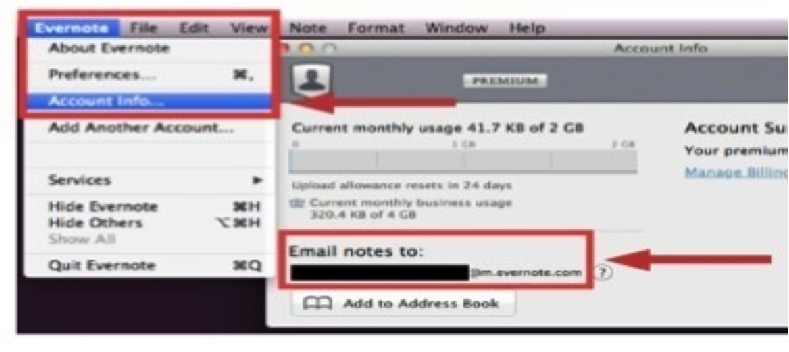
            On a laptop or desktop version of the Evernote app, follow Evernote > Account Info > Email Notes To for finding the email address assigned to your specific database. Likewise, on the iPad or iPhone app, tap the elephant head image to get back to your main menu; from there, tap the gear image in the top, left-hand corner, follow General > Evernote Email Address, and you will see the email address assigned to your specific database. Finally, on an Android version of the Evernote app, tap the image of three dots stacked vertically to follow General > Evernote Email Address, and you'll find the email address assigned to your specific database.

            Whatever you see as that email address assigned to your Evernote database is designed to be complicated and difficult to remember so others can't start sending content into your Evernote account. I find it's not realistic to think I'll just remember what that email address is; therefore, I recommend saving your email address as a contact in your address book. Often, I use Evernote as the first name and Upload as the last name. Once that information is saved as a contact, when I'm sending an email to my Evernote database, in the To line, I start typing Evernote Upload, and the address populates for me. It's such an easier way to quickly add content to my Evernote database!

            When you started your Evernote account, the first notebook given to you was labeled as your "default" notebook. As content is created in alternative manners, like emailing or scanning into Evernote, that content will automatically go to your default notebook. While you can always go into a different notebook's settings to change that into your default, overriding the original notebook's settings, you can alternatively just rename your original notebook to make the default easier to find. I recommend renaming your default notebook as your Inbox, just like the Inbox in your email management tool. Then, you can process newly received content from your Inbox just like you process emails from that Inbox location.

            On the other hand, if you'd rather the content you are emailing into your Evernote database bypass that default notebook, doing directly to a desired destination, you can utilize the email's subject line to aid organization... Add @ before an existing notebook name to add the content as a note in that specific notebook. Add # before an existing tag to add that tag to the note being created by the content you're emailing. Insert a reminder as !YYYY/MM/DD. 

            If you choose to utilize the subject line of an email you are sending into your Evernote database, there are a couple requirements to remember. First, the left-to-right order of your subject line must be note name, reminder, notebook name and, then, tags. While you do not have to include each one of those elements, Evernote will understand the information you are sending only if you have the information in that specific order. Second, any notebook or tag to be added via an email subject line must already exist in your database; you cannot use a subject line to create a new notebook or a new tag. Likewise, if the notebook name or tag doesn't match the exact spelling of what already exists, the system won't recognize it as a match so it won't work.

            Regardless of whether you are adding typed text, video and audio files, documents, checklists or photos, emailing into your database is a technique to simplify the process. For more, view my related video by clicking here, and, then, let me know your thoughts.

            Do you use email to add content into your database? What successes have you had? Which of the aforementioned shortcuts will you implement with your Evernote use?

            Wednesday, March 4, 2015

            Procrastinating for Less Stress and Better Well-Being

            While I previously wrote about overcoming procrastination here and here, there is an interesting holiday occurring this week that takes a very different view of things. At the beginning of each March, Procrastinators' Club of America encourages folks to celebrate National Procrastination Week, which is all about putting off important tasks.

            I can hear you now... "What?!? Emily, have you lost your mind? Why would you encourage us to put off important tasks?" Well, there's much more to it than just putting off what must be done.

            This week's holiday is absolutely not encouraging you to be lazy or develop self-destructive behavior; instead, the claim is that putting off such important tasks will open up time in your schedule for what activities could not be accomplished if you were working on completing those important tasks. That means time for exercising, meditating, doing your hobbies, grooving to some tunes or just resting. Refreshing, eh?

            The philosophy behind National Procrastination Week directly reflects the concept that everything to which you say "yes" means there is something else to which you'll need to say "no". There are only 168 hours or 10,080 minutes in any given week; with the limited resource of time at your disposal, you have to pick and choose how you want to invest it. Taking a mental and emotional break from the "do, do, do" perspective of our society can decrease folks' stress and anxiety.

            What are some activities on this week's schedule that you can put off or delay until later? What will you do with the newly available time that results?