Brought To You By Emily Parks
Productivity Consultant at Organize For Success, LLC...
Helping You Make Every Minute Matter!


Showing posts with label life's work. Show all posts

Monday, March 9, 2015

Tips to Utilize Email for Adding & Organizing in Evernote

Last week, I shared with you the many forms of information that can be added in multiple ways to your Evernote database. In that list, I included "send to your Evernote account's email address", but that might've led to even more questions. Let's dive a little deeper into this functionality.

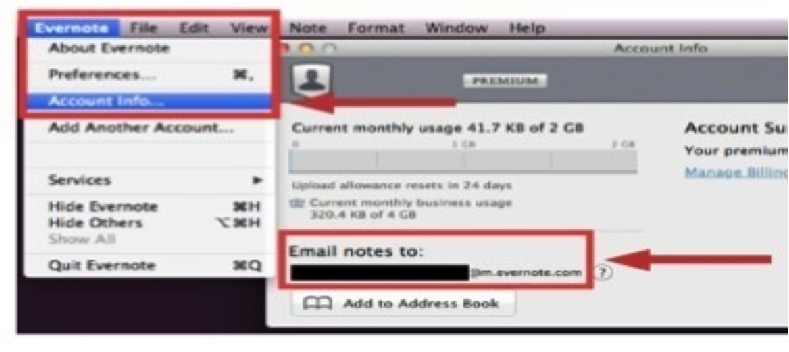
On a laptop or desktop version of the Evernote app, follow Evernote > Account Info > Email Notes To for finding the email address assigned to your specific database. Likewise, on the iPad or iPhone app, tap the elephant head image to get back to your main menu; from there, tap the gear image in the top, left-hand corner, follow General > Evernote Email Address, and you will see the email address assigned to your specific database. Finally, on an Android version of the Evernote app, tap the image of three dots stacked vertically to follow General > Evernote Email Address, and you'll find the email address assigned to your specific database.

Whatever you see as that email address assigned to your Evernote database is designed to be complicated and difficult to remember so others can't start sending content into your Evernote account. I find it's not realistic to think I'll just remember what that email address is; therefore, I recommend saving your email address as a contact in your address book. Often, I use Evernote as the first name and Upload as the last name. Once that information is saved as a contact, when I'm sending an email to my Evernote database, in the To line, I start typing Evernote Upload, and the address populates for me. It's such an easier way to quickly add content to my Evernote database!

When you started your Evernote account, the first notebook given to you was labeled as your "default" notebook. As content is created in alternative manners, like emailing or scanning into Evernote, that content will automatically go to your default notebook. While you can always go into a different notebook's settings to change that into your default, overriding the original notebook's settings, you can alternatively just rename your original notebook to make the default easier to find. I recommend renaming your default notebook as your Inbox, just like the Inbox in your email management tool. Then, you can process newly received content from your Inbox just like you process emails from that Inbox location.

On the other hand, if you'd rather the content you are emailing into your Evernote database bypass that default notebook, doing directly to a desired destination, you can utilize the email's subject line to aid organization... Add @ before an existing notebook name to add the content as a note in that specific notebook. Add # before an existing tag to add that tag to the note being created by the content you're emailing. Insert a reminder as !YYYY/MM/DD. 

If you choose to utilize the subject line of an email you are sending into your Evernote database, there are a couple requirements to remember. First, the left-to-right order of your subject line must be note name, reminder, notebook name and, then, tags. While you do not have to include each one of those elements, Evernote will understand the information you are sending only if you have the information in that specific order. Second, any notebook or tag to be added via an email subject line must already exist in your database; you cannot use a subject line to create a new notebook or a new tag. Likewise, if the notebook name or tag doesn't match the exact spelling of what already exists, the system won't recognize it as a match so it won't work.

Regardless of whether you are adding typed text, video and audio files, documents, checklists or photos, emailing into your database is a technique to simplify the process. For more, view my related video by clicking here, and, then, let me know your thoughts.

Do you use email to add content into your database? What successes have you had? Which of the aforementioned shortcuts will you implement with your Evernote use?

Wednesday, January 21, 2015

Hold Your Team Accountable For Greater Success

According to Dictionary.com, accountability is the state of being liable, answerable or subject to the obligation of reporting, explaining or justifying something. Basically, accountability means having to answer for one's actions. In business, leaders who hold their employees accountable are telling their teams "behave knowing in advance you will have to explain yourself and that your actions will have consequences". If team members know that they will have to explain actions taken to the leader or other team members, typically, those employees will make better decisions, better carry their portions of the workload and be better team members, leading to greater success for the team overall.

As a leader, you have big, hairy, audacious goals for your team; however, it is much more difficult (if not impossible) to meet those goals when your team members are not on the same page, not working towards the same objectives and not carrying their respective shares of the workload. Instead of success, the results are more like a rowing team with members not rowing in tandem or in the same direction at the same time: you start spinning in circles, not moving at all or moving backwards. Sadness!

Ensure folks are on the same page, working towards the same objectives and carrying their respective shares of the workload by holding each member of your team accountable, both for the elements in their job descriptions as well as the core values to be exhibited by members of your team. To facilitate that accountability, you must do the following:

  • determine when each team member will need to report back to you and explain his or her actions
  • determine what consequences will occur when completed actions fulfill versus do not fulfill the leader's and team's necessary functions
  • inform team members of what you have determined
  • follow through on getting those explanations when deemed appropriate and carrying out the subsequent consequences, whether rewards or punishments

Beyond those initial steps, for a system of accountability to truly succeed, I've found that your employees must trust and believe there is a fair and accurate process for keeping track of their actions as well as tying their behavior to real consequences. I believe such a scenario can be created with regular checkins of the leader directly connecting with each team member, ongoing open communication and a concerted emphasis on feedback from employees leading to action on your part.

As you develop a culture of accountability and the habits of holding team members accountable, remember the following key points:

  • Employees will assume their behavior is correct unless it is corrected... Set expectations clearly.
  • Holding people accountable is only 90% communication and problem-solving; the other 10% is the discipline to keep at it and follow through. No, this aspect of discipline and follow through is certainly not easy; however, it is vital.
  • You as the leader may never feel truly comfortable holding your team members accountable; there may always be a point of hesitation right before you hold someone accountable for their actions where a voice inside your head says "Maybe I should let this slide..." However, your responsibility as a leader is to forge ahead for the greater good of the team's success.

As leaders and managers, often, our main fear in holding people accountable is that our interaction with that person will turn emotional, whether angry, sad or something else. To move beyond that hesitation, understand that emotion can be a good thing as it will drive change to take place.

Take steps TODAY to start laying the groundwork for your team's greater success:

  • Clearly spell out expectations in advance.
  • Track employee performance every step of the way.
  • Follow through with real consequences based on whether or not your employee's actual performance meets your conveyed expectations.
  • Focus hourly, daily, weekly, monthly, quarterly and annually on actions the team member can truly control.
Bottom line, just get started... Sometimes, simply asking team members to explain their actions each day is a great foundation on which to build and will develop habits needed for meeting higher goals. You need information in order to hold your team members accountable so start asking questions... What have you been working on today? What successes can we celebrate? What hurdles have you faced so we can overcome them? What do you see as our team's immediate needs, short-term goals and long-term vision? What role do you see yourself playing in our group's successes? How can I help you be a bigger part of the group's successes? With more information, movement can be made, but the key is to get started.

How do you utilize accountability now? Have you seen greater success by holding team members accountable? How can you implement greater accountability?

Thursday, December 4, 2014

This Evernote Business Certified Consultant Can Help

Recently, I completed a comprehensive and rigorous training program to be selected as an Evernote Business Certified Consultant. This is a new certification that Evernote created so companies and teams can find experts in their own backyards to help them best implement Evernote Business. Using my certification, I can assist you and your team in increasing your productivity, passing along the latest updates as well as what's happening with Evernote and what best practices might best aid your specific workflows.

Technology can be overwhelming, but, with a tool like Evernote, one can easily increase their productivity and create a clutter-free environment. Since 2009, I've offered Evernote workshops, adding Evernote courses in North Carolina State University's Technology Training Solutions unit just this past fall. By becoming an Evernote Business Certified Consultant, I've exhibited expertise in helping professionals implement this suite of tools across their businesses, expanding on the training I provide as to how Evernote can help individuals as well as teams increase their productivity.

What is Evernote?
Evernote is a secure suite of apps that allows users to capture typed text, video and audio files, checklists, web clippings as well as photos, including photos of handwritten notes. In this database, content can be created by the user or culled in from other sources. Plus, all elements of the database are easy to sort, edit, search and share. Even writing within imagery, whether handwritten or typed, can be searched! Evernote's ubiquity allows for accessing the same information everywhere at the same time as all data syncs "real time" across linked devices; plus, its sharing boosts collaboration.

Beyond the Free, Premium and Business options, Evernote offers plenty of complementary options to enhance the functionality of this suite of apps, including Skitch, Scannable, Web Clipper, Penultimate and Evernote Food, not to mention the various market offerings, like Triangle Commuter Bag, Jot Script Stylus, ScanSnap Scanner, Pfeiffer platforms and Moleskin notebooks.

How Can Evernote Benefit You?
The ways in which you can use Evernote are limitless. In my Evernote Advanced course, I go beyond the basics to cover all the following ways in which you can use Evernote to boost productivity while aiding your peace of mind as well as helping your collaboration and communication abilities:
- task and project management options
- documenting and sharing workflow processes
- writing more proficiently, especially as a word processor
- hold better meetings
- options to enhance contact management
- be better prepared for emergencies
- go paperLESS and create an online file cabinet
- streamline and better enjoy traveling
- assist gift-giving and recognition programs
- track invoices and compile reimbursements to manage money
- enhance work with clients, especially record-keeping and sharing information
- photo storage and sharing options
- and much, much more...

For everything you'll do, Evernote is the workspace in which you can best get it done... Write, collect, find and present on every device you use everyday.

What is Unique About Evernote Business?
If you compare the Premium option to the basic, Free option, you'll see the additions of four times larger note capacity, the ability to annotate PDFs instead of just photos, presentation mode, context provided for your current work via related notes in your database as well as related news in the News Corp family, ability to search text in uploaded documents and being able to work with notes offline; still, there are specific benefits offered in Evernote Business that can't be found anywhere else.

In addition to being the central hub for your employees to work together, communicating and collaborating for better results, it's also the one main spot to keep, share and find companywide documents alongside your personal contents. Within Evernote Business, all team members can find their own information as well as the business' information quickly and easily whenever needed.

- Secure, flexible sharing so new hires can easily be given access to company information while that access can be quickly cut off should said team member depart. The business owner can rest assured that information is secure while those collaborating never fear anything being lost.

- There is plenty of room for projects to grow as the monthly upload for Evernote Business is greater than that for the Free and Premium versions. Each user receives 2GB of monthly uploads for their personal notebooks and 2GB of monthly uploads for their business notebooks, totaling 4GB a month.

- Access to everyone's knowledge boosts team collaboration, communication and output. Team members can speak with one another and share details real time via Work Chat. Plus, as team members create, edit or view content, Evernote Business highlights related content in the companywide database as well as in News Corp content or on LinkedIn; the team becomes smarter!

How Can This Evernote Business Certified Consultant Help You?
I can help you and your team determine which Evernote option is best for your unique needs; then, together, we create workflows and systems within the Evernote suite of apps that empower you to take advantage of all the features and benefits provided within this robust productivity tool. Via this partnership, you are able to successfully deploy implementation of Evernote, learning best practices to make your adoption of this tool as seamless as possible. Plus, with ongoing training, support and maintenance systems, you are able to make adjustments before every getting too far off course.

With your own consultant to help get Evernote Business up and running quickly, you achieve improved productivity more quickly while establishing habits to make that success last longer.

Do you and your business currently use Evernote Business? Why or why not? How could you envision this tool better enhancing your productivity so you reach even loftier goals?