Brought To You By Emily Parks
Productivity Consultant at Organize For Success, LLC...
Helping You Make Every Minute Matter!


Showing posts with label Evernote. Show all posts

Tuesday, January 2, 2018

Stop Depending on Remembering... Document Everything

Keeping track of our ever-growing to-do lists, resource materials, checklists, websites to reference and shopping lists gets progressively more overwhelming every day. The amount of information to be remembered is constantly increasing. How can we possibly remember it all, let alone take the actions necessary to respond to each request for attention?!?

No matter how we attempt to keep track of everything, we must keep in mind that our brains are meant for strategic and creative thinking, not remembering things. Our brains are less than ideal tools for keeping track of anything, and the biggest lie we tell ourselves is "I don't need to write that down; I'll remember it." How often does that actually work?

Get what must be remembered out of your head and document everything. Whether you choose a paper or electronic solution, do a data dump and collect it all in something other than your brain.

While you probably use a calendar for dates to remember, an address book for contacts' information and a task management solution for your must-do items, where do you cull together everything else that is overflowing your brain? Do you prefer a paper notebook, a mobile app or something accessible everywhere?

If you prefer a paper solution, I suggest you look at the Arc notebook system from Staples®. Once you choose which notebook size, style and color you prefer, you customize it with the type of paper preferred; then, you can segment the content to be retained with tab dividers, adjust the amount of paper that can be retained with expansion discs and move pages around by simply lifting them out and pressing them back into the rings however preferred.

I prefer to document everything in Evernote since it allows easy reference as I live, work and play on-the-go. This suite of applications allows me to use one username and password for accessing my information synced across all my devices (smartphone, tablet, laptop, desktop as well as accessible via the Internet), it has unbelievable search capabilities to find exactly what I need when I need it, it allows for uploading an extensive amount of different content types in various ways, and it empowers me to easily share content with others to boost collaboration. Whether retaining typed text, web clippings, photos of handwritten notes, checklists, audio / video recordings, bills from service providers or files, I can easily add those to my Evernote database; plus, when adding content, there are so many ways to seamlessly accomplish it: manually, scanning from my phone or the Fujitsu ScanSnap, IFTTT, emailing, FileThis and many more options.

As an Evernote Certified Consultant, I often post about ways to implement Evernote for your greater success, how you can utilize Evernote to boost productivity and ways Evernote will help alleviate your stress as you achieve harmony through work-life integration. To find these many helpful hacks and tidbits, simply search Evernote in the top, left-hand corner of this blog.

Do you already have a tool you prefer using to remember everything? Are you trying to rely on your brain, do you rely on a paper solution or do you have an electronic option you prefer? Have you tried Evernote for culling it all together?

Sunday, January 31, 2016

Document Everything

Our ever-growing to-do lists, reference materials, resources, process outlines, checklists, websites to visit, shopping lists and much, much more... The amount of information we need to remember is constantly getting bigger and bigger. How can we possibly remember it all, let alone act upon any of it?!?

Where do you keep lists & references?
As we attempt to keep track of everything, it is important to remember that our brains are meant for strategic and creative thinking, not remembering things. Therefore, get it out of your head and document everything. Whether you choose a paper or electronic solution, do a data dump and collect all the information in a solution other than your brain.

While you probably use a calendar for dates to remember, an address book for contacts' information and a task management solution for your must-do items, where do you cull together everything else that is overflowing your brain? Do you prefer a paper notebook, a mobile app or something accessible everywhere?

I prefer to document everything in Evernote as it empowers easy reference while moving it all from to-do to done. Evernote gives me one username and password to access all information synced across my devices (smartphone, tablet, laptop, desktop as well as accessible via the Internet), it has unbelievable search capabilities to find exactly what I need when I need it, it allows for uploading an extensive list of different content types in various different ways, and it empowers me to easily share content with others to boost collaboration. Whether I'm retaining typed text, web clippings, photos of handwritten notes, checklists, audio or video recordings, bills from my service providers or documents, I can easily add those to my Evernote database; plus, when adding new content, there are so many ways to accomplish it: manually, scanning, IFTTT, emailing, FileThis and many more options.

As an Evernote Business Certified Consultant, I often post about ways to implement Evernote for your greater success, how you can utilize Evernote to boost productivity and ways Evernote will help alleviate your stress as you achieve harmony through work-life integration. To find these many helpful hacks and tidbits, simply search Evernote in the top, left-hand corner of this blog.

What tool do you use to remember everything? Your brain or an external place for dumping out all that information? Have you tried Evernote for culling it all together?

Tuesday, March 31, 2015

Evernote Can Boost Your Collaboration

Collaborate Better With Evernote
Although Evernote provides an excellent catchall for what I need to reference or am using to complete my current projects, its usefulness goes well beyond containing content in a manner that makes it easy to find. My experience repeatedly shows that Evernote's greatest value comes from how it supports and empowers collaboration. Yes, sharing notes can aid my workflows, but sharing Notebooks, using Work Chat and pulling Context from my LinkedIn network or Notes of others in my Business' accounts can really boost my abilities.

For example, when I'm chairing a non-profit committee or serving on a Board of Directors, Evernote enables sharing more than any online file repository. If we were to use Dropbox or Google Drive, we would be limited to Word documents, Excel spreadsheets, PowerPoint presentations and the like; however, by sharing a Notebook in Evernote, we can share those same types of documents PLUS any content included in any of that Notebook's notes, like typed text, articles clipped from the Internet, photos of handwritten notes, audio and video files created right in the app itself, checklists and much more.

Likewise, when I'm traveling with others, Evernote enables sharing all sorts of information related to our upcoming trip. This includes a packing list of who is bringing what, our reservations for flights, airport shuttle or rental car and hotel rooms, our expected itineraries, things we want to do while visiting this destination and contact information for places we will visit or folks we will be seeing. Avoid email madness by simply sharing a Notebook.

Whenever someone with a Premium or Business account shares a Notebook with others, they can choose what access the invitee would have for that content to be shared. If the access provided is "can edit" or "can edit and invite", voila... Collaboration is empowered! Publicity teams can share and continually update a list of press contacts. A creative services team can save design inspiration while going back and forth on production of new campaigns. Corporations can allow all employees to easily access the most up-to-date version of that company's employee handbook or any forms related to human resources, like requests for time off.

I like using Notebooks shared in Evernote for group meetings. Via that Notebook, I can seamlessly share with all attending any related information: documents to be reviewed beforehand, meeting agenda, summary notes or minutes, who is responsible for what follow-up to be completed by when and anything requested during the meeting to be shared with others. In addition, as long as I'm on the Premium or Business version, others can add requests to the agenda or make edits to the minutes without emailing back and forth with others or awaiting someone else doing it. Click here for a video of me discussing how I use this aspect of Evernote.

You can always change permissions or stop sharing, ensuring you aren't unnecessarily constrained by Evernote. Yet, when you can share what's needed for moving forward on the project at hand without clogging up someone's email inbox, there is definitely value. When folks can have at their fingertips what is needed for getting things done, there is value.

How do YOU use Evernote? In which of your uses have you found Evernote's greatest value?

Friday, March 27, 2015

Tactics to Quickly Find What's Needed in Evernote

Whether you are seeking your own words, images, documents, checklists or content culled from elsewhere, Evernote's powerful search and discovery features make it easy to quickly find what you need when you need it, no matter from where you are seeking it. How would you like to stop wasting time, searching for what you "know" you have?!? Well, look no further!

Anytime you enter text in the Search field of your Evernote account, it searches all the content in your notes' titles, your notes' bodies, notebook names, tags you've used and content in your URLs for notes in your database, including text in photos that has been processed by Optical Character Recognition; plus, in Business or Premium, you can search text inside attachments, PDFs and spreadsheets. Yet, Evernote's search capabilities go well beyond a simple keyword search option.


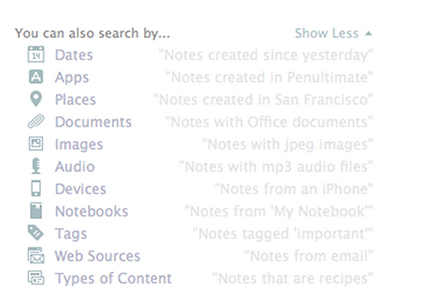
With Descriptive Search, those using Evernote on a Mac can use plain language to describe what is being sought. You can search by location you visited on a specific trip, by dates you know you were doing whatever is being sought, by type of device you used to upload the information and more. Click here for a video overview of the Descriptive Search functionality.

Still, within that same search field, Evernote offers codes or equations you can use to focus in on certain aspects of the content for which you are searching. Here are some examples:
  • created:20150115 finds notes created on January 15, 2015
  • updated:20150327 finds notes updated on March 27, 2015
  • intitle:"coffee" finds notes with coffee in their titles
  • resource:image/* searches for notes that include images
  • notebook:"Receipts" finds notes in the Receipts notebook
  • tag:"Mobile" finds notes tagged with Mobile
  • any:"New York" searches for notes that have New OR York in them, unlike how typing New York on its own in the search box will pull up notes that have both New AND York in them
  • todo:true finds notes with a checkbox that is checked
  • todo:false finds notes that contain an unchecked checkbox
  • todo:* searches for all notes that contain any checkbox at all
  • source:mobile finds all notes created on a mobile device

Many of my clients extend the power of Evernote for quickly finding what's needed via the Atlas and Shortcuts. By clicking the word Atlas in your Evernote account, you see a map and can locate any note based off the location in which it was added to your database. Likewise, under word Shortcut, you can access any note or notebook you've added to the shortlist of which content you access most frequently and, therefore, want most easily accessible. It is quite simple to add content to your Shortcuts by simply dragging a note or notebook atop the Shortcuts name and, then, dropping it into that section; however, I highly encourage you to keep your list of Shortcut content short so it doesn't become cumbersome to scroll through these options.

Above all else, though, I think Evernote's recent additions of Context and Augmented Intelligence empower me to most easily find whatever I might need quickly. If you are using Evernote Premium, it is with Context that you are given related notes from you own account, people from your LinkedIn network related to that note's content and relevant content for free from trusted news sources, like The Wall Street Journal, Fast Company, Inc Magazine, Pando Daily, CrunchBase, TechCrunch, Forbes and Lifehacker. On Evernote Business, the Context functionality adds related notes from team members, others in your company who many know more about the topic at hand and content from Factiva's web content. Context dramatically extends my ability to get work done within my Evernote workspace. Further, via Augmented Intelligence, my Evernote database is incorporating what it learns from how I use the tool to better provide me with what content it determines would be helpful, and it is quite fascinating. For example, if I've been adding content to specific notebooks, those notebooks will appear atop my list of notebook options when adding new notes on the go.

How do you find what you need quickly in your Evernote database? Do you utilize any of these tactics or are there any you'll be incorporating in your daily work habits?

Monday, March 9, 2015

Tips to Utilize Email for Adding & Organizing in Evernote

Last week, I shared with you the many forms of information that can be added in multiple ways to your Evernote database. In that list, I included "send to your Evernote account's email address", but that might've led to even more questions. Let's dive a little deeper into this functionality.

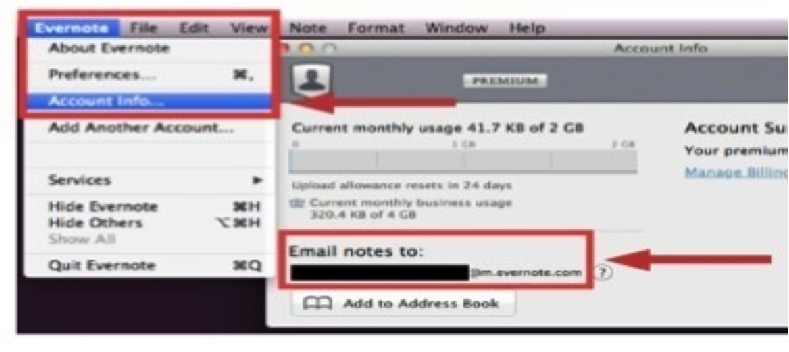
On a laptop or desktop version of the Evernote app, follow Evernote > Account Info > Email Notes To for finding the email address assigned to your specific database. Likewise, on the iPad or iPhone app, tap the elephant head image to get back to your main menu; from there, tap the gear image in the top, left-hand corner, follow General > Evernote Email Address, and you will see the email address assigned to your specific database. Finally, on an Android version of the Evernote app, tap the image of three dots stacked vertically to follow General > Evernote Email Address, and you'll find the email address assigned to your specific database.

Whatever you see as that email address assigned to your Evernote database is designed to be complicated and difficult to remember so others can't start sending content into your Evernote account. I find it's not realistic to think I'll just remember what that email address is; therefore, I recommend saving your email address as a contact in your address book. Often, I use Evernote as the first name and Upload as the last name. Once that information is saved as a contact, when I'm sending an email to my Evernote database, in the To line, I start typing Evernote Upload, and the address populates for me. It's such an easier way to quickly add content to my Evernote database!

When you started your Evernote account, the first notebook given to you was labeled as your "default" notebook. As content is created in alternative manners, like emailing or scanning into Evernote, that content will automatically go to your default notebook. While you can always go into a different notebook's settings to change that into your default, overriding the original notebook's settings, you can alternatively just rename your original notebook to make the default easier to find. I recommend renaming your default notebook as your Inbox, just like the Inbox in your email management tool. Then, you can process newly received content from your Inbox just like you process emails from that Inbox location.

On the other hand, if you'd rather the content you are emailing into your Evernote database bypass that default notebook, doing directly to a desired destination, you can utilize the email's subject line to aid organization... Add @ before an existing notebook name to add the content as a note in that specific notebook. Add # before an existing tag to add that tag to the note being created by the content you're emailing. Insert a reminder as !YYYY/MM/DD. 

If you choose to utilize the subject line of an email you are sending into your Evernote database, there are a couple requirements to remember. First, the left-to-right order of your subject line must be note name, reminder, notebook name and, then, tags. While you do not have to include each one of those elements, Evernote will understand the information you are sending only if you have the information in that specific order. Second, any notebook or tag to be added via an email subject line must already exist in your database; you cannot use a subject line to create a new notebook or a new tag. Likewise, if the notebook name or tag doesn't match the exact spelling of what already exists, the system won't recognize it as a match so it won't work.

Regardless of whether you are adding typed text, video and audio files, documents, checklists or photos, emailing into your database is a technique to simplify the process. For more, view my related video by clicking here, and, then, let me know your thoughts.

Do you use email to add content into your database? What successes have you had? Which of the aforementioned shortcuts will you implement with your Evernote use?

Monday, March 2, 2015

Add Many Forms of Info in Multiple Ways to Evernote

One of the features offered by Evernote that makes it so beneficial for users' writing, collecting, finding and presenting all their lives' work is the ability to upload different forms of information in multiple ways.

Beyond the ability to capture typed text, Evernote's suite of productivity apps opens your options. It allows photos, handwritten notes, audio & video files, web clippings and more to be added to your database. The value of having all such particulars in one place is so powerful, saving you time in finding what you need by checking only one source for the necessary information.

Once you've created the username and password for your database, you can manually create any note, whether on a laptop, desktop, smartphone, tablet or web browser. However, I highly recommend you not limit yourself to adding content in that one method... There are so many other options!

Alternate ways to create content in your Evernote database include the following:
- Use web clipper installed in your Chrome, Firefox, Internet Explorer or Safari web browser
- Clip content from the clipper atop your Mac homescreen
- Scan from your Fujitsu ScanSnap device or the Scannable app
- Automate creation with If This Then That, Zapier or Podbox
- Skitch or Clearly apps
- Utilize FileThis for bringing in PDFs of your monthly bills
- Send to your Evernote account's email address
- And much more!

For a video on what contents I like to include in my Evernote database and how I normally add that content, please click here. Meanwhile, I'd love your feedback in the comments... What sort of information do you like adding to your Evernote database? Using what method do you prefer to add that content and create new notes?

Monday, December 15, 2014

Get Clear For The New Year Week #3: Organize Your Calendar and Contact Systems

As we talk about steps you can take now to make the new year your best thus far, we are empowering you with the optimal tools to drive your desired workflow results, which must include your calendar and contacts’ list. While many might contend that “one is a lonely number”, when it comes to your productivity, I say that one is a very powerful number. With that in mind, I highly recommend you address your productivity toolbox like you are one human-being, not a personal you versus a professional you, which means...

One Calendar: A single planner enables tracking all commitments in one place, making it less likely to forget anything. Having business and personal showing at once will allow scheduling for you as one full entity and better ensure that nothing falls through the cracks while you avoid any double-booking.

One Place for All Your To-Do Items: Keeping all action items that need your attention in one running list allows you to easily pull 3 - 5 items for each day’s must-do list, making it more likely all will get done, aiding in prioritizing and empowering you to assign each “what” a “when” so time is scheduled for its completion.

One “Data Dump”: Our brains are designed to think, not remember, but we fill them with more and more each day; keeping all that we’d like to remember in one place (such as in your Evernote database) ensures meeting notes, ideas, phone messages, inspirations and the like are easily accessible from anywhere.

One Address Book / Contact Relationship Management (CRM) Tool: For contacts’ names, phone numbers, emails and snail mail addresses as well as any related notes, keeping everyone’s information centralized better ensures contacts’ data is kept up-to-date and accessible. When updates must be made in numerous places, they’re less likely to get done.

One “Weekly Strategy Session”: As we discussed last week, dedicating time each week to creating a game plan for the upcoming week means more gets done and keeps you on the right track, especially pared with a morning jumpstart and end-of-day wrap-up. With this trio of tools, you stay in control of your actions.
____________________________________________________

To elaborate on steps you can take right now to prepare for your greatest successes in the new year, here are a few calendar-related items to consider and incorporate in your actions:

- Whether paper or electronic, make sure your one calendar solution for 2015 is equipped with the holidays, birthdays, important events and reminders that are most important for you. If any are missing, add them now; plus, if your solution is electronic, add alerts as appropriate to keep you on track.

- Get in the habit of documenting all activities; rather than depending on your brain or a running list of events, let your calendar do the heavy-lifting for all date-specific commitments.

- As you become more comfortable with your weekly strategy session, morning jumpstart and end-of-day wrap-up, you’ll view your calendar solution as a bigger and bigger part of your productivity toolbox; with all the options available, there is guaranteed to be a good fit for your specific needs. Test out what options exist until you find a good fit for your needs, whether paper or electronic, daily or weekly or monthly view.
____________________________________________________

Likewise, to further elaborate on steps you can take right now to prepare for your greatest successes in the new year, here are a few contacts-related items to consider and incorporate in your actions:

- Whether paper or electronic, make sure your one address book or CRM tool is filled with all your contacts, whether personal or professional, including clients, team members, vendor partners, friends, family members, neighbors, industry contacts, networking connections or referrals. 

- Double-check that each person’s record includes the most up-to-date information for contacting that particular individual, including that person’s current phone number, email address, job title, place of employment and pertinent notes. If you are looking for a technological tool to shortcut this process, consider apps like EasilyDo, Humin, Sync.ME, Brewster, EverContact and FullContact.

- Determine what will be your system for continually inputting updated or additional information as it is brought to your attention. While this may be resolved via one of the aforementioned apps, if someone mentions her new job to you when you’re meeting face-to-face, you’ll need a specific process to document the associated updates and, then, add them to your contacts’ solution. You might want to document them in your “data dump” and schedule one block of time weekly to transfer the updates.

- If you would like a solution that does more than any address book can complete, consider a Contact Relationship Management (or CRM) Tool. With a CRM tool, you remember everything about each individual with whom you’ve connected and you make sure no opportunities fall through the cracks. As you are searching for your best option for a CRM solution, determine whether its ease of use, accessibility, customization and integration with other tools all meet your specific needs; then, make sure you test drive the product before making any short- or long-term commitment. Options that deserve some consideration are ACT!, Infusionsoft, Insightly, Nimble, OntraPort and Zoho CRM.

Speaking of CRMs, as these provide structure for walking prospects through a sales process, they empower leaders to hold team members accountable, measuring each team member’s success rate as they move prospects from step to step of the sales process. Be sure that each team member is aware of what consequences exist for not utilizing the designated sales process, provide resources for improving conversion rates and hold each team member accountable for trying to improve. Via structure, customer relationship management boosts success.
____________________________________________________

ASSIGNMENT: Visit here to see a video related to this blog post; then, this week, clarify what you’ll use as your one calendar solution, one place for all your to-do items, one “data dump”, one contact management solution and one weekly strategy session. Then, make sure your calendar solution includes alerts for any applicable holidays, birthdays and important events, starting to develop the habit of documenting all activities in this one calendar solution. Finally, verify you have the most up-to-date contact information for everyone in your database and choose a tool and / or process for ongoing maintenance of contacts’ data.

Where has “the power of one” proven most helpful for your productivity? Do you prefer a paper or an electronic solution for your calendaring tool? Alternatively, do you utilize any apps to help maintain your contacts’ information? Further, are you using a paper or electronic address book or do you prefer a CRM tool instead? What do you find as strengths and weaknesses of paper versus electronic for any of your current productivity tools?

Thursday, December 4, 2014

This Evernote Business Certified Consultant Can Help

Recently, I completed a comprehensive and rigorous training program to be selected as an Evernote Business Certified Consultant. This is a new certification that Evernote created so companies and teams can find experts in their own backyards to help them best implement Evernote Business. Using my certification, I can assist you and your team in increasing your productivity, passing along the latest updates as well as what's happening with Evernote and what best practices might best aid your specific workflows.

Technology can be overwhelming, but, with a tool like Evernote, one can easily increase their productivity and create a clutter-free environment. Since 2009, I've offered Evernote workshops, adding Evernote courses in North Carolina State University's Technology Training Solutions unit just this past fall. By becoming an Evernote Business Certified Consultant, I've exhibited expertise in helping professionals implement this suite of tools across their businesses, expanding on the training I provide as to how Evernote can help individuals as well as teams increase their productivity.

What is Evernote?
Evernote is a secure suite of apps that allows users to capture typed text, video and audio files, checklists, web clippings as well as photos, including photos of handwritten notes. In this database, content can be created by the user or culled in from other sources. Plus, all elements of the database are easy to sort, edit, search and share. Even writing within imagery, whether handwritten or typed, can be searched! Evernote's ubiquity allows for accessing the same information everywhere at the same time as all data syncs "real time" across linked devices; plus, its sharing boosts collaboration.

Beyond the Free, Premium and Business options, Evernote offers plenty of complementary options to enhance the functionality of this suite of apps, including Skitch, Scannable, Web Clipper, Penultimate and Evernote Food, not to mention the various market offerings, like Triangle Commuter Bag, Jot Script Stylus, ScanSnap Scanner, Pfeiffer platforms and Moleskin notebooks.

How Can Evernote Benefit You?
The ways in which you can use Evernote are limitless. In my Evernote Advanced course, I go beyond the basics to cover all the following ways in which you can use Evernote to boost productivity while aiding your peace of mind as well as helping your collaboration and communication abilities:
- task and project management options
- documenting and sharing workflow processes
- writing more proficiently, especially as a word processor
- hold better meetings
- options to enhance contact management
- be better prepared for emergencies
- go paperLESS and create an online file cabinet
- streamline and better enjoy traveling
- assist gift-giving and recognition programs
- track invoices and compile reimbursements to manage money
- enhance work with clients, especially record-keeping and sharing information
- photo storage and sharing options
- and much, much more...

For everything you'll do, Evernote is the workspace in which you can best get it done... Write, collect, find and present on every device you use everyday.

What is Unique About Evernote Business?
If you compare the Premium option to the basic, Free option, you'll see the additions of four times larger note capacity, the ability to annotate PDFs instead of just photos, presentation mode, context provided for your current work via related notes in your database as well as related news in the News Corp family, ability to search text in uploaded documents and being able to work with notes offline; still, there are specific benefits offered in Evernote Business that can't be found anywhere else.

In addition to being the central hub for your employees to work together, communicating and collaborating for better results, it's also the one main spot to keep, share and find companywide documents alongside your personal contents. Within Evernote Business, all team members can find their own information as well as the business' information quickly and easily whenever needed.

- Secure, flexible sharing so new hires can easily be given access to company information while that access can be quickly cut off should said team member depart. The business owner can rest assured that information is secure while those collaborating never fear anything being lost.

- There is plenty of room for projects to grow as the monthly upload for Evernote Business is greater than that for the Free and Premium versions. Each user receives 2GB of monthly uploads for their personal notebooks and 2GB of monthly uploads for their business notebooks, totaling 4GB a month.

- Access to everyone's knowledge boosts team collaboration, communication and output. Team members can speak with one another and share details real time via Work Chat. Plus, as team members create, edit or view content, Evernote Business highlights related content in the companywide database as well as in News Corp content or on LinkedIn; the team becomes smarter!

How Can This Evernote Business Certified Consultant Help You?
I can help you and your team determine which Evernote option is best for your unique needs; then, together, we create workflows and systems within the Evernote suite of apps that empower you to take advantage of all the features and benefits provided within this robust productivity tool. Via this partnership, you are able to successfully deploy implementation of Evernote, learning best practices to make your adoption of this tool as seamless as possible. Plus, with ongoing training, support and maintenance systems, you are able to make adjustments before every getting too far off course.

With your own consultant to help get Evernote Business up and running quickly, you achieve improved productivity more quickly while establishing habits to make that success last longer.

Do you and your business currently use Evernote Business? Why or why not? How could you envision this tool better enhancing your productivity so you reach even loftier goals?

Thursday, November 27, 2014

Counting My Blessings This Thanksgiving Holiday

In 1621, the Plymouth colonists and Wampanoag Indians shared an autumn harvest that is now recognized as the first Thanksgiving celebration of Americans. The event was proclaimed by Governor William Bradford in honor of the harvest reaped in the colony following a brutal winter. In 1789, President George Washington proclaimed November 26, 1789 as the first nationwide day of Thanksgiving, marking the event as a time of public prayer. Then, in 1863, President Abraham Lincoln issued a presidential proclamation setting aside the final Thursday in November as a day to be commemorated by all the states. On December 26, 1941, President Franklin Roosevelt signed a joint resolution of Congress to change the official day of Thanksgiving from the last Thursday to the fourth Thursday in November.

For more than two centuries, this Thanksgiving day has been honored as a time to acknowledge and express gratitude for the many benefits we have experienced.

As Oprah Winfrey said, "Be thankful for what you have; you'll end up having more. If you concentrate on what you don't have, you will never, ever have enough." Just as I do each year, I reflect on all the wonderful things in my own life: fantastically supportive friends, wonderful clients who flourish as we partner for their improved productivity, a solid roof over my head with a beautiful home to surround me and an amazingly warm fireplace amidst these chilly autumn nights, opportunities to see exciting sporting events by teams for which I'm a fanatic and much more.

This year, I am even more blessed... My business is growing solidly, including national speaking engagements, expanding my services offered and adding products. I completed a comprehensive and rigorous training program to be selected as an Evernote Business Certified Consultant, and I was carefully chosen by North Carolina State University's Technology Training Solutions unit as an instructor to provide continuing education for people on how to efficiently and effectively use technology in increasing productivity while sharpening business organization skills. Plus, the 2014 Greensboro LUNGe Forward Run, Walk and Rally for which I served as Event Chairperson raised over $135,000 to decrease deaths and provide support to those affected by lung cancer through research, awareness, education and access programs across North Carolina. What amazing blessings this year!

Whether you'll be joining a large group of loved ones or celebrating in solitude, no matter if you are on the East or West Coast, whether you are up North or down South, all across the United States of America, please take time to reflect on what blessings you have.

This Thanksgiving holiday, for what are you most thankful?

Tuesday, November 25, 2014

Top 10 Sources for Information on Productivity, Technology and Running Your Business

While my site + my blog are obviously excellent sources of information to use in boosting your productivity, staying up to date on technology, running your business for optimal profitability and aiding your peace of mind, I spend a good bit of time culling others' information into my Evernote database as well as re-sharing via social media content from other reputable sources which I find most helpful and valuable. 

To further assist you, here are some of my favorite such resources:

- Engadget --- As described at http://www.engadget.com/about/, “Engadget is the definitive guide to this connected life.” I utilize Engadget content to stay abreast of cutting edge technological tools, focusing on how these new or evolving gadgets can most greatly benefit my life or my clients’ lives. Engadget’s claim is that “Our primary focus is on breaking news — the latest in gadgets, technology and consumer electronics. However, we’re also interested in related developments in science, the cultural impact of technological progress, geeky things that make us laugh and, yes, even stories that are old news to some but are simply too cool or interesting for us to skip”. This is a great source for the latest and greatest regarding technology.

- Entrepreneur --- This magazine and website provide advice, insight and news for established as well as aspiring entrepreneurs about entrepreneurialism, small business management and related opportunities. Per http://www.entrepreneur.com/page/225367, Entrepreneur works to inspire, inform and celebrate entrepreneurs. This source offers practical advice on starting and growing a business.

- Fast Company --- Per http://www.fastcompany.com/about-us, Fast Company offers “a unique editorial focus on innovation in technology, ethical economics, leadership and design” and works to inspire "innovative and creative thought leaders who are actively inventing the future of business". Fast Company sets out “to chronicle how changing companies create and compete, to highlight new business practices and to showcase the teams and individuals who are inventing the future and reinventing business.” This is a great source for content regarding technology, business and design.

- Huffington Post --- Founded and led by conservative-turned-liberal Arianna Huffington, this online news aggregator is a destination for content regarding world news, US politics, business, technology, entertainment, style, television, arts, books, recipes / food and comedy information. This site provides both reliable, breaking news as well as commentary and can catch you up on expansive breadth and depth of what is happening across a wide array of topics. Learn more about the community’s code of conduct and how to comment on conversations at http://www.huffingtonpost.com/p/frequently-asked-question.html.

- Inc Magazine --- For tips, advice, tools and services to help you start, run and grow your small business, the printed publication, website and social media feeds connected to the Inc brand are exceptional. As it describes itself, this is the only major publication designed exclusively to “guide CEOs and owners of small-to-midsize companies to success”. While plenty of useful information is available on its homepage, I like to visit http://www.inc.com/technology and http://www.inc.com/grow. This is a great source for information about starting up, growing your company, leading, innovations, technology and money. 

- Lifehacker --- With daily updates on its site and social media as well as annual lists to be downloaded, this source “curates tips, tricks and technology for living better in the digital age”. Lifehacker offers plenty of personal productivity and software recommendations to help you work smarter and save time. Always looking for additional content from worldwide experts, Lifehacker offers its pertinent details at http://lifehacker.com/5732066/about-lifehacker, and follow its applicable blogs for ways to get more done.

- Make Use Of --- Whether you sort the content by topics like Android, Gaming, Hardware, the Internet, iOS, Mac OS X and Windows or you reference its "top lists" of apps, software, tools and websites, there is a wealth of technology-focused information on the websites and social feeds of Make Use Of’s brand. At http://www.makeuseof.com/about/, you can learn more about this “leading destination for digital productivity tips and your guide to cool stuff on the Internet.” This source helps in using technology to boost work and play.

- Mashable --- As described at http://mashable.com/about/, “Mashable is a leading source for news, information and resources for the Connected Generation. Mashable reports on the importance of digital innovation and how it empowers and inspires people around the world.” Whether you are seeking better understanding on apps, being your most productive, gadgets, mobile devices, running a business, social media or software, Mashable offers helpful and insightful content. 

- Real Simple --- This company’s magazine, website and related products offer practical information and useful tidbits related to money, family, life strategies, technology, travel, etiquette, organizing, food and recipes, beauty, fashion, holidays, entertaining, weddings and health. I find their checklists particularly helpful, and you can subscribe to receive a daily quote that can be inspiring and amusing. Check out the Daily Finds at http://www.realsimple.com/magazine-and-more/inside-website/daily-finds for a sampling.

- Technology in Business --- This corporate brand is dedicated to promoting greater use of technology in businesses via asset management systems, technology systems, sales, marketing and business training. Per http://www.technology-in-business.net/about-us/, “technological advanced in the past few decades have greatly increased the competitive nature of business… (the site’s) aim is to continue this trend by providing… the latest information and best technologies available today.” This is a great source for information about using technology to increase productivity and to grow your business.

On a related note, I encourage you to check out Alltop as a solution for culling many of these resources together. It's an excellent tool to sort content by source, topic or how recently the information was posted.

What are your go-to blogs, social feeds, websites or publications? Do you have any go-to sources of information, particularly related to productivity, technology and running your business?

Friday, October 10, 2014

6 Powerful Takeaways from Carley Knobloch

Carley and I at Evernote Conference
One of the highlights from my trip to the Evernote conference was attending Carley Knobloch’s presentation, “Secrets of a Sometimes-Organized Working Parent”. I do not have children; however, many of the same techniques that help working parents to balance parenthood with a full-time job are applicable for balancing the many different hats that I wear and can be transferred to my clients in one-on-one consultation sessions. Plus, Carley Knobloch’s ability to convey her digital expertise in an engaging manner is just amazing. I first learned about Carley back in 2011 when her Digitwirl YouTube channel was growing attention and folks were learning how her weekly web show could make tech work for anyone. Following her path to The Today Show and beyond via her email list, I have found that Carley is a relatable individual who truly cares about helping others, which was obvious in her concurrent session that I attended.

Evernote is an excellent tool for helping anyone get more done while maintaining sanity and peace of mind, tips for which were exuding from Carley’s presentation. Here are a few of the takeaways I gathered:

- “Accumulate nothing. Keep everything.” - As Carley explained, physical items pose a burden for where they will be kept and how they can be accessed whenever needed. Alternatively, when you photograph your physical items or scan your paper, uploading it all to Evernote, you alter the situation. As all you need can be accessed from anywhere at any moment via the Evernote app on any of your devices, you retain control of where you do business and when you focus on friends, family, hobbies or volunteering. In other words, you are in control of of your world instead of your world controlling you.

- “Achieve work / life efficiency, not balance.” - For years, I’ve emphasized that work / life balance isn’t applicable to everyone; instead, I believe in work / life integration, but I really do like the terminology Carley introduced of work / life efficiency. As Carley explained, it’s the in-between moments that allow for getting your best work accomplished. These days, individuals are called upon to access important information and complete business transactions at any time and from any location. With Evernote, people can have any and all contacts, content and context needed from wherever at whatever time.

- “Run your home like a workplace.” - In living life and working with my clients, I have found that our brains are made for thinking, not remembering, and tools like Evernote make it possible for me to remember all that I must, which is just as important for a household or non-profit committee as it is for one’s company, whether it’s repairs, cleaning supplies, insurance details, maintenance completed, paint colors, the plumber's phone number or more. As Carley reminded those in her concurrent session, systems and procedures are necessary for making any entity a well-oiled machine; further, having what information is needed at your fingertips is invaluable. Evernote is hugely helpful for sharing process documents, chore documents, key contact lists, health insurance filing rules and more so you can continue to move forward while the world swirls around you.

- “Keep everyone at ease when the CEO is extracted.” - As Carley explained, “time waits for no traveling parent” so it’s important to empower those left to keep the household running with whatever answers will be needed, documenting what must happen when while you are gone and how to keep things rolling during your physical absence. Well, the same philosophy applies to any scenario where the leader will be stepping away, and Evernote is an excellent tool for sharing what answers others need. Just like you as the traveler should get an itinerary that includes travel details, confirmation numbers and appointment locations, Evernote empowers you to leave an itinerary for those staying behind, including things like what’s for dinner or who needs to be where at what time.

- “Evernote is the new scrapbook.” - How many photos, keepsakes and memorabilia items do you have stored in a box in your garage or in a notebook on a shelf in your closet? As Carley explained, keeping those physical items in a manner that makes their content non-accessible is really quite nonsensical. Most of us don’t have a need for the physical item itself, but we want to enjoy its content, which is how Evernote becomes helpful. By uploading a photo or a scan of the keepsake, we can access and enjoy that content from anywhere at any time, maybe even in Evernote’s presentation mode. Further, when uploading her kids’ artwork, Carley has them add an audio explanation, which will prove especially valuable as the family looks back on their projects down the road or as a pick-me-up for Carley’s bad days.

Above all else, though, my greatest takeaway might’ve been “breathe a little and laugh a lot”, where Carley reminded all of us to “give yourself permission to make mistakes, keep chipping away at it and test things to see what works”. Life is an adventure, and living is about the process of experiencing that adventure. None of us has all the answers, and, with how rapidly technology is evolving, it can be quite the task to simply keep up with all the options available. As I tell my clients frequently, most tech tools have a free option or a trial offer, and it’s important to test them out before committing; however, the testing things out philosophy applies to so much more than just technology, and I think it’s important to never stop trying options to see what’s available to best meet your needs.

Which of Carley’s best practices resonates most with you? Are there any which are new to you that you plan to implement? 
I’d love to hear your success stories so please share below!

Wednesday, October 8, 2014

Evernote Announces New Ways to Boost Productivity

Evernote is a secure suite of apps that allow users to capture all sorts of content. Plus, all elements of the database are easy to sort, edit, search, share, present and fuel collaboration. Evernote’s ubiquity allows me to access the same information everywhere at the same time as it syncs all uploaded content “real time” between devices. Evernote’s mind-boggling search capabilities allow me to quickly access whatever content I’m seeking, and its sharing allows me to provide others access to various elements of my database as well as collaborate with committees, teams, clients, vendors and partners alike. Yet, what Evernote offers is getting better as I type.

CEO Phil Libin with EBCCs
On October 2-3, 2014, Evernote held its 4th annual conference in San Francisco, CA, entitled “From Inspiration to Achievement”, and CEO Phil Libin (wearing the black t-shirt and gray sports coat in the photo to the left with all of us Evernote Business Certified Consultants in attendance) demonstrated how Microsoft’s tools are outdated while Evernote is revitalizing the world of business tools, providing collaborative, productivity tools so everyone can complete “your life’s work” in this one workspace. As Libin explained, with the four key elements of work being write, collect, find and present, “we’ve gotten past typewriters, filing cabinets and desktops”. Now, Libin is positioning Evernote as each individual’s and each team’s workspace, in which folks will be able to more easily write, collect, find and present with the additions of the Scannable app, enhanced Presentation mode, Context and Work Chat as well as an amazingly advanced Web Client version that allows for incredibly enhanced focus as one is working in Evernote online. Here’s what’s out now or coming next month:

- The Scannable App is a companion to the Fujitsu ScanSnap Evernote Edition Desktop Scanner, which will allow for feeding data into various folks’ mobile devices and will greatly assist in “moving paper forward”.

- The enhanced Presentation mode is adding headers and footers in the layout editor, allows the presenter to make edits simultaneously as sharing the content, will make it easier to create a table of contents, automatically sets page breaks that can be changed by the presenter and makes meetings less terrible by boosting collaboration, enhancing information sharing and driving discussions.

- Context understands that people don’t write, collect, find or present in a vacuum so Evernote will use augmented intelligence to provide Premium and Business users what’s needed for being more productive, showing as needed other notes, people’s LinkedIn profiles and relevant new articles from CrunchBase, Factiva, Fast Company, Inc, LinkedIn, Pando, TechCrunch and the Wall Street Journal.

- Work Chat aims to refine the connection between working and communicating, allowing you to see who’s viewing the same note at the same time and empowering you to start a chat with team members, sharing notes within that particular chat; users will have real-time collaboration and rely less on email for doing today's work.

- The overhauled Web Client addresses what issues have always plagued accessing Evernote online, offering a simple, elegant and powerful platform to eliminate distractions while working; users will get formatting only as needed and includes beautiful search functionality.

With concurrent sessions focused on “Using Evernote to Reduce Overhead, Build a Smarter Team and Get More Done”, “Creating a More Productive Workday with Evernote”, “Effortless Teamwork: Using Evernote for Seamless Workflows”, “Merging Your Paper and Digital Worlds” and “Building the Success Habit with Evernote”, this conference was clearly focused on empowering Evernote users with a tool to be their new workspace, better enabling everyone worldwide to more easily complete their life’s work.

About which of the new offerings are you most excited? 
Further, how do YOU use Evernote now?

Monday, October 6, 2014

Surviving The Information Avalanche

 The majority of us are on information overload. We are constantly inundated with emails, news, texts, articles, feeds, tweets, blogs, calls, reminders and much more, not only in our professional lives but our personal lives as well. Digital storage space is much less expensive than ever before. Regular folks, in addition to companies, are contributing online content, which has multiplied the amount of content being generated. Our tech tools do much more than ever before, and mobile professionals are “on call” for working 24/7. It can be extremely overwhelming!

To take control, it is important that we address these 5 different challenges:
  •        We must capture and cull together all the relevant bits of information.
  •        We must organize those contents, grouping like with like and, hopefully, indexing the details for later searching.
  •        We must make sure we have enough space to adequately store and manage the contents being retained, not worrying if we’ll go over imposed limits.
  •        We must address privacy concerns by verifying what we keep is stored safe from theft, loss or damage.
  •        We must plan for quickly locating what’s needed later so we see the contents in an understandable way, being able to share what’s needed.

In addressing the immense challenges of surviving today’s info avalanche, there are action items we can implement immediately. For busy professionals to wade through all the information with which we’re bombarded, the first step is to turn off all the pings and dings of our various notifications; this empowers us to be in control of when we handle information, not whoever is sending that information out in our direction. Then, it’s important for us to be very clear about our personal and professional goals so we’ll know upfront how we’d like to use whatever useful information we receive, which will allow for a much clearer focus in on what information is applicable, thereby blocking out what is really not needed. Such tweaks to how we address the info avalanche can make an immediate and noticeable difference in how we survive.

When evaluating the info avalanche and how we can best handle it, email is a place where we can get overwhelmed until it’s all a blur; however, there are tons of great techniques for clearing the clutter in our email. First, send fewer emails to get fewer emails back. Obviously, if you need something documented, you’ll need to stick with sending an email, and, if you need to send the information to multiple people at once, email is the best option; however, if a phone call will suffice, give that a try. Next, unsubscribe from eNewsletters you are not reading. While it only takes a second to hit the delete key, those seconds add up if you are continuing to delete the same eNewsletter regularly; instead, take a little extra time upfront to unsubscribe so you save the accumulating time of deleting with each receipt. On the other hand, consider culling those subscriptions you do want to keep receiving into a “roll-up” by using Unroll.me’s website or The Swizzle’s email tool. Third, master the art of creating reference folders within your email management tool. You can more quickly locate a message for later reference when you have enough folders that everything to be kept can have a home while you limit the number of fodders so nothing could be appropriate for more than one of those existing. Within your reference folders, utilize automated rules to sort emails into their appropriate homes, whether to highlight what needs time-sensitive attention or to cull items for reading when convenient for you. Finally and probably most importantly, shift your mentality related to email from “checking” your email to “processing” it so your Inbox is no longer a holding zone, you don’t repeat time and effort of reading any original message and what you’ll reply doesn’t weigh on you continually between receipt and finally responding. Tasks that take less than 5 minutes should be completed with the message asking for them to be done is initially received. Any task that will take longer than 5 minutes to do needs to be added to your running tasks list. Appointments should be moved to your calendar, retention items should be moved to your personal folders and anything not needed should be moved directly to Trash.

When processing and maintaining your email account, please remember the “delete” key can be your friend. There’s no need to hold onto whatever is no longer accurate, applicable, useful or bringing you joy. Likewise, there is a big difference between junk that you should never bring into your space to begin with and trash that you can delete after reviewing. Most importantly, though, when determining what to save, ignore or delete, consider what can be easily located online later. There’s no need to clutter your space with what you don’t need or can just as easily get online.

Further, even though much of the daily overwhelm comes from electronic, paper can be a problem, too. To clear the clutter with regards to paper, we must first acknowledge that it’s easier to find what’s needed in electronic form; therefore, convert what paper you can to electronic files. There are such powerful scanning options from Doxie, Fujitsu and Neat, but many folks simply take a photo of the paper to be converted to electronic using their phones so it’s important to keep in mind how many options can turn paper to electronic. Beyond that, as with email, consolidate what paper comes into your space via an Inbox, empowering you to address what’s most important when convenient for you. Create naming conventions to mirror between paper and electronic and, then, schedule time regularly to edit the contents of your retention files. When any piece of paper is no longer accurate, applicable, useful or bringing you joy, get it out of your space, whether via recycling or shredding. Finally, utilize a fireproof safe for those most important papers, especially what needs to be accessed quickly in the event you die or are incapacitated.

There are excellent tools currently available for our mobile devices to aid in easily storing what information we will need later without it turning into another form of clutter. Using MorningCoffee for Android or Firefox, Morning for iOS or Flipboard that works across the various platforms, you can determine which communication or news channels cross into your space. Then, you can more easily save what will be needed later into a “Read It Later” app, like Pocket, Instapaper and Readability. Likewise, for any blog or website that posts content in a stream, you can pull its RSS feed into an RSS Reader, like Feedly, FeedReader, NewsBlur, and RSSOwl. While Pinterest has been pigeon-holed into being just for planning DIY projects, pulling fashion ideas or planning your home renovation, Pinterest can be a great tool for storing the information facing us daily, allowing you to create an image board for any project or client. Alternatively, Twitter can be a great tool for storing the information onslaught we get with sweet Tweets, making them easier to locate again later. Lastly, lest we not forget my all-time favorite tool for storing information that we’ll need later without creating another form of clutter, I recommend a self-made database in Evernote, to which you can send emails so each is better retained for later. See which best meets your needs and enhances your toolbox.

Meanwhile, although there are tons of useful apps to boost your productivity and enable sharing information with your team, you don’t have to log into each individually each day; many of these tools talk to one another so you can get information from several of these tools by logging into just one app. You can cull together documents from various online file repositories with CloudCube on Android and Citrix ShareFile QuickEdit on iOS. Quip Business lets a team combine shared documents with messaging about related projects, all in one place. Further, both Catch App and Hojoki App merge data from multiple different apps for quicker response and easier understanding of all that’s happening. As your team grows and evolves, always be thinking about how tech tools can help you be more efficient.

Streamlining can be vital in clearing the clutter, and there are two other tools I’d like to bring to your attention to aid in your attempts at streamlining the info avalanche. First, although it’s important to have the right message in front of the right audience at the right time to grow your business, you can’t be everywhere at once, which makes a social media manager very valuable. Options include Buffer, Hootsuite, Postling, SocialOomph and Sprout, but find the one that best meets your unique needs and test it before committing. Second, since our brains are meant for thinking, not remembering, a Customer Relationship Manager helps remember the details of previous interactions as well as when each contact needs follow-up. I recommend looking at Infusionsoft, Insightly, NetVibes, Nimble and Zoho.

As many people claim that one is a lonely number, I’ve found it to be very powerful for boosting folks’ productivity. In my work with individuals and corporate teams, I’m continually reminded that each of us is just one person, not a work person and home person. With that in mind, these are 5 tools I’ve found to be most helpful when you use just one for all segments of your life:
  •        One calendar for both work and personal items encourages you to not double-book yourself and leads to fewer items falling through the cracks.
  •        One running tasks list that funnels into one daily to-do list for each day means you more easily know what needs to be done at each moment and allows you to better focus on the 3 to 5 action items most important for your current day.
  •        One “data dump” that enables your brain to think, rather than remember details, allows you to search just one location for all your notes, research and references.
  •        One address book for both work and personal contacts empowers you to better maintain contacts’ most current information.
  •        One weekly strategy session that is supported with one wrap-up each day allows you to have a game plan for attacking what absolutely must be done each week as well as those important items that are not urgent.

On a related note, though I do believe work / life integration is replacing the impractical concept of work / life balance, I also feel it is vital for busy professionals to set limits on our availability to customers, vendors and other team members. There’s no right or wrong answer about how accessible you should be, but it’s important to set guidelines based on what works best for you and the unique needs of your business. Tools and software can mesh with the way you need to communicate day to day, but it’s also smart to step away for a while from time to time. Whether you are an introvert or an extrovert, it’s important to incorporate downtime into your routine and to disengage from electronic communications by building some much-needed quiet into your day. This can be for reflection, for progressing towards goals, for re-energizing or whatever meets your needs, but its value is beyond measure.

Even though it might seem impossible, you can certainly survive the information avalanche in today’s society, but you must be focused in your efforts and fully utilize the available tools to help you. Click here to view a recent interview of me addressing this topic with Julie Coraccio of Reawaken Your Brilliance, and think about how these tools and techniques can apply to your specific needs. Don’t hesitate to ask for help and keep evolving as the available tech tools continue to develop around you do.

What tools and techniques do you employ in surviving the info avalanche?