Brought To You By Emily Parks
Productivity Consultant at Organize For Success, LLC...
Helping You Make Every Minute Matter!


Showing posts with label efficiency. Show all posts

Thursday, January 11, 2018

Which Tasks Can You Complete Quickly?

There is a well-known quote that instructs each of us to "plan your work and work your plan", which provides valuable insights for how to be more successful and better achieve more desired results. With a weekly strategy session, we create a game plan for addressing our priorities through tasks, communications, time commitments and development opportunities, staying on track toward achieving our most important goals via the habit of a daily wrap-up at the end of each day. Yet, there are times when we find that we can do even more than that which we'd planned to accomplish.

Maybe traffic was light and you arrived at your next appointment with a few moments to spare. Maybe one of your meetings ended early, giving you extra minutes before the next commitment. Maybe you had a cancellation, which opened up an unexpected block of time. That time can be a gift for boosting productivity.

If you have no guidance as to what can fit within the available time, you might spend 5 of your 10 available minutes determining your 10-minute tasks, which leaves only 5 minutes to actually get anything done. Alternatively, if you denote within your data-dump of tasks how long each will take, you'll know immediately which take 10 minutes and easily plug what fits into the available time.

Don't lose minutes. Make the most of your time, optimizing the most limited of your resources. Know which of your to-do items can be completed quickly so fewer valuable minutes are wasted determining possible tasks for small windows of available time, whether 5 minutes, 10 minutes, 30 minutes or another increment.

How do you optimize your task management efforts, filling small windows of time as they become available for accomplishing more?

Saturday, May 20, 2017

Top Ten Ways to Make Meetings More Productive


Organize for Success® Turns 10 
In honor of 10 years of business for Organize for Success®, I will be posting a "top 10" list to this blog each day through Wednesday, May 31st. Each Sunday, my team will randomly select from those who commented on the prior week's "top 10" blog posts for a gift card giveaway and free download of one eBook from OrganizeForSuccess.biz/shop. The grand prize for celebrating Organize for Success, LLC's 10 years will be awarded on Thursday, June 1st, randomly selecting from all those who commented on any of the month's "top 10" blog posts as well as those who have subscribed to my eNewsletter for a winner to receive downloads of all 5 eBooks, a pass for my Stress and Time Management online video course as well as a 60-minute productivity consultation via video conference.

Today, it's my top 10 tactics to make meetings more productive:

10. Have a clear purpose. Many meetings mistakenly focus on simply updating those in attendance; however, there are plenty of alternative means for conveying updates that are less intrusive to attendees' valuable time. Instead, meetings are most productive when they focus on one of two purposes: (a) discussion or (b) decision-making. If your meeting's purpose is not one of those, could the goal be achieved using alternative means?

9. Be strategic with scheduling. Often, when meetings are set, we indicate a starting time but forget to set a specific ending time; attendees can better plan the remainder of their day if provided an end time in addition to a start time. Further, be cognizant of vacation plans so meetings are not scheduled when many who need to attend will be gone. Finally, avoid scheduling a meeting in the days leading up to a big deadline, especially if the meeting is unrelated to the project coming due, as well as during times when there will be too many distractions for folks to focus on the goal.

8. Trim the fat. Shorten how long you plan to meet and, then, push yourself to accomplish everything on the agenda within that shorter duration by using a timer or having someone serve as timekeeper. Try to end meetings at least 10 minutes before the next hour, like 12:50, 1:50, 2:50, etc, or schedule your meetings in 15-minute blocks, like running from on the hour to quarter 'til the next hour. Attendees will appreciate those few minutes before the next hour to return a quick call, run to the restroom, grab a beverage or gather their thoughts.

7. Invite the right people and only the right people. It is important to include those whose contributions are necessary for accomplishing the meeting's goals: those with the authority to make decisions, those with enough pull in the organization to advocate for what's decided, those with the expertise needed to make informed decisions as well as those necessary for successfully executing said decisions. On the other hand, the Rule of 7 states that "everyone in a meeting over 7 people reduces your ability to make decisions by 10%"; therefore, include only those whose contributions are necessary for accomplishing the meeting's goals as too many attendees will deplete productivity.

6. Have a plan to achieve the meeting's stated purpose. Create a realistic agenda, listing what you truly believe can be accomplished within the scheduled time allowed. Structure that agenda to address the most important issues first. Try to indicate how much time is being allocated for each element listed. Solicit feedback from attendees to make sure anything important is included while lower priorities and unrelated topics get removed.

5. Prepare beforehand. Distribute any supplemental items for review to all attendees beforehand. Share necessary updates via email or your team's collaboration tool before the meeting date. If there is legwork that can be done in advance, completing that beforehand will allow the meeting itself to run more efficiently. As explained by Dana Manciagli in The Triad Business Journal, "proper planning prevents poor performance". Take time to get your ducks in a row before, allowing the time during which folks have come together to be devoted to discussion and / or decision-making.

4. Communicate expectations clearly. If you are leading the meeting, set expectations on how those attending should behave and, then, share those expectations with attendees, whether in writing prior to the meeting or at the start of the meeting. Here are a few suggestions: come prepared, contribute to the discussion with feedback, share your insights as applicable, make sure to ask whatever questions  you have and limit technology distractions. Additionally, specifically state guidelines for interjecting during the agenda, like when to ask questions, how to pipe up for brainstorming or at what point it is appropriate to share feedback during a discussion. Think proactively about what situations might arise related to each meeting and be specific with standards set.

3. Take notes. This shows your commitment to the topic, helps you pay attention and enables you to refer back to items covered earlier as the meeting progresses. If you have the agenda beforehand, use that agenda as a framework for filling in notes from the meeting. Highlight what is important, whether via a different color of ink or by blocking that content off separately. Designate each task that must be done as it arises in conversation during the meeting; then, end your meeting notes with a recap, including the highlights, action items and timing of next meeting.

2. Stay focused. Denote on a separate list any issues not on the agenda as they arise. If there is extra time at the end in which attendees want to address those items, feel free to do so; however, it is often the best use of everyone's time to schedule a time for discussing or resolving those issues on a later date.

1. Ensure attendees are accountable for completing tasks. Each action item arising from the meeting needs a deadline for its completion; further, ensuring each task gets completed is more likely when there is someone accountable for its completion. Assign someone to the completion of each task that results from meeting discussions and decide how you'll confirm follow through.

Do you find that meetings steal valuable moments from your day? What are your favorite ways to make meetings more productive? Are there any on this list you'd like to try?

Friday, April 14, 2017

Get Top Tech Tools for Rocking It at Work and in Life


One of my most popular workshops is coming up in Raleigh next week, and I know you don't want to miss out on reserving your spot for 6-8pm on Thursday, April 20th or 10am-noon on Saturday, April 22nd if you are local to the Triangle in North Carolina. If you feel like there aren't enough hours in the day to get everything done and you might be losing time that you'd like to get back, technology could help. Don't waste your time searching all over the Internet for the tech tools to perfectly fit your needs; I have done the research and heavy-lifting for you, saving you time by sharing the best of the best. Adjust how you approach work, home, community involvement and taking care of yourself to organize for greater success so you better achieve your goals, quickly find what you need when you need it and always know what must be done. With what you learn in this workshop, you will be able to take full advantage of available software, apps and tech tools to achieve enhanced efficiency, greater productivity, larger profitability, an organized workspace and better harmony across all aspects of your life. Space is limited so hurry on over to http://bit.ly/NCLearning, select which of the two offerings works best for your schedule and get registered.

Tuesday, December 6, 2016

Do You Look to Squeeze Every Minute Out of the Day?

Has it really been over 8 months since my last post to the Tips To Organize For Success blog? Yes, I took a bit of a hiatus from blogging, investing that time in making sure Organize for Success, LLC is growing effectively and efficiently to best meet the needs of my clients while making the greatest impact on improving this world. To make sure my company is moving in the right direction, I'd love your feedback (and your referrals) as you see the following best fitting into your life and your loved ones' lives.

The vision statement for Organize for Success, LLC is to "Make life efficient for time-crunched leaders" while its mission statement is "Maximize work / life solutions for meaningful results with your very limited time." Since we are gifted only 1,440 minute each day, it is imperative that each of us invest every minute as best we can to achieve our current priorities in each domain of our lives: work or school, home or family, community or society and the private realm of mind, body and spirit. Although we cannot achieve complete success in all domains at one time, harmony is possible as we work to have each domain complement the others.

Life is fluid, meaning there is an ebb and flow to our priorities. At some points in life, our emphasis might be more on work or school while, at other points, our emphasis is more on home or family. The key is to adjust our organizational systems, workflow processes, technological tools and general approaches to getting things accomplished accordingly so we best address the most important goals for each specific moment in the cycle of life.

In fulfilling this mission statement and working towards this vision, I partner well with several types of folks, which are detailed below:

  • Time-crunched, high achievers who want to squeeze every minute out of each day.
  • Overwhelmed managers who have more deadlines than hours or days to get it all accomplished.
  • Teams that need tools and technology to better collaborate for attaining loftier goals and desired results.

As my business continues growing and I near Organize for Success' 10th anniversary, I've revamped my packages, expanded my eBooks, added a self-paced online video course and renewed my emphasis on speaking engagements nationwide to share more useful tidbits with a greater portion of those needing my help.

When you think about your own productivity and how you handle each day's limited time, with what do you struggle the most? Where do you feel like you are losing time or being inefficient?

Wednesday, December 9, 2015

Gift Guide for One's Many Work-Life Integration Needs

It is the holiday season, and chances are good that your shopping list feels endless. While there are plenty of smart home kits or home monitoring hubs and wireless charging options, not everyone needs such expansive tech tools in their lives. Instead, when determining which gifts to consider, it is important to think about lifestyle elements for the recipient of whatever gift you're giving. Here are some of my favorite clutter-free gift options:

- If the person to whom you are gifting is a runner, a walker or just someone who likes working out, assuming they don’t have an Apple Watch or similar toy, something to attach their phones to their arms would be helpful. Sprigs offers the Phone Banjees with up to 2 pockets so the phone goes on one side, their personal items go on the other side, and it slips right onto the arm. While you can purchase directly from Sprigs' website, there are alternative designs on Amazon, eBay and TheGrommet.com.

- For those fashionistas who love their current gloves but are frustrated by not being able to use their smart devices while styling and profiling, consider NANOTIPS. These transform any leather, rubber, fabric or fleece gloves into touchscreen compatible smart gloves and work well with iPhone, iPad or Android devices.

- I like having a “drop zone” by my entryway so my keys have a home and I can easily find them as I’m leaving; however, that’s not feasible for everyone. Lots of folks spend plenty of time searching for tiny objects, such as the car key when rushing to get out the door. There are several options for solving this, like Tile, TrackR and SecuriTag, but they all function the same: You attach a tile or tag that’s a little bigger than a quarter to the object you want tracked, sync that to an app on your smartphone and, then, track the object with your phone. Your gift recipient doesn’t have to limit use to just car keys; there are endless options for tracking!

- Cords are always an issue so a solution to wrangle in that problem is welcome by everyone: With CableDrop from BlueLounge, you can keep cords plugged in but not falling down as you plug in and unplug your devices. Simple peel and stick the adhesive backs to your desktop or wherever your devices sit to be charged, clip a cable through each CableDrop and it stays put whether connected to a device or not. Kableflags are tags you attach to each cord’s plug so you can identify which cord goes with which item, and you’re protected from ever pulling a wrong plug again. Neet’s Cable Keeper comes in many different colors to organize, protect and identify all your cords; with its inner wire to hold its shape, insert your cable, zip it up and wind, squeeze, loop or tie a bowtie to keep the cable together. If you put each device’s cable in a different colored Neet Cable Keeper, you go beyond just protecting them and can identify at a glance which is where. Likewise, the Cord Wrap from Bobino comes in 3 sizes and 6 different colors, allowing options for wrapping various cords for easily transporting them. CableKeeps secures the cable and charger for your iPhone or iPad together; adding a bit of fun and color while Cordlupa stays on your cord's plug cube so it's fast and simple to wrap up when ready to travel or store your cable. When planning your holiday gift giving, you could give these cord solutions individually or bundled together.

- Whether at home, in our offices or while traveling, plugs can be an equally big issue. Acoustic Research offers a travel plug with USB charger slots, perfect for airports, train stations and hotels where there are never enough plugs for all that needs charging, especially not located close enough together to be truly helpful. The PowerCube offers big, colorful outlets for 3-prong plugs on all 4 sides as well as 2 USB outlets for devices. The ChargeHub plugs into a wall outlet or an automobile to provide 7 USB charging options, and Easy Hub cleverly converts a single USB port into 4. Then, the Pivot Power Flexible Surge Protector offers variety in the angling of each outlet so chunky adapters and chargers can fit better side-by-side. Plus, with Quirky's Pickup Power, you can gift a surge protector for 3-prong plugs that includes USB charger slots and a portable battery pack. Wow!

- These days, we all have a love / hate relationship with our mobile devices, but I’d imagine most of us don’t have many days go by without using them at some point, making gifts related to our mobile devices especially popular. ZAGG, Logitech and Belkin each offer keyboard folio options to add a real keyboard to our iPad tablets, making it easier to type while working or playing on-the-go. Or, if your gift recipient is notorious for letting his or her smartphone batter go dead, there are tons of battery cases, like Mophie, Anker or Tylt Energi. Native Union's JUMP Cable offers a 2-in-1 cable and battery solution with attractive, brown leather case for easy portability. To protect the connections on charging cords, a Klip Cable Protector can be slid over the sensitive area of any plug. The Mist Screen Cleaner and Microfiber Sponge from AM Company includes antibacterial all-in-one spray and microfiber cloth designed to clean computer, tablet and smartphone screens. If you’d rather avoid liquids, the iRoller Touchscreen Cleaner is a liquid-free, reusable option for removing fingerprints, smudges and bacteria from touchscreen devices. The PhoneSoap Smartphone Sanitizer uses UV light as a safe, effective way of cleaning, sanitizing and polishing devices.

- If the person you are gifting lives with several others that have similar-looking mobile device cords, vinyl labels from Whooz can be a welcome gift; they help to differentiate which cord belongs to whom while adding character and color with all different options.

- Or, if the person you are gifting likes to work on plugged-in mobile devices but the outlet is far from where they’d like to be working, REACHarge offers extended lengths of charging cords for Android, iPad and iPhone devices.

- Hyper’s Pearl is a compact, LED-lit mirror with a built-in USB battery pack to charge devices on-the-go.

- Although I personally use my Grid-It from Cocoon to organize my tech-related gadgets, gizmos and accessories, the ways in which this marvelous tool can be used are limitless and can apply to so many of the folks for whom you’ll be seeking gifts this holiday season. Golfers can keep tees, a divot repair tool, ball markers and even an extra ball or two snugly secured in this ultimate organizer. There are plenty of little objects that new parents need on-the-go which can be secured in the family’s bag with this tool. Even the items usually thrown loosely in a woman’s purse can be better contained with this gift. It comes in various sizes and has little rubber lines on each strap to secure things.

- Any time our car batteries go dead, we’re used to needing another vehicle to connect to ours for charging. Well, now, we have an alternative… Juno Jumper is the most portable smart jump starter available, offering a battery pack that connects to your car’s battery for jump-starting your own dead battery. It’s that easy! This would be an ideal gift for anyone that travels regularly, particularly folks that drive alone.

- As a huge fan of all types of music, I’m also a huge fan of the iHome Bluetooth mini speaker, which streams tunes from any Android, Blackberry, iPad or iPhone that has been paired to it. The volume is adjusted on the paired device; battery is rechargeable.

- Since the holidays are a peak time for traveling, this next item could be a good gift to give others or for yourself: PacSafe offers several tools with RFID-blocking, and I encourage considering the RFID-blocking passport protector as well as the credit card sleeve… Very important security tools!

- Although not tech-related, the Pocket Monkey fits in your wallet, is TSA compliant to fly with you and performs 12 different functions, including bottle opener, flat and Phillips screwdrivers, phone kickstand, orange peeler, Hex wrenches, earbuds wrap, letter opener, ruler, straight edge and door latch slip.

- For kiddos aged 5 to 13, I am loving Osmo, an award-winning game system that aids children's learning with hands-on play. Start with Tangram, Words, Newton and Masterpiece; then, choose if you'd like to add Numbers for an additional emphasis on math.

- Finally, since it is hard to go wrong with gift cards and gift certificates, consider Gyft to buy, send, organize and redeem eGift cards while Yiftee lets you send certificates to what's local for any recipient via text or email.

While my go-to resources for finding unique, useful and tech-related gifts are usually The Container Store, The Grommet and Uncommon Goods, there are other sites for you to check as you are shopping around this holiday season. Consider shopping ShutUpAndTakeMyMoney.com, OpenSky.com, TheGadgetFlow.com, Fancy.com and AwesomeClaus.com, and use each site’s filtering options to make the gift options less overwhelming; there are some very cool gift ideas floating between these sites.

If you are looking for more information to have an organized holiday and about giving clutter-free gifts, please check out my interview with Julie Coraccio in Episode 86 of her "Clearing the Clutter Inside and Out" podcast, entitled "Technology Tips for an Organized Holiday and Clutter Free Gifts Ideas", which can be found by visiting this website.

What gifts do you have in mind to help your loved ones boost productivity while taming technology? What tools do you currently utilize in your own work-life integration?

Tuesday, June 2, 2015

Prepare Your Business For When Natural Disasters Strike

As the Atlantic hurricane season is June 1st through November 30th, I find this an excellent time to revisit preparedness for your business, your home and you personally. There are many issues for which you need to be prepared, and hurricanes are just one of the options listed. According to the Insurance Service Office, the top causes of insured disaster-related losses from 1993 to 2012 are as follows:
1. Hurricanes / Tropical Storms - $158 billion in claims
2. Tornadoes - $141 billion in claims
3. Winter Storms - $28 billion in claims
4. Terrorism - $25 billion in claims
5. Geological Events - $18 billion in claims

When you take into account all possible natural disasters, each of us is in danger of something, no matter in which part of the world you live, work and play. Whether you face hurricanes, tornadoes, snow blizzards or thunderstorms with lightening, are you, your business and your loved ones prepared? Per Ready.gov, only 57% of people report they have readiness items set aside for use in disasters; likewise, just 34% of people have readiness supplies in their automobiles, and less than half of households have an Emergency Plan created.

In this first post of my preparedness series, let’s talk about the steps you can take now to be ready:
- Determine what types of disasters are possibilities for your area.
- Decide where you will go and who you will contact for check-in should you have to evacuate.
- Make a list of what essential equipment must be taken from the premises as evacuating.
- Learn and practice how to turn off water, gas and electricity at the main switches or valves.
- Locate your fire extinguisher and learn how to operate it.
- Find out where your smoke alarms and carbon monoxide detectors are located; mark on your calendar regularly replacing their batteries and learn which sounds indicate what.
- Establish from here employees can obtain important updates during an emergency situation, especially when and where to return to work if there is a satellite or back-up location.
- Decide how you will facilitate payroll in a disaster scenario.
- Keep your business’ policies and procedures in writing to be accessed from anywhere at any time.

If it is unsafe to go out, you might be stuck at work or your home; therefore, make sure you have the necessary supplies. Visit http://www.ready.gov/build-a-kit for what should be included in a disaster supplies kit and, then, start accumulating it all, storing them somewhere easily accessible yet secure. For more about what you need, click here for a video description, and take actions to get ready now.

As different natural disasters impact different areas of the globe in different ways, take time to peruse the details at http://www.ready.gov/natural-disasters, paying close attention to what you need in the various scenarios that potentially impact your area. With each, though, power outages are regularly a by-product of natural disasters; therefore, prepare for potential power outages with these steps:
- Fill up your gas tank. Without power, the pumps don’t work.
- Visit your bank's ATM for cash. Credit and debit cards won’t work during a power outage.
- Charge your mobile devices and try steps from http://bit.ly/VcvO6u to conserve battery consumption.
- Keep on hand extra batteries for your flashlights so you are always ready to see in the dark.

Another excellent resource is at http://www.preparemybusiness.org/planning, from which you can obtain checklists for recovery overview, critical business functions to consider, assessing your risks, creating your emergency communications plan, phone recovery, your disaster recovery kit, winter weather preparedness, earthquake preparedness, tornado preparedness, wildfire preparedness, flood preparedness, hurricane preparedness, crisis communications to consider and much more.

Above all, though, make a plan, prepare for possible communication gaps, have the supplies you need on hand, keep what you’ll need remotely stored in the cloud and update everything regularly.

What natural disasters are issues where you reside? How have you prepared for those potential issues? What steps can you take now to be fully prepared?

Tuesday, March 31, 2015

Evernote Can Boost Your Collaboration

Collaborate Better With Evernote
Although Evernote provides an excellent catchall for what I need to reference or am using to complete my current projects, its usefulness goes well beyond containing content in a manner that makes it easy to find. My experience repeatedly shows that Evernote's greatest value comes from how it supports and empowers collaboration. Yes, sharing notes can aid my workflows, but sharing Notebooks, using Work Chat and pulling Context from my LinkedIn network or Notes of others in my Business' accounts can really boost my abilities.

For example, when I'm chairing a non-profit committee or serving on a Board of Directors, Evernote enables sharing more than any online file repository. If we were to use Dropbox or Google Drive, we would be limited to Word documents, Excel spreadsheets, PowerPoint presentations and the like; however, by sharing a Notebook in Evernote, we can share those same types of documents PLUS any content included in any of that Notebook's notes, like typed text, articles clipped from the Internet, photos of handwritten notes, audio and video files created right in the app itself, checklists and much more.

Likewise, when I'm traveling with others, Evernote enables sharing all sorts of information related to our upcoming trip. This includes a packing list of who is bringing what, our reservations for flights, airport shuttle or rental car and hotel rooms, our expected itineraries, things we want to do while visiting this destination and contact information for places we will visit or folks we will be seeing. Avoid email madness by simply sharing a Notebook.

Whenever someone with a Premium or Business account shares a Notebook with others, they can choose what access the invitee would have for that content to be shared. If the access provided is "can edit" or "can edit and invite", voila... Collaboration is empowered! Publicity teams can share and continually update a list of press contacts. A creative services team can save design inspiration while going back and forth on production of new campaigns. Corporations can allow all employees to easily access the most up-to-date version of that company's employee handbook or any forms related to human resources, like requests for time off.

I like using Notebooks shared in Evernote for group meetings. Via that Notebook, I can seamlessly share with all attending any related information: documents to be reviewed beforehand, meeting agenda, summary notes or minutes, who is responsible for what follow-up to be completed by when and anything requested during the meeting to be shared with others. In addition, as long as I'm on the Premium or Business version, others can add requests to the agenda or make edits to the minutes without emailing back and forth with others or awaiting someone else doing it. Click here for a video of me discussing how I use this aspect of Evernote.

You can always change permissions or stop sharing, ensuring you aren't unnecessarily constrained by Evernote. Yet, when you can share what's needed for moving forward on the project at hand without clogging up someone's email inbox, there is definitely value. When folks can have at their fingertips what is needed for getting things done, there is value.

How do YOU use Evernote? In which of your uses have you found Evernote's greatest value?

Friday, March 27, 2015

Tactics to Quickly Find What's Needed in Evernote

Whether you are seeking your own words, images, documents, checklists or content culled from elsewhere, Evernote's powerful search and discovery features make it easy to quickly find what you need when you need it, no matter from where you are seeking it. How would you like to stop wasting time, searching for what you "know" you have?!? Well, look no further!

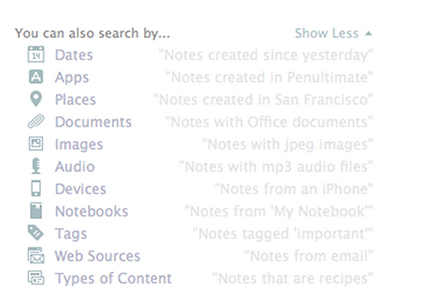
Anytime you enter text in the Search field of your Evernote account, it searches all the content in your notes' titles, your notes' bodies, notebook names, tags you've used and content in your URLs for notes in your database, including text in photos that has been processed by Optical Character Recognition; plus, in Business or Premium, you can search text inside attachments, PDFs and spreadsheets. Yet, Evernote's search capabilities go well beyond a simple keyword search option.


With Descriptive Search, those using Evernote on a Mac can use plain language to describe what is being sought. You can search by location you visited on a specific trip, by dates you know you were doing whatever is being sought, by type of device you used to upload the information and more. Click here for a video overview of the Descriptive Search functionality.

Still, within that same search field, Evernote offers codes or equations you can use to focus in on certain aspects of the content for which you are searching. Here are some examples:
  • created:20150115 finds notes created on January 15, 2015
  • updated:20150327 finds notes updated on March 27, 2015
  • intitle:"coffee" finds notes with coffee in their titles
  • resource:image/* searches for notes that include images
  • notebook:"Receipts" finds notes in the Receipts notebook
  • tag:"Mobile" finds notes tagged with Mobile
  • any:"New York" searches for notes that have New OR York in them, unlike how typing New York on its own in the search box will pull up notes that have both New AND York in them
  • todo:true finds notes with a checkbox that is checked
  • todo:false finds notes that contain an unchecked checkbox
  • todo:* searches for all notes that contain any checkbox at all
  • source:mobile finds all notes created on a mobile device

Many of my clients extend the power of Evernote for quickly finding what's needed via the Atlas and Shortcuts. By clicking the word Atlas in your Evernote account, you see a map and can locate any note based off the location in which it was added to your database. Likewise, under word Shortcut, you can access any note or notebook you've added to the shortlist of which content you access most frequently and, therefore, want most easily accessible. It is quite simple to add content to your Shortcuts by simply dragging a note or notebook atop the Shortcuts name and, then, dropping it into that section; however, I highly encourage you to keep your list of Shortcut content short so it doesn't become cumbersome to scroll through these options.

Above all else, though, I think Evernote's recent additions of Context and Augmented Intelligence empower me to most easily find whatever I might need quickly. If you are using Evernote Premium, it is with Context that you are given related notes from you own account, people from your LinkedIn network related to that note's content and relevant content for free from trusted news sources, like The Wall Street Journal, Fast Company, Inc Magazine, Pando Daily, CrunchBase, TechCrunch, Forbes and Lifehacker. On Evernote Business, the Context functionality adds related notes from team members, others in your company who many know more about the topic at hand and content from Factiva's web content. Context dramatically extends my ability to get work done within my Evernote workspace. Further, via Augmented Intelligence, my Evernote database is incorporating what it learns from how I use the tool to better provide me with what content it determines would be helpful, and it is quite fascinating. For example, if I've been adding content to specific notebooks, those notebooks will appear atop my list of notebook options when adding new notes on the go.

How do you find what you need quickly in your Evernote database? Do you utilize any of these tactics or are there any you'll be incorporating in your daily work habits?

Monday, March 9, 2015

Tips to Utilize Email for Adding & Organizing in Evernote

Last week, I shared with you the many forms of information that can be added in multiple ways to your Evernote database. In that list, I included "send to your Evernote account's email address", but that might've led to even more questions. Let's dive a little deeper into this functionality.

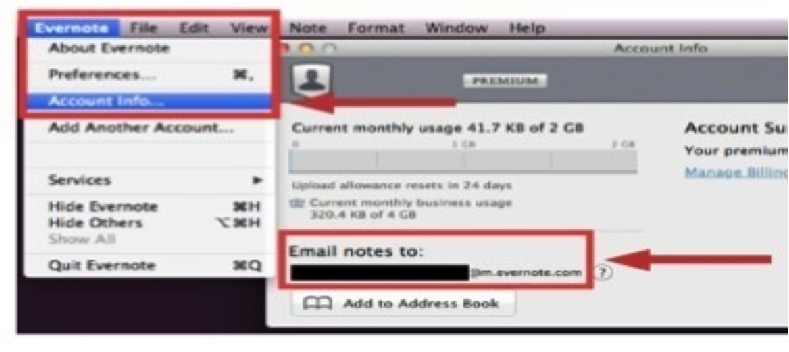
On a laptop or desktop version of the Evernote app, follow Evernote > Account Info > Email Notes To for finding the email address assigned to your specific database. Likewise, on the iPad or iPhone app, tap the elephant head image to get back to your main menu; from there, tap the gear image in the top, left-hand corner, follow General > Evernote Email Address, and you will see the email address assigned to your specific database. Finally, on an Android version of the Evernote app, tap the image of three dots stacked vertically to follow General > Evernote Email Address, and you'll find the email address assigned to your specific database.

Whatever you see as that email address assigned to your Evernote database is designed to be complicated and difficult to remember so others can't start sending content into your Evernote account. I find it's not realistic to think I'll just remember what that email address is; therefore, I recommend saving your email address as a contact in your address book. Often, I use Evernote as the first name and Upload as the last name. Once that information is saved as a contact, when I'm sending an email to my Evernote database, in the To line, I start typing Evernote Upload, and the address populates for me. It's such an easier way to quickly add content to my Evernote database!

When you started your Evernote account, the first notebook given to you was labeled as your "default" notebook. As content is created in alternative manners, like emailing or scanning into Evernote, that content will automatically go to your default notebook. While you can always go into a different notebook's settings to change that into your default, overriding the original notebook's settings, you can alternatively just rename your original notebook to make the default easier to find. I recommend renaming your default notebook as your Inbox, just like the Inbox in your email management tool. Then, you can process newly received content from your Inbox just like you process emails from that Inbox location.

On the other hand, if you'd rather the content you are emailing into your Evernote database bypass that default notebook, doing directly to a desired destination, you can utilize the email's subject line to aid organization... Add @ before an existing notebook name to add the content as a note in that specific notebook. Add # before an existing tag to add that tag to the note being created by the content you're emailing. Insert a reminder as !YYYY/MM/DD. 

If you choose to utilize the subject line of an email you are sending into your Evernote database, there are a couple requirements to remember. First, the left-to-right order of your subject line must be note name, reminder, notebook name and, then, tags. While you do not have to include each one of those elements, Evernote will understand the information you are sending only if you have the information in that specific order. Second, any notebook or tag to be added via an email subject line must already exist in your database; you cannot use a subject line to create a new notebook or a new tag. Likewise, if the notebook name or tag doesn't match the exact spelling of what already exists, the system won't recognize it as a match so it won't work.

Regardless of whether you are adding typed text, video and audio files, documents, checklists or photos, emailing into your database is a technique to simplify the process. For more, view my related video by clicking here, and, then, let me know your thoughts.

Do you use email to add content into your database? What successes have you had? Which of the aforementioned shortcuts will you implement with your Evernote use?

Thursday, January 22, 2015

Top 10 Ways To Make Email a Better Productivity Tool

Did you know that the average business professional gets at least 150 new emails each workday? I have clients that can easily reach 300 or 400 new emails on any given day, and many of them feel strongly that handling email is a very time-consuming aspect of the workday... Wow! It can make you wonder how any real work gets done amidst simply reading all those messages.

While there are countless tools and techniques that'll help you use email to organize for success while getting more done in less time and quickly finding what you need, here are a few solutions I have found to offer the greatest results:

1. Shift your mentality from "checking" to "processing" your email so your email inbox is no longer a holding zone:

  • Tasks taking less than 5 minutes should be done when the message is received while tasks taking longer should be added to your running to-do list
  • Appointment requests should be moved to your calendar
  • Reference emails should be quickly moved to personal folders
  • Trash is not really junk and should be moved to the trash

2. If the average person needs anywhere from 3 to 8 minutes or more to really refocus after any distraction, don't make email a distraction; think of OHIO and "only handle it once" for each message, including reading and processing each email.

3. It is easier to quickly find what you need when you need it if you aren't searching through electronic clutter; therefore, there is no need to hold onto whatever is no longer accurate, applicable, useful or bringing you joy. Further, when determining what to save or delete, consider what can be easily located online later... There's no need to take up valuable space on your computer when you can easily find that information online whenever it is needed.

4. Send fewer emails to get fewer emails back. Although it sounds simple when stated like that, we are in a society trained to quickly shoot out an email when we need to tell or ask someone something. This can be excellent for having documentation of your communications; however, one simple phone call can element quite a bit of back-and-forth when the topic is more complex or when you need an answer to included questions.

5. Unsubscribe from eNewsletters you aren't reading; otherwise, consider culling subscriptions you maintain and stay up-to-date reading in a daily "roll-up" or "bundle" via Unroll.me.

6. Master the art of creating reference folders by having enough that each email to be kept has a home while limiting the number of folders so no one email could appropriately fit in multiple. If you struggle with where to file a message upon its receipt, how will you ever be able to locate it again later?

7. Utilize automated rules to sort email into folders... Highlight what needs time-sensitive attention by directing it into a folder designated to that particular sender or subject line topic. Cull together what can be attended to more conveniently on a later date and time, setting messages from that sender to bypass the inbox and go to a separate Personal Folder all their own.

8. Better employ all the features offered by your email management tool, like Delay Send, Send Again, Meeting Requests and renaming your received emails' subject lines.

9. If you have been emailing someone back and forth, each subsequent email contains all the content of the prior emails so keep only the most recent message in a conversation; in newer versions of Outlook, clear such clutter with the "clean-up" button on Outlook's home ribbon.

10. If an out-of-date email address keeps populating when you are trying to send a message, there are options for removing an erroneous email address. As you start typing in Outlook's "to" field, press the down arrow to highlight the erroneous address and, then, hit DELETE; in Mac Mail, populate the erroneous address in an new email message and, then, click the arrow on the far right to select "Remove from Previous Recipients". Problem solved!

I'm working on an eBook about how to "Use Email to Organize for Success and Get More Done in Less Time" and could use your input... What techniques have made it easier for you to management your email?

Monday, January 12, 2015

Boost Your Credibility and Productivity By Celebrating National Clean Off Your Desk Day

Happy National Clean Off Your Desk Day! Addressing the top of your desk can be important for several reasons, but I highlight the two I find most important and that pop-up most frequently in today's workspaces... First, now that more offices are open, collaborative spaces, fellow team members and office visitors can more easily see exactly how clean you keep your space; from that visual, people make assessments, and your credibility can be put into question. Second, your productivity depends on efficiently finding what you need when you need it; unfortunately, when your desk is covered with active and archive files, it can be more difficult to quickly put your hands on what you or your colleagues might need from amidst the chaos. Have no fear! There are steps you can take today to celebrate National Clean Off Your Desk Day which will positively impact your credibility and productivity, leading to more success in the near future.

1. Consider the available space in your office as you would a real estate investment, where "location, location, location" matters. Keep only those items used daily on your desktop; then, position items further and further away based on being used less and less frequently.

2. Often, the clutter atop your desk represents lingering decisions and unaddressed to-do items; therefore, assign homes to what active and archive items are in your space so they can always be put back in their homes when you are not currently using them. Work happens on your desk so you'll need to bring out the files being used for that work when it's happening; yet, when you know in what homes those items belong, you can more easily put them back away when not in use. Then, take the last 15 or so minutes in each day as a "check-up from the neck up" to wrap up your day, returning anything atop your desk to where it belongs and setting out whatever, items will be needed first-thing the next day. Knowing in what "homes" your items below helps to tie up all loose ends, adding resolution to the end of your day, and prepares you for the next day's priorities.

3. The more you keep then the more you have to peruse through in order to find what you need at any moment in time. Therefore, edit out any unnecessary items. Keep only what is accurate, applicable, useful and bringing you joy. Also, consider eliminating anything that can easily be found again online.

4. Be strategic in where you store what items you choose to keep. If you have a running list of all unfinished tasks, there's no need to keep their related files atop your desk; however, if they are active projects, you'll want to keep their files handy for easy access. When items are related, it's important to keep those items together, focusing on "like with like" for quick recovery when working on that to which they are related. Remember that "horizontal is hidden while vertical is visible", and utilize walls or the back of your door whenever possible; those areas can be valuable real estate, particularly as you are assigning homes to items in your workspace. Finally, utilize containers to limit the amount of any item to be retained; once the container is full, it's time to edit out unnecessary contents.

5. Since people, priorities and current projects continually evolve, no organizational system is ever completely finished. Therefore, continually evaluate how your office organization is working and adjust to meet evolving needs. As your situation changes, adjust accordingly.

Take a moment to look around right now. Does your desktop need a little TLC? If so, what steps can you take right now to celebrate National Clean Off Your Desk Day? Please share your success stories below... or read others' to get motivated for your own.

Monday, December 29, 2014

Get Clear For The New Year Week #5: Clean Out And Organize Your Workspace

Now that we are just a few days away from 2015, by following the assignments in this series, you’ve laid an excellent foundation for success in the new year; however, in order to achieve your optimum success, it is important to establish a work environment that’s yet another tool in your productivity toolbox. If your paper and electronic files are unorganized and filled with unnecessary contents, they can be overwhelming and unhelpful. This week is an ideal time to “get clear for the new year” by proactively addressing your filing as well as where items are kept in your workspace.

First, take time to edit the contents of your workspace. When files are overstuffed with outdated information, it is difficult to locate what you need when you need it; therefore, it is vital to address your files before the new year, clearing out what no longer needs to be there.
  • Will the documents be relevant to work in the coming year? If you’ve completed the related project or the file contains last year’s receipts, move the content into storage with your archived files, rather than keeping it with your active files.
  • Do you need this piece of paper? What’s the worst that can happen if you throw it away?
  • Is the info on file somewhere else or easily accessible online?
If any file's contents are no longer (1) accurate, (2) applicable, (3) useful or (4) bringing you joy, consider getting rid of those contents. Can the discarded papers be recycled or do they need to be shredded? Further, if you are keeping something that would be easy to find again online, is it something you will reference frequently enough to justify the space it is taking to retain? Consider keeping only items that would be difficult to relocate or recreate.

Likewise, as you are purging the accumulated excess from your paper and electronic files, evaluate whether you can resell or recycle any technology that is no longer being used. Those devices, cords and accessories are taking up valuable real estate in your workspace, which could be devoted to items actually being used instead. Still, if you do utilize all the technological tools in your space, are there any that can be consolidated so you retain functionality while lowering the number of devices maintained? Keep in mind efficient use of what space you have.

Then, address the onslaught of emails received daily. Unsubscribe from eNewsletters you are not reading, consider bundling subscriptions that you do read via The Swizzle or Unroll.me and create a system for diligently keeping up on reading.

Take time to verify everything in your workspace has a home as well as that each item is in its assigned home. When folks are looking to buy real estate, you often hear “location, location, location”, and I challenge you to consider your workspace in the same light as buying real estate where location really does matter. The space closest to where you will be working is considered the most valuable real estate location; therefore, that area should be filled with what items you use most frequently. Then, the placement of items moving out from there should be based on how often the item is needed, placing items used least frequently the farthest away.
  • Make certain there is a 2014 tax folder to hold incoming documentation for the year ending; then, create a 2015 tax folder to be prepared for the upcoming new year’s tax records. 
  • Get accounting records up to snuff by writing off uncollectable accounts receivable; while accounts receivable write-offs are tax deductions this year, they become a bonus if collected in the new year.
  • Make sure your tech tools are housed near where they will be used, that all accessories are still easily accessible and that any upgrades needed are completed before the new year starts.
  • Simplify your office supplies and plan space for what new supplies will be needed in the new year.

By focusing on editing out what is no longer needed and, then, strategically assigning homes to what you will be keeping, your workspace will be a useful tool in your productivity toolbox, driving your optimum success.

ASSIGNMENT: Visit here to see a video related to this blog post; then, this week, take time to edit the contents of your workspace, removing contents that are no longer accurate, applicable, useful or bringing you joy, and verify everything to remain has a home as well as that each item is in its assigned home. What needs to be added or removed in order to simplify your work for better achieving your desired results? Be strategic, aligning the set-up in your workspace with the goals you’ve set, making sure the workspace is another tool in your productivity toolbox.

Leave a comment below about your ongoing system for editing the contents of your workspace. What tends to build up most quickly? How will you maintain the productive workspace that you’ll be creating this week?

Monday, December 22, 2014

Get Clear For The New Year Week #4: Organize Your Morning Routine and "Drop Zone"

 As we talk about steps you can take now to make the new year your best thus far, empowering you with the optimal tools to drive your desired workflow results, it is important to address how your days start and end. Whether you are a morning person or night owl, your productivity depends on a proper foundation, which comes from your morning and evening routines. Take these steps to minimize the madness so you are ready on time and your exit each day is much less stressful:


- End today with tomorrow in mind… Each night, check the next day’s schedule to plan what you’ll need for all activities. Verify the weather forecast and lay out your clothes for the day as well as any accessories you’ll be wearing. Think through what you will eat for breakfast so you aren’t scrambling for something to eat. Go ahead and prepare the next day’s lunch; likewise, if you often forget to grab your pre-made lunch from the fridge, leave yourself a “remember lunch” note on the door or by your keys. Have a set place near the door for any items you’ll need to grab as you’re headed out the door, like your keys, work files and purse / wallet / backpack; plus, keep a morning checklist by the door to verify you have all that you need. Make sure you have gas in your vehicle. Finally, finish your evening with a tablespoon of unsweetened almond butter, which will ensure you don’t awake groggy from low blood sugar.

- Remove unnecessary actions from your morning routine… When the goal is getting out the door, it is important to stay focused, but it is easy to get distracted. Can unloading the dishwasher wait until after work? Can you absorb the morning’s news on your commute to the office instead of in the morning news on TV? For some, these actions are necessary to start the day off on the right foot; however, for others, they are simply distractions that lead to tardiness in getting out the door. Determine in with of those groups you fall and act accordingly.

- Streamline your processes for getting ready each day… Choose a hairstyle that is easy to maintain. Choose a breakfast that is easy to prepare and can be replicated each morning. Choose wrinkle-free clothing. Look at each element of your morning routine, and determine what can be simplified. Doing more without thinking makes the whole process better.

- Make the most of every available minute… Set your alarm clock to go off 15 minutes earlier than necessary to give yourself a buffer in your morning preparations. Get up and moving soon after you awake to open your lungs for more oxygen, which helps our brains and bodies function properly; I use the 7 Minute Workout app, and you might want to give it a try, too. Start your day by drinking a tall, cold glass of water with a squeeze of fresh lemon juice, which boosts energy, promotes good digestion, encourages your immune system’s functioning, detoxifies the liver, helps you lose weight, encourages better skin and kicks off your day hydrated. Break each element of your morning routine into a “zone” so supplies for each action are grouped together and located in the area where they will be needed, like tools for getting dressed, tools for prepping your face or applying your make-up, tools for preparing your coffee and tools for making your breakfast. Further, use music to motivate your desired behaviors.

With a little planning, preparation and routine-building, it can be easier and less stressful to get out of your home. quickly moving on to your day’s activities. Still, one of the most powerful tools for organizing your morning routine might be the aforementioned place near the door set aside for any items you’ll need to grab as you’re headed back out the door. This is known as your “drop zone” and is where you drop off those items when you arrive home so you can quickly locate them when you are ready to leave. Normally, this includes your keys, work files and purse, wallet or backpack; however, anything you bring home that will be needed when you leave should be left in this “drop zone” so you aren’t frantically searching in the morning.

ASSIGNMENT: Visit http://youtu.be/NzQAsfEk9Vc?list=UUEoZpJ_B6A1dWLzzsSVTwbg to see a video related to this blog post; then, this week, review your evening routine to make sure you are properly preparing for the next day, establish your “drop zone”, starting to develop a habit for using it, remove unnecessary actions from your morning routine, streamline your processes for getting ready each day and see how you can make even more out of every available minute in your morning routine. Do you need to awake earlier? Are you moving around soon after awaking? Could you add the cold glass of water with a squeeze of fresh lemon juice to your morning routine? Are you utilizing music?!?


Leave a comment below with what’s working best for you. What is your nightly routine? What is your morning routine? How have you simplified either to make it more helpful?

Monday, December 8, 2014

Get Clear For The New Year Week #2: Weekly Strategy Session, Morning Jumpstart and End-of-Day Wrap-up

Last week, we discussed determining and, then, focusing your actions on your personal and professional priorities, goals and objectives. To do this successfully, it is imperative to be proactive. 

If you wait until your week unfolds, you are often at the whim of others’ priorities; if you take time to plan your approach beforehand, checking your progress throughout, you are more likely to build a structure for focusing on what’s most important to you. Here are tools I recommend building into your regular habits for ensuring the greatest success in marrying your actions to your priorities:

I. Weekly Strategy Session: Whether you accomplish this at the end of your Friday, sometime over the weekend or first-thing on Monday morning, it is imperative to create a game plan for the upcoming week. Just like football teams wouldn’t go into a game with out a plan, you need a game for accomplishing all you intend for your week. In each weekly strategy session, focus on these items…

- Evaluate which of the prior week’s tasks were completed, determining what’s left undone and must be carried into the new week; then, reschedule each undone “what” to a new “when” so you have a clear timeline for winning.

- Clarify any changes to your priorities so those people and activities most important to you get scheduled accordingly; start your weekly game plan by allocating time for what’s most important before anything else.

- Review the upcoming week’s commitments to ensure you’ve prepared for the related tasks and appointments; as appropriate, include when you’ll sleep, when you’ll workout and what you’ll eat.

- Determine additional opportunities for personal and professional growth; what actions or connections will move you towards accomplishing more of your goals?

- Map out a game plan for the upcoming week’s activities, remembering that every “what” assigned a specific “when” is more likely to get done but that you have only so many minutes allocated to your week.

II. Morning Jumpstart: While we all believe we are superheroes who can accomplish a never-ending list of tasks and appointments, each of us is only one human-being; therefore, it is important to start the day on the right foot to accomplish all that is realistically possible. Jumpstart your morning in these ways...

- Enter each day of your life with 3 - 5 items that are “must do” for that day, whether those are appointments or tasks, as that is a realistic goal. If you complete more, that is a bonus.

- Follow the philosophy of “swallow the frog” such that you complete the most difficult and vital task or item you’ve been avoiding before moving to others.

- Keep in mind the saying that an elephant is eaten one bite at a time, and break projects into smaller, more manageable action items, starting each of these on your list with a specific verb.

III. End-of-Day Wrap-Up: I like to think of the last 15 minutes or so of each workday as my “check-up from the neck up”, and I always aim to accomplish the following activities…

- Review the day’s tasks, preparing the next day’s “must do” list based off what was left undone from today as well as what must be done for tomorrow.

- Evaluate your schedule for the next day and verify that you are prepared for everything coming up.

- Get end-of-day updates from each of your team members.

- Tidy up your workspace, filing newly arrived items while putting the day’s work back into each item’s assigned home.

- Reflect on your greatest success from that day, and make note of that for which you are grateful.

If you’re having trouble completing any one of these processes or think they are taking too long, you can use a timer to move things along… Here are a few benefits from using this productivity tool:
- Once you get rolling, you might not stop as activity breeds activity, ending procrastination.
- You can do anything for 15 minutes or so, better keeping yourself focused over a shorter duration.
- Shorter times allowed for specific activities lead to an extra burst of energy, driving greater output.

ASSIGNMENT: Visit http://youtu.be/Kt0UAyzyvpQ to see a video related to this blog post; then, this week, start developing the habits of a weekly strategy session, morning jumpstart and end-of-day wrap-up. Find an existing habit with which you can connect each of these new processes so you are more likely to get them all completed; then, set a timer to see how quickly you can accomplish each one. Reward yourself for successfully doing each of the three, celebrating every step towards developing them into habits.


Do you currently complete a weekly strategy session, morning jumpstart and / or end-of-day wrap-up? If you do, how have these boosted your productivity? If you don’t do them already, how can you incorporate these into your existing workflows to better boost your output?

Saturday, December 6, 2014

6 Ways to Stay on Track Amidst the Holiday Hustle

As of today, we are just 10 days from the start of Hanukkah, 19 days from Christmas and 26 days from New Year’s Day, which can mean exceedingly long to-do lists over and above the normal, day-to-day workload: decorating, cooking and baking, shopping, wrapping, sending cards, television specials, parties, traveling, out-of-town visitors and much, much more… Whew! It can be extremely overwhelming, but there are steps you can take to help:

1. Be proactive and strategic about handling all your job requires. While team huddles can be good for some, all individuals can benefit from a weekly strategy session done alone for appropriately scheduling time for necessary tasks, meetings, professional growth and current priorities. By assigning a specific “when” for every “what”, more gets done and you have more wins. Then, keep that weekly game plan on track with a daily wrap-in in the last 15 minutes of each workday, where you complete a “check-up from the neck up” for tasks and appointments, get updates from each of your team members, tidy up your workspace, acknowledge the day's successes and show gratitude.

2. Take a look at your ongoing tasks and activities; see what can be deferred until after the holidays. During this time of year, we add so many activities to our already full calendars, but there are only so many hours in any day… Each time we say "yes" to something, we are saying "no" to something else; when each opportunity arises, make a conscious effort to consider, "If I say yes to this, to what am I saying no?" What can be set aside to make room for your priorities this season?

3. Make time for self-healing and keep self care a priority. Whether it is a massage, a coffee break with friends, reading the latest and greatest novel, a quick nap, time to reflect in nature, exercise or just a bit of silence in front of the fireplace, it is vital to fuel yourself in order to have any energy for giving to others.

4. Take vacation time off to handle holiday obligations. While you can’t add hours to the day, you can manage your actions for optimizing the time you have by taking some time off to finish shopping, cooking or decorating. This approach empowers you to be fully focused when you are at work, knowing you have adequate time set aside for those holiday commitments. Likewise, if you are the team lead, be aware of everyone’s desires for vacation time, and be careful to balance employee vacation requests with business needs; consider having a policy for no vacations on especially busy days or limiting the number of days off during the holidays, focusing on giving folks the time off they need to be fully engaged while at work at the same time as getting all work done.

5. Know when to ask for help. While successful collaboration, communication and scheduling can enhance your team’s ability to diffuse the company’s workload, utilizing all available bandwidth, don’t forget that there are plenty of options for outsourcing and delegating outside your organization. There are many resources, including Elance, Fiverr, Sweeps, Task Rabbit and Thumbtack, that are excellent solutions for helping with holiday overload. Utilize all available resources to optimize results.

6. Make lists for all that must be done, bought, wrapped, decorated, cleaned, etc. When faced with holiday-season projects, break each into bite-sized, action steps that can be more easily tackled; checking individual steps off will keep you motivated to continue. Then, whether paper or electronic, be sure to keep your list with you throughout the season, referencing it often.

What tactics do you utilize for maintaining productivity during the holidays? How do you incorporate seasonal commitments amidst your day-to-day routines? Have you noticed any hiccups thus far this year?

Monday, December 1, 2014

Get Clear For The New Year Week #1: Priorities, Goals, Objectives and Saying No To What Doesn't Fit

Today, successful small businesses must make changes quickly when needed. Technology is evolving rapidly, dramatically altering the way in which businesses find, interact with and meet the needs of clients. The number of employees continues to be cut while resources become more limited, continually asking small businesses to do more with less. We're often reminded how important collaboration, communication and scheduling are when looking at our own successes as well as our teams' successes.

Chances are good that your expectations for the new year are even higher than what you had in mind and have accomplished in the year that’s ending. If so, take action now to make changes for improving your business moving forward. In my “Get Clear For The New Year” series, I’ll post each week of this month about steps you can take now to make the new year your best thus far, empowering you with the optimal tools to drive your desired workflow results.

Let's start by discussing the foundation for your upcoming success: your priorities, goals and objectives. Each of us has 1,440 minutes in each day or 10,080 minutes in each week, which means we have only 525,600 minutes in all of 2015 to achieve everything we desire. Time is a limited resource, and we cannot add to that allocation. Instead, we can only manage our actions within that allocated time to do all we possibly can. With such a limited allocation of time, it is extremely important to be focused on how we want to use it.

As Stephen Covey encourages, think of each week in your year as if it were a jar. In front of you, you’ve been given a pile of rocks, a pile of pebbles and a pile of sand. Those rocks represent actions to support the most important commitments in your life, whether your career, your health, your loved ones, your education, volunteering for a cause that’s important to you or something of equal priority to you; there are serious consequences if these tasks are left undone. The sand represents actions that are neither important nor urgent but can be good releases throughout your day, week or month, like watching funny videos on YouTube, playing video games and catching up on personal social media. Then, the pebbles represent what actions fall in between the importance levels of your rocks and sand; often, what are currently considered pebbles would become rocks if they are postponed for too long, but you currently have a little wiggle room on them. The pebbles represent tasks with slight but manageable consequences if left undone. Each week in your year can hold only so many of your rocks, pebbles and sand; be strategic and proactive about which items you choose to give your limited time. As indicated in the video at http://youtu.be/6_N_uvq41Pg, if we each allocate time for what’s most important first, we’re more likely to have more time to accomplish much more of the rock, pebble and sand items that we desire.

In these last few weeks of 2014, it’s important to clarify your rocks, pebbles and sand, creating the habit of scheduling each week with time allocated for rocks before pebbles before sand. To determine your business’ rocks, it is imperative to be clear about what are your company’s priorities and goals. Jumpstart this analysis and move towards clarity on your priorities with these strategic-planning questions:

1. What is the one thing your organization did best this year, and what is needed to repeat that success?

2. What is the one thing your organization most needs to improve, and what must happen to fix it?

3. Which groups or individuals have prevented your organization from reaching its greatest possible success, and what can be done to remove that hurdle?

4. Which groups or individuals were most responsible for your organization’s successes this year, and how can those folks be shown appreciation while encouraging that success to be repeated in the new year?

5. What performance metric has been falling below expectations, and what can be done to correct that?

6. What performance metric most closely reflects whether your organization is operating successfully?

7. Which products or services offered by your organization are most profitable? Least profitable? How can business operations be more aware of the profitability aspect for what products and services are offered?

8. What resources can help team members better achieve the organization’s goals, like networking, administrative support, technological tools or more streamlined processes?

9. About what results are you most passionate, excited and motivated? How can you focus more intently on that specific facet of your organization?

10. What areas of your business can be outsourced or automated to achieve better results in other areas?

From your answers to these questions, you can deduce which areas of your business rank as your highest priorities headed into the new year. Create a goal for each of the determined priorities; then, make sure that each goal is supported by SMART objectives, meaning they are Specific (targeting an exact area that is to be improved), Measurable (able to quantify progress), Assignable (have specified who will complete), Realistic (associated with results that can realistically be achieved with available resources) and Time-related (to be achieved by a specified deadline). 

Heading into a new year means a blank slate, and focusing your actions on your personal and professional priorities can lead to outstanding outcomes; however, it can also mean changes to your existing behaviors or habits, which is challenging. As opportunities come your way that are not aligned with your priorities, it will be important that you are armed with ways to say “no”… Here are a few examples:

- Let go of the kind of work you do not want to be spending your time on by saying “Unfortunately, I simply don’t have time for that right now”, which opens space for doing the work that really deserves your time.

- If someone approaches you with an idea, venture or suggestion in which you are interested but you just don’t have the bandwidth to consider it at this particularly busy time, say that this is a busy time for you, and ask that they contact you again after whatever date you specify as being a less busy time; this approach avoids your overwhelm by putting the ask back on the asker’s to-do list.

- Although you never owe the other person more explanation than you feel comfortable giving, if you choose to elaborate a bit more, you can always say “I’d love to, but I’ve got other commitments right now”, and feel free to explain to whatever degree you prefer what those other commitments might be.

- You can always choose the more direct approach, saying “It’s a no, I’m afraid, but thanks for asking me."

- Whenever you are overwhelmed by your current commitments and turning down a new alternative, I find it very successful to be upfront and clear about your state of overwhelm; examples of this approach include “I’ve got too much on my plate right now” or “Bandwidth is low so I won’t be able to make it work."

Whenever you are offering a “no" response, it should always be truthful, firm and not overly apologetic or explanatory; once you’ve made the decision to say “no”, try to not overthink it and always take action.

ASSIGNMENT: Visit http://youtu.be/tls8uNfeBao to see a video related to this blog post; then, this week, take time to answer the aforementioned strategic-planning questions, deducing what your priorities might be. Practice scheduling your week to focus more intently on your priorities, and brainstorm goals as well as SMART objectives associated with those priorities. Make time in your schedule for what matters most.

What are your priorities, goals and objectives? How do you make time for what’s most important? How do you move away from opportunities that do not fit your priorities?