Brought To You By Emily Parks
Productivity Consultant at Organize For Success, LLC...
Helping You Make Every Minute Matter!


Showing posts with label email. Show all posts

Monday, July 30, 2018

Top Tips to Simplify Your Life

As we near the first week of August, plan how you'll celebrate "Simplify Your Life Week" with baby steps you can take to streamline, cut out the clutter, make life easier and better invest your limited resource of time. With a few tweaks to how you get things done, you can better focus on what matters most, making greater progress on your priority goals to achieve your desired results.

Per Dictionary.com, simplify means "to make less complex or complicated; make plainer or easier." Invest some time in simplifying to limit stress, more quickly find what you need when you need it, have a clear grasp on what needs to be done at any moment and stop wasting precious moments of time. Make every minute matter!Ⓡ

Here are tactics to jumpstart your efforts at simplifying your life:

  • Learn to say "no". What actions are being asked of you that don't actually need to be done? Are there tasks on your to-do list that could be delegated to someone else that can do them equally well if not even better so you open time for what only you can do? Alternatively, should you consider "not now" for something that can be delayed until a later deadline?
  • Stay true to your priorities. When you know what matters most, you can more intentionally align your actions with those areas of importance, avoiding burnout. As priorities shift, you can be flexible and shuffle how to invest your time so you keep your actions focused on your goals.
  • Utilize work-life integration for greater overall success. By studying research by Wharton's Work / Life Integration Project along with my experience with clients' best practices, I know first-hand how you can create harmony with goals for home, work, society and yourself complementing one another rather than competing with each other. Focus on actions that can accomplish multiple goals at once, plan how you can invest your time with each of your most important priorities at the forefront of your emphasis and maintain pliability to easily address your priorities as they evolve over time.
  • Respect the value of your space. Whether it's in your physical space, electronic files or calendar, keep only what is accurate, applicable, useful, bringing you joy and not just as easily found with a quick Google search. If something filling your physical space, electronic files or calendar no longer meets those requirements, remove that clutter.
  • Plan to have the tools you need nearby when needed. Do you utilize a smartphone, tablet or laptop? If so, you are well aware of all the accessories needed, especially when you are working on-the-go, like charging cords, earbuds and the like. Rather than depending on whether you remember to bring "all the stuff" with you whenever you work outside an office, keep multiple sets of accessories (one for the office, one in your vehicle, one for your bag), bundling your tech tools together with the GRID-IT or a canvas pouch that's easily portable.
  • Address email. Unsubscribe from eNewsletters you are no longer reading, consider bundling subscriptions that you do read via Unroll.me and shift from checking to processing newly received messages, moving to-do items to your task management system, adding requests for your time to your calendar, shifting retention items from your inbox to personal folders and using delete as your friend to remove trash or junk.
  • Save time with forms, templates and checklists. If you regularly send the same reply, create a template that can be easily plugged in and tweaked as necessary, saving time by not starting from scratch each time. Create a packing checklist so you don't forget anything needed for travel. Design a form for your grocery shopping list so you remember to restock the essentials each time and save valuable minutes by listing the items in order of the aisles at your store.
  • Automate daily processes. "Set it and forget it" may be the greatest time-saver. Investigate options such as IFTTT, Podbox and Zapier to find the best solution for your needs. In addition, add an automated cloud back-up solution, such as Backblaze, Carbonite or CrashPlan, and consider which social media management solution will allow you to automate putting the right message in front of the right audience at the right time.
  • Cut back on distractions with fewer pings and dings. When distracted, it can take us an average of 23 minutes to fully re-engage in the task at hand. Each time we receive a notification for a new email, social media update, text message or voice mail received, those are distractions that rob us of valuable time. Turn off the notifications and schedule set times to check each platform. For folks that do require an immediate response (like key account clients or your direct supervisor), make them VIPs so you can utilize Do Not Disturb on iOS and Priority Mode on Android.

Where do you see excess in your life or time being wasted? How can you take action in tiny steps that will assist in simplifying your life so you get to your goals more easily?

Wednesday, January 17, 2018

Control Your Email Instead of Letting Email Control You

The average professional receives over 175 email messages each day, and many of my clients receive over 400 new emails daily, causing them to view handling email as a very time-consuming aspect of the workday. This is truly an overwhelming amount of communications. It can make you wonder how any real work gets done beyond simply reading each day's new email messages.

If someone were to peer over your shoulder right now to look at your email inbox, what would that person find? Do you keep just about everything received in your inbox, making it such that you have several hundred or thousands of emails in there right now? Do you keep action items alongside retention items in your inbox, making it harder to know what's been handled or what needs to be done? One little tidbit with an immense impact on productivity is the realization that your email inbox is definitely not your to-do list. I recommend using your email inbox as exactly that... an "in box". New items funnel through as needed.

To make this possible, shift your mentality from "checking" to "processing" new messages. According to stats from email marketing company BlueHornet, folks look at their phones more than 150 times a day on average, many of which are to glance at their email inboxes. Each time you read a new email and, then, plan to come back to deal with it later, that initial reading becomes a distraction because you have to re-read the message and re-start your thought-process on how to respond. Beyond the repetition involved with new messages, stop letting emails rob you of time by retaining fewer and moving them from your inbox.

Instead of wasting time by reading and re-reading your emails throughout each day, develop a habit of OHIO and "only handle it once", meaning you read new messages only when you are ready to deal with them and you use your inbox as a funnel instead of a holding zone. Here are tips to make such emailing easier:

  • If the email is asking you to complete a task that takes less than 5 minutes to complete, follow Nike's advice and "Just do it" immediately upon reading it.
  • If the email is asking you to complete a task that takes longer to complete, move it to your running data dump of to-do items needing your attention, and make time for completion.
  • Move appointment requests to your calendar.
  • File reference emails in your personal folders, making sure you have enough folders that everything has a home and no more than necessary so you never have to wonder in which folder you should file a new message.
  • Implement delete as a tool so you have fewer retained emails to search through when looking for a specific one.
  • Replace multiple, back-and-forth email messages with a quick phone call, even if you have to follow that call with a summary email for documentation purposes.
  • Unsubscribe from emails you no longer read rather than investing more time in repeatedly deleting the unread ones.
Do you find email overwhelming? How do you address email overload now? Which of these tactics will you employ in turning the email you receive into a productivity tool?

Tuesday, January 16, 2018

Delete and Discard Can Help Boost Productivity

Whether email, paper, electronic documents, physical items or calendar commitments, the more we have, then the more we must sift through to find what we need when we need it; those wasted moments can be better invested with other activities. Clutter, piles and excess can be debilitating, preventing desired results. Be selective.

The Justin Case book series is a great example of how keeping things "just in case" they're needed leads to terrible results. Justin worries about everything and carries his concerns to wild extremes, similar to those worried about not having something will keep everything and those with fear of missing out will commit to doing more than feasible. Failing to remove anything might be worse than editing out everything, although neither is an ideal scenario.

Realize that delete and discard can help boost productivity when utilized appropriately. Keep only what is accurate, applicable, useful, bringing you joy as well as difficult to replicate or find online. You'll better utilize your available tools to boost productivity and have less excess to drag down progress.

When struggling with whether to keep something, consider what would be the worst-case results if you discard it and, then, need it later. Are there legal ramifications? Can the content be easily recreated? It is important and necessary to keep certain things, but I encourage you to be more strategic as you select what is allowed to fill your workspace, your schedule and your hard drive.

How do you currently decide what to discard? Once you've made a decision about what to keep, how will you maintain what's established? What are your retention schedules?

Tuesday, March 15, 2016

Schedule Meetings More Easily With Better Tech Tools

There are many different commitments and responsibilities vying for our time… Clients, family and friends, business development, volunteering, personal growth, exercise, meditation, eating, sleep and more! When scheduling time with others, the back and forth communications can be overwhelming. What if there were tech tools to simplify and streamline this process? Well, you are in luck!

If you are scheduling a one-on-one appointment with someone, whether that's an individual or a team you are consulting, these tools will help:

- Acuity Scheduling --- automate client bookings, cancellations, reminders and payments as well as offer online sales of gift certificates

- Booking Bug --- multichannel bookings, event ticketing, customized booking journeys, appointment outcome analysis and CRM integration

- Calendly --- clean, simple, beautiful way to set your availability preferences and share a link to your calendar; then, after others pick desired times, they appear automatically on your calendar immediately

- Meetin.gs --- beyond simplifying scheduling, allows accessing meetings on-the-go to view details, respond to requests, receive notifications and connect via teleconferencing, Skype, Google+ Hangouts or Lync

- Pick --- compare calendars, regardless of email domain, and choose to share calendar link or use iOS app to schedule meetings on-the-go

- SchedFAST --- integrates receivables; provides email and text notifications for appointment confirmations, reminders and payments received; can import entire customer list and allows for multiple team member activity

- ScheduleOnce --- easily integrate booking page into your website, from which customers can book directly to your calendar from any device

- Setster --- include confirmations, reminders, cancellation and rescheduling options; allows requesting payment via PayPal; integrates with FreshBooks

TimeBridge --- integrates with Outlook or Google, including maps; handles unlimited changes, rescheduling, cancelations, notifications, reminders, location details, conference calls, video conferencing and time zone sync

- Time Trade --- schedule appointments through any channel, like website, email, phone and social media; can include concierge and analytics

- Vcita --- much more than simply online scheduling with live portal to cull together inquiries, CRM, online payments, document sharing, widget with dynamic call-to-action for website, custom forms and tons of integrations

- Vyte.in --- see invitees' availability alongside your own; can suggest places directly from calendar inquiries; invitees don't need to have own account

- YouCanBook.me --- integrates with Google and iCloud calendars via your own personalized scheduling page; bookings go straight into your online calendar with reminders, payment options and rescheduling available

If you are pulling together a group of individuals for a meeting, team practice or volunteer session, there are plenty of tech tools that can help... In each of the following solutions, whoever will be hosting the event, meeting or gathering goes to the website, enters date and time options and gets a link for soliciting feedback from potential attendees; then, those being invited click through the link provided to indicate which of the options provided will work. I highly encourage anyone hosting to specify a deadline for providing feedback when sending out the indicated link, after which you can go with whichever option got the most votes. No back and forth. No email overload. It's a simple and direct way to save time and limit stress in scheduling.

Why waste time going back and forth with folks to simply set time for later? Why reserve time for something that will end up happening at some other date and time? Let technology aid your efforts so you can use your time for that which better aligns with your goals and needs, boosting your outputs and enhancing your peace of mind. Add these links to your email signature or website, and you'll move towards simplified scheduling immediately.

Have you tried any of these tools before? What technology do YOU utilize for setting appointments and scheduling meetings? 

Wednesday, February 24, 2016

Baker’s Dozen Rules for Proper Time Management

How do you handle managing your time? Do you have a philosophy or best practices by which you swear for time management?

If you’ve been reading my blog awhile, you know I believe in managing our actions and the tools at our disposal rather than talking about time management as there’s nothing we can do to change how each day is limited to only 1,440 minutes. Still, this National Time Management Month is a great time to discuss some basic principles for best investing our limited time.

Here are some of what I recommend as basic principles for investing your time and, thereby, making every minute matter:

1. Saying yes to doing one thing means no to another. As time is a limited resource, we cannot invest the same minutes in multiple ways, and we can’t get back what minutes we’ve already invested elsewhere.

2. Be proactive in planning how to invest your time with monthly reviews of what’s upcoming, weekly strategy sessions to draft plans and daily wrap-ups.

3. Assign a “when” to each “what” to get more done. I have yet to find a calendar with “someday” but I complete tasks for which I’ve set aside time.

4. Plan no more than 3 – 5 “must-do” tasks per day. It is easy to feel like we are superheroes who can complete endless lists of to-do items; however, we are all human and can do only so much with what time we are gifted daily.

5. Enlist your energy level as a productivity tool. If your energy peaks first-thing in the morning, you may choose to tackle your most difficult tasks first; however, if your energy peaks later in the workday, you may prefer to start with easier tasks and build momentum to do your more difficult work later.

6. Align your actions with your priorities and goals to prevent burnout. As what’s important may shift over time related to work, home, community or society and the private realm of mind, body and spirit, continually audit how you are investing your time and focus your actions to what’s important.

7. Delegate or automate when you can. Consider resources like Fancy Hands, Fiverr, Guru, Help Tap, Moonlighting, Task Rabbit, Thumbtack, Upwork and 99Designs to enlist others’ help for getting things done; alternatively, If This Then That, Podbox, Zapier and social media managers like Buffer, Edgar, Falcon Social, Hootsuite, SocialOomph and Sprout Social help you “set it and forget it” so things happen without you having to invest your time to do it all.

8. Keep a list readily available of which tasks can be done in a 10- or 30-minute time slot so you are prepared to hit the ground running when those free moments magically appear.

9. End procrastination. Break projects into bite-sized actions so each step is less daunting. Ask for help or seek direction on anything that is ambiguous. If a task takes less than 5 minutes, just do it. Assign rewards for celebrating successful completion of tasks or ramifications for missed deadlines.

10. Utilize a timer. Get started on a “big, hairy, audacious” goal. Capitalize on how activity breeds activity. Attack challenging tasks for shorter times. Stay on task when working for a longer period of time. Energize greater results with shorter spans of effort.

11. Limit distractions. Turn off the pings and dings for notifications. Send your phone directly to voicemail as needed. Set a timer for how long you will use social media. Consider working remotely at times. Employ technology (like KeepMeOut, LeechBlock, Nanny, SelfContol and StayFocused) to block distracting websites temporarily.

12. Manage your tech instead of letting it manage you. Typical smartphone users check their phones 150 times a day, and it takes time to re-focus on the task at hand whenever distracted by our tech tools. Start with these tips to manage email and, then, make your mobile device a tool working for you rather than technology to chain or confine you.

13. Do not confuse immediate or urgent with important. What are the consequences of getting something done sooner versus later? When folks get you to stop working on what is important to achieving your goals in order to address their needs, they are managing your time; if you were unavailable, whether due to meetings or travel, an immediate issue would have to wait.

What tactics do you utilize for making every minute matter? Have you had success with any of those listed above or will you be implementing any of these strategies?

Tuesday, January 19, 2016

Steps to Stop Letting Email Consume So Much Time

The average professional receives over 150 email messages every business day; however, many executives can get upwards of 300 or 400 emails per day. The idea of reading all those emails can be overwhelming, let alone responding or doing anything with them. Quite a few of my clients groan as soon as we start discussing emailing, noting that their emails can be very time-consuming.

Control your email instead of letting it control you. With a few action steps, you can take back power over how much time gets invested in your emails.

- Shift your mentality from "checking" to "processing" so your inbox is never a holding zone and each email is no longer handled more than once, limiting wasted time; move tasks to a running to-do list, appointment requests to your calendar, reference emails to your personal folders and those messages no longer needed to your trash file.

- Employ tools to help... Technological tools like Boomerang, Mailstrom and SaneBox can assist in automating your email processing so it happens without your time doing it.

- Send fewer emails out to get fewer replies back; sometimes, a quick phone conversation can replace multiple, back-and-forth email messages, even if you have to follow that call with a summary email for documentation purposes.

- Unsubscribe from subscriptions you are no longer reading. I realize that deleting an email takes only a second; however, those seconds add up, and the time it takes to unsubscribe is likely less than the accumulation of all the time deleting those multiple messages received. While the content might've been of interest to you when you signed up for it, if your need for that information has changed, take the time to unsubscribe.

- Bundle together when you get the subscriptions you read. If you are subscribed to an eNewsletter via AOL Mail, Gmail, Google Apps, Hotmail, iCloud, MSN, Outlook.com, Windows Live or Yahoo! Mail, you can utilize Unroll.me to get all of the subscription emails received each day in a "rollup", which is one email with all your designated subscriptions that appears in your inbox every day at the time you choose. As you are choosing which emails go into your "rollup", you can unsubscribe directly from Unroll.me with one click. Further, Unroll.me offers this bundled email for free... Yes, that's right; it's free. If you are not already subscribed to lists via one of those email services, simply create a free Gmail account and, then, update your subscriptions with it. For FAQs, click here.

- Strategically utilize rules in your email tool. Whether you check your new messages in Gmail, Mac Mail, Outlook or somewhere else, you can create rules for certain emails to bypass the inbox and go directly to a designated folder. For example, if you get Google Alerts, you could have them culled together into their own folder rather than processing them from your inbox. Likewise, if you have a few VIP contacts needing more immediate responses, give each of them his or her own folder and, then, create a rule for messages from that person to go directly into the specified folder, which will draw your attention into them needing a reply sooner than finding them amidst other messages in the inbox.

- Establish others' expectations. As human-beings, when there is a lapse in information provided, we inherently fill in the blanks ourselves. When it comes to how quickly you are going to get back to someone sending you an email, you probably do not want anyone creating this expectation for him- or herself. When you are clear on your own goals for how you plan to use email as a tool in your productivity toolbox and you are aware of your time constraints for when you will realistically be able to process newly received messages, you can designate what are appropriate expectations. Then, it is your responsibility to clearly communicate those to others, whether it is via initial meetings with new clients, in your email signature or through your actions as you respond to emails at regular intervals each workday.

Do you find email time-consuming? If so, which of these tactics will you implement to better control your email?

Monday, June 15, 2015

Prepare Your Business For Data Issues

Companies and individuals are more dependent on technology than ever before, and that dependence grows daily. As such, computer viruses, data leaks, system hacks and other technology-related issues can pose real emergencies. While the thought of something bad happening is difficult to consider, it is vital to take steps to protect yourself, your team, your clients and your overall business.

Here are a few items to consider now to support your preparedness when any potential data issues arise:

1. Make sure your business uses a hosted exchange server. Moving your exchange server offsite ensures your company email, calendar sharing and contacts directory will work, even when your physical office space is unavailable. Plus, moving it offsite removes the cost and complexity of managing the hardware yourself.

2. Utilize hosted VoIP for your business' telephone needs. Moving the brains of your phone system to an offsite solution ensures you can still send and receive calls amidst whatever disaster impacts your area, even when your physical office space is unavailable; plus, this ensures you can transfer calls to anywhere at any time, and each team member will receive voice mail messages as emails to whichever email address he or she prefers.

3. Download apps from the web. Applications installed to your computer by a CD or by the manufacturer of your laptop / desktop require manually upgrading to the latest version. Alternatively, using cloud-based software applications will ensure all team members are always working on the latest software from anywhere on any technological device. Plus, this option provides tools that are more reliable and more easily accessible, enabling your business to function from nearly anywhere.

4. Save important information to a cloud storage solution. Both paper and electronic documents can be damaged by natural disasters when saved locally. An onsite server is subject to local emergencies, especially fire and flood. Having vital data saved in one place leaves you susceptible to viruses and "disappearing" content. However, when you choose a cloud storage solution, such as Backblaze, Carbonite, Crash Plan or Mozy, your information is encrypted and saved in several places, making it much safer and more secure. Convert paper documents to an electronic format and, then, store them remotely, making all your information easily accessible AND safe from harm. Here are some items to include:
- insurance policies and contact phone numbers
- business licenses, permits, articles of organization and EIN
- bank account numbers and representatives' contact information
- deeds to properties
- service contracts for all your products / tools and the contact numbers for those overseeing their maintenance
- inventories, both of items in office space as well as items to sell

5. Create and implement a cybersecurity strategy. For my clients, I recommend a consultation with Bianca Montes Jones of justotech; however, no matter with whom you consult, it's important to make sure your company has appropriate virus protection, is not susceptible to hacks and maintains appropriate restrictions for team members' use of the Internet.

A little bit of risk management up front can lead to saving a good deal of money, headaches and heartache over time. Click here for a video overview of steps you can take to prepare your business for potential data issues, and please share successes in the comments.

What steps will you take now to boost your preparedness?

Monday, March 9, 2015

Tips to Utilize Email for Adding & Organizing in Evernote

Last week, I shared with you the many forms of information that can be added in multiple ways to your Evernote database. In that list, I included "send to your Evernote account's email address", but that might've led to even more questions. Let's dive a little deeper into this functionality.

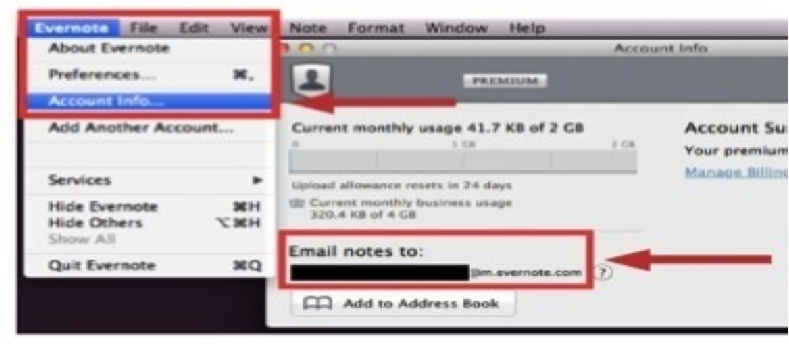
On a laptop or desktop version of the Evernote app, follow Evernote > Account Info > Email Notes To for finding the email address assigned to your specific database. Likewise, on the iPad or iPhone app, tap the elephant head image to get back to your main menu; from there, tap the gear image in the top, left-hand corner, follow General > Evernote Email Address, and you will see the email address assigned to your specific database. Finally, on an Android version of the Evernote app, tap the image of three dots stacked vertically to follow General > Evernote Email Address, and you'll find the email address assigned to your specific database.

Whatever you see as that email address assigned to your Evernote database is designed to be complicated and difficult to remember so others can't start sending content into your Evernote account. I find it's not realistic to think I'll just remember what that email address is; therefore, I recommend saving your email address as a contact in your address book. Often, I use Evernote as the first name and Upload as the last name. Once that information is saved as a contact, when I'm sending an email to my Evernote database, in the To line, I start typing Evernote Upload, and the address populates for me. It's such an easier way to quickly add content to my Evernote database!

When you started your Evernote account, the first notebook given to you was labeled as your "default" notebook. As content is created in alternative manners, like emailing or scanning into Evernote, that content will automatically go to your default notebook. While you can always go into a different notebook's settings to change that into your default, overriding the original notebook's settings, you can alternatively just rename your original notebook to make the default easier to find. I recommend renaming your default notebook as your Inbox, just like the Inbox in your email management tool. Then, you can process newly received content from your Inbox just like you process emails from that Inbox location.

On the other hand, if you'd rather the content you are emailing into your Evernote database bypass that default notebook, doing directly to a desired destination, you can utilize the email's subject line to aid organization... Add @ before an existing notebook name to add the content as a note in that specific notebook. Add # before an existing tag to add that tag to the note being created by the content you're emailing. Insert a reminder as !YYYY/MM/DD. 

If you choose to utilize the subject line of an email you are sending into your Evernote database, there are a couple requirements to remember. First, the left-to-right order of your subject line must be note name, reminder, notebook name and, then, tags. While you do not have to include each one of those elements, Evernote will understand the information you are sending only if you have the information in that specific order. Second, any notebook or tag to be added via an email subject line must already exist in your database; you cannot use a subject line to create a new notebook or a new tag. Likewise, if the notebook name or tag doesn't match the exact spelling of what already exists, the system won't recognize it as a match so it won't work.

Regardless of whether you are adding typed text, video and audio files, documents, checklists or photos, emailing into your database is a technique to simplify the process. For more, view my related video by clicking here, and, then, let me know your thoughts.

Do you use email to add content into your database? What successes have you had? Which of the aforementioned shortcuts will you implement with your Evernote use?

Thursday, January 22, 2015

Top 10 Ways To Make Email a Better Productivity Tool

Did you know that the average business professional gets at least 150 new emails each workday? I have clients that can easily reach 300 or 400 new emails on any given day, and many of them feel strongly that handling email is a very time-consuming aspect of the workday... Wow! It can make you wonder how any real work gets done amidst simply reading all those messages.

While there are countless tools and techniques that'll help you use email to organize for success while getting more done in less time and quickly finding what you need, here are a few solutions I have found to offer the greatest results:

1. Shift your mentality from "checking" to "processing" your email so your email inbox is no longer a holding zone:

  • Tasks taking less than 5 minutes should be done when the message is received while tasks taking longer should be added to your running to-do list
  • Appointment requests should be moved to your calendar
  • Reference emails should be quickly moved to personal folders
  • Trash is not really junk and should be moved to the trash

2. If the average person needs anywhere from 3 to 8 minutes or more to really refocus after any distraction, don't make email a distraction; think of OHIO and "only handle it once" for each message, including reading and processing each email.

3. It is easier to quickly find what you need when you need it if you aren't searching through electronic clutter; therefore, there is no need to hold onto whatever is no longer accurate, applicable, useful or bringing you joy. Further, when determining what to save or delete, consider what can be easily located online later... There's no need to take up valuable space on your computer when you can easily find that information online whenever it is needed.

4. Send fewer emails to get fewer emails back. Although it sounds simple when stated like that, we are in a society trained to quickly shoot out an email when we need to tell or ask someone something. This can be excellent for having documentation of your communications; however, one simple phone call can element quite a bit of back-and-forth when the topic is more complex or when you need an answer to included questions.

5. Unsubscribe from eNewsletters you aren't reading; otherwise, consider culling subscriptions you maintain and stay up-to-date reading in a daily "roll-up" or "bundle" via Unroll.me.

6. Master the art of creating reference folders by having enough that each email to be kept has a home while limiting the number of folders so no one email could appropriately fit in multiple. If you struggle with where to file a message upon its receipt, how will you ever be able to locate it again later?

7. Utilize automated rules to sort email into folders... Highlight what needs time-sensitive attention by directing it into a folder designated to that particular sender or subject line topic. Cull together what can be attended to more conveniently on a later date and time, setting messages from that sender to bypass the inbox and go to a separate Personal Folder all their own.

8. Better employ all the features offered by your email management tool, like Delay Send, Send Again, Meeting Requests and renaming your received emails' subject lines.

9. If you have been emailing someone back and forth, each subsequent email contains all the content of the prior emails so keep only the most recent message in a conversation; in newer versions of Outlook, clear such clutter with the "clean-up" button on Outlook's home ribbon.

10. If an out-of-date email address keeps populating when you are trying to send a message, there are options for removing an erroneous email address. As you start typing in Outlook's "to" field, press the down arrow to highlight the erroneous address and, then, hit DELETE; in Mac Mail, populate the erroneous address in an new email message and, then, click the arrow on the far right to select "Remove from Previous Recipients". Problem solved!

I'm working on an eBook about how to "Use Email to Organize for Success and Get More Done in Less Time" and could use your input... What techniques have made it easier for you to management your email?

Thursday, December 11, 2014

Utilize Automation to Do More With What Time You Have

While each day offers us only 1,440 minutes, beyond sheer strategy and proactivity, there are plenty of ways to make the most of what limited time we have. According to Dictionary.com, automation is "the technique, method or system of operating or controlling a process by... electronic devices, reducing human intervention to a minimum", which conveys the value of automation in that less of your direct human intervention opens up your time for addressing other functionality that cannot be done otherwise. Here are a few ways automation allows you to do more with your limited resource of time:

- Use cloud-based back-up for saving your files that matter. Computers crash. Fires can destroy all your devices. Emergencies happen, but you can be prepared with automated remote storage, saving you the time it takes to plug in a back-up device and safeguarding you from accidentally forgetting to do the back-up yourself. Simply "set it and forget it" with one of these options: Carbonite, Crash Plan or Mozy.

- Use a social media manager to share the right info at the right time. Whether you depend on Google+, LinkedIn, Facebook or Twitter, you must post the best message for your audience at the best time for that audience to receive it. While timing and messaging varies by platform, you still have other things to be doing; you can't stay planted by your computer all the time. Although there is controversy about their SEO impact, there are tools to help with the aforementioned issue as well as monitoring your business' social media results. Schedule messages to be posted on each social media outlet when you want via one of these options: Buffer, Hootsuite, Postling, SocialOomph or Sprout Social.

- Use a password manager for safekeeping your many different logins. As more of our work and play is conducted online, it becomes increasingly important to use a diverse set of strong passwords; however, as the list of passwords grows, the harder it is to remember them all. Further, the dangers associated with a printed list are frightening, whether it is losing that list, damaging that list or having that list fall into the wrong person's hands. Allow your brain to focus on thinking, rather than remembering, and rest assured that your passwords are safely secured in the cloud, instead of just a piece of paper. Employ one of these options for your password management: 1Password, Dashlane, LastPass, Roboform or SplashID.

- Use tools to manage your email, rather than letting email manage you. The average busy professional receives over 150 email messages each day. While "processing" emails is much more efficient than repeatedly "checking" emails, it still takes a good chunk of time to go through that many messages daily, let alone should you get behind at all. While there are plenty of technological tools designed to help, there are a few that rise above the competition. If you use Gmail, Boomerang allows you to send an email later, take messages out of your inbox until you actually need them, be nudged into following up at a specified time when there's no reply to a message you've sent and utilize email to remind yourself of what you think about needing to do while on-the-go. Alternatively, Mailbox lets you quickly swipe messages to your archive or trash, scan entire conversations in a chat-like view to more rapidly work through what messages have been received and bring messages back to your inbox when more appropriate for you to focus on what's important now. Finally, Mailstrom identifies which of your emails are related, groups them together for you to more easily process them quickly and empowers you to more succinctly unsubscribe from mailing lists you no longer desire.

- Put the Internet to work for you. It is very valuable to use all available options for helping business processes occur without your involvement, and there are several shining stars operating in this space. If This Then That integrates 152 different channels (or applications), each of which has its own options, allowing you to create "recipes" for a trigger action to lead to a resulting action. For example, you could use the trigger of "when I receive an email that has an attachment to my Gmail account" for the resulting action of "that attachment is added to my Evernote database" as a recipe. Plus, If This Then That is currently totally free... Happiness! Browse all the recipes currently being utilized by clicking here. Likewise, Podbox and Zapier expand the options for various channels or applications that can be integrated, but they can have fees.

How do you currently utilize automation? What benefits do you perceive could come from greater automation? Are there tools mentioned here that you will start to use?

Monday, October 6, 2014

Surviving The Information Avalanche

 The majority of us are on information overload. We are constantly inundated with emails, news, texts, articles, feeds, tweets, blogs, calls, reminders and much more, not only in our professional lives but our personal lives as well. Digital storage space is much less expensive than ever before. Regular folks, in addition to companies, are contributing online content, which has multiplied the amount of content being generated. Our tech tools do much more than ever before, and mobile professionals are “on call” for working 24/7. It can be extremely overwhelming!

To take control, it is important that we address these 5 different challenges:
  •        We must capture and cull together all the relevant bits of information.
  •        We must organize those contents, grouping like with like and, hopefully, indexing the details for later searching.
  •        We must make sure we have enough space to adequately store and manage the contents being retained, not worrying if we’ll go over imposed limits.
  •        We must address privacy concerns by verifying what we keep is stored safe from theft, loss or damage.
  •        We must plan for quickly locating what’s needed later so we see the contents in an understandable way, being able to share what’s needed.

In addressing the immense challenges of surviving today’s info avalanche, there are action items we can implement immediately. For busy professionals to wade through all the information with which we’re bombarded, the first step is to turn off all the pings and dings of our various notifications; this empowers us to be in control of when we handle information, not whoever is sending that information out in our direction. Then, it’s important for us to be very clear about our personal and professional goals so we’ll know upfront how we’d like to use whatever useful information we receive, which will allow for a much clearer focus in on what information is applicable, thereby blocking out what is really not needed. Such tweaks to how we address the info avalanche can make an immediate and noticeable difference in how we survive.

When evaluating the info avalanche and how we can best handle it, email is a place where we can get overwhelmed until it’s all a blur; however, there are tons of great techniques for clearing the clutter in our email. First, send fewer emails to get fewer emails back. Obviously, if you need something documented, you’ll need to stick with sending an email, and, if you need to send the information to multiple people at once, email is the best option; however, if a phone call will suffice, give that a try. Next, unsubscribe from eNewsletters you are not reading. While it only takes a second to hit the delete key, those seconds add up if you are continuing to delete the same eNewsletter regularly; instead, take a little extra time upfront to unsubscribe so you save the accumulating time of deleting with each receipt. On the other hand, consider culling those subscriptions you do want to keep receiving into a “roll-up” by using Unroll.me’s website or The Swizzle’s email tool. Third, master the art of creating reference folders within your email management tool. You can more quickly locate a message for later reference when you have enough folders that everything to be kept can have a home while you limit the number of fodders so nothing could be appropriate for more than one of those existing. Within your reference folders, utilize automated rules to sort emails into their appropriate homes, whether to highlight what needs time-sensitive attention or to cull items for reading when convenient for you. Finally and probably most importantly, shift your mentality related to email from “checking” your email to “processing” it so your Inbox is no longer a holding zone, you don’t repeat time and effort of reading any original message and what you’ll reply doesn’t weigh on you continually between receipt and finally responding. Tasks that take less than 5 minutes should be completed with the message asking for them to be done is initially received. Any task that will take longer than 5 minutes to do needs to be added to your running tasks list. Appointments should be moved to your calendar, retention items should be moved to your personal folders and anything not needed should be moved directly to Trash.

When processing and maintaining your email account, please remember the “delete” key can be your friend. There’s no need to hold onto whatever is no longer accurate, applicable, useful or bringing you joy. Likewise, there is a big difference between junk that you should never bring into your space to begin with and trash that you can delete after reviewing. Most importantly, though, when determining what to save, ignore or delete, consider what can be easily located online later. There’s no need to clutter your space with what you don’t need or can just as easily get online.

Further, even though much of the daily overwhelm comes from electronic, paper can be a problem, too. To clear the clutter with regards to paper, we must first acknowledge that it’s easier to find what’s needed in electronic form; therefore, convert what paper you can to electronic files. There are such powerful scanning options from Doxie, Fujitsu and Neat, but many folks simply take a photo of the paper to be converted to electronic using their phones so it’s important to keep in mind how many options can turn paper to electronic. Beyond that, as with email, consolidate what paper comes into your space via an Inbox, empowering you to address what’s most important when convenient for you. Create naming conventions to mirror between paper and electronic and, then, schedule time regularly to edit the contents of your retention files. When any piece of paper is no longer accurate, applicable, useful or bringing you joy, get it out of your space, whether via recycling or shredding. Finally, utilize a fireproof safe for those most important papers, especially what needs to be accessed quickly in the event you die or are incapacitated.

There are excellent tools currently available for our mobile devices to aid in easily storing what information we will need later without it turning into another form of clutter. Using MorningCoffee for Android or Firefox, Morning for iOS or Flipboard that works across the various platforms, you can determine which communication or news channels cross into your space. Then, you can more easily save what will be needed later into a “Read It Later” app, like Pocket, Instapaper and Readability. Likewise, for any blog or website that posts content in a stream, you can pull its RSS feed into an RSS Reader, like Feedly, FeedReader, NewsBlur, and RSSOwl. While Pinterest has been pigeon-holed into being just for planning DIY projects, pulling fashion ideas or planning your home renovation, Pinterest can be a great tool for storing the information facing us daily, allowing you to create an image board for any project or client. Alternatively, Twitter can be a great tool for storing the information onslaught we get with sweet Tweets, making them easier to locate again later. Lastly, lest we not forget my all-time favorite tool for storing information that we’ll need later without creating another form of clutter, I recommend a self-made database in Evernote, to which you can send emails so each is better retained for later. See which best meets your needs and enhances your toolbox.

Meanwhile, although there are tons of useful apps to boost your productivity and enable sharing information with your team, you don’t have to log into each individually each day; many of these tools talk to one another so you can get information from several of these tools by logging into just one app. You can cull together documents from various online file repositories with CloudCube on Android and Citrix ShareFile QuickEdit on iOS. Quip Business lets a team combine shared documents with messaging about related projects, all in one place. Further, both Catch App and Hojoki App merge data from multiple different apps for quicker response and easier understanding of all that’s happening. As your team grows and evolves, always be thinking about how tech tools can help you be more efficient.

Streamlining can be vital in clearing the clutter, and there are two other tools I’d like to bring to your attention to aid in your attempts at streamlining the info avalanche. First, although it’s important to have the right message in front of the right audience at the right time to grow your business, you can’t be everywhere at once, which makes a social media manager very valuable. Options include Buffer, Hootsuite, Postling, SocialOomph and Sprout, but find the one that best meets your unique needs and test it before committing. Second, since our brains are meant for thinking, not remembering, a Customer Relationship Manager helps remember the details of previous interactions as well as when each contact needs follow-up. I recommend looking at Infusionsoft, Insightly, NetVibes, Nimble and Zoho.

As many people claim that one is a lonely number, I’ve found it to be very powerful for boosting folks’ productivity. In my work with individuals and corporate teams, I’m continually reminded that each of us is just one person, not a work person and home person. With that in mind, these are 5 tools I’ve found to be most helpful when you use just one for all segments of your life:
  •        One calendar for both work and personal items encourages you to not double-book yourself and leads to fewer items falling through the cracks.
  •        One running tasks list that funnels into one daily to-do list for each day means you more easily know what needs to be done at each moment and allows you to better focus on the 3 to 5 action items most important for your current day.
  •        One “data dump” that enables your brain to think, rather than remember details, allows you to search just one location for all your notes, research and references.
  •        One address book for both work and personal contacts empowers you to better maintain contacts’ most current information.
  •        One weekly strategy session that is supported with one wrap-up each day allows you to have a game plan for attacking what absolutely must be done each week as well as those important items that are not urgent.

On a related note, though I do believe work / life integration is replacing the impractical concept of work / life balance, I also feel it is vital for busy professionals to set limits on our availability to customers, vendors and other team members. There’s no right or wrong answer about how accessible you should be, but it’s important to set guidelines based on what works best for you and the unique needs of your business. Tools and software can mesh with the way you need to communicate day to day, but it’s also smart to step away for a while from time to time. Whether you are an introvert or an extrovert, it’s important to incorporate downtime into your routine and to disengage from electronic communications by building some much-needed quiet into your day. This can be for reflection, for progressing towards goals, for re-energizing or whatever meets your needs, but its value is beyond measure.

Even though it might seem impossible, you can certainly survive the information avalanche in today’s society, but you must be focused in your efforts and fully utilize the available tools to help you. Click here to view a recent interview of me addressing this topic with Julie Coraccio of Reawaken Your Brilliance, and think about how these tools and techniques can apply to your specific needs. Don’t hesitate to ask for help and keep evolving as the available tech tools continue to develop around you do.

What tools and techniques do you employ in surviving the info avalanche?