Brought To You By Emily Parks
Productivity Consultant at Organize For Success, LLC...
Helping You Make Every Minute Matter!


Showing posts with label be efficient. Show all posts

Sunday, January 28, 2018

Learn How and When to Say No

In clarifying our priorities, it is paramount to acknowledge how limited our most valuable resource truly is. Each day offers only 1,440 minutes, and each of those minutes can be invested no more than once. If you spend time doing something, you can't get those minutes back for doing anything else; your return on time invested needs to fuel your passions or move you closer to attaining your loftiest goals.

Saying "yes" to doing one thing is inherently saying "no" to doing something else, which means the opposite is true, too... Saying "no" to activities that don't really excite us is imperative for making time to do what matters most. Yet, for the many of us who enthusiastically pursue many different passions, learning how and when to say no might be the most difficult lesson possible.

When figuring out how to make saying no work best for your specific needs in boosting productivity, keep the following in mind:
  • Think of all that's possible. Consider what you would do if you could rather than what you feel like you should do. As Americans, we tend to should all over ourselves, whether from peer pressure or from within, and, as adults, our shoulds can become barriers. It is our most basic need, craving, ideal, calling or passion that we must make time for doing, which is very different from caving into what we should do. Instead of saying "should", try "could" and, then, choose the possible path that reflects your own priorities and the fire within you.
  • Listen to your gut. Often, our bodies know what we really want to do. We might suppress the pull in that direction because it would involve challenges or conflict with others; yet, we're better off if we don't ignore the wisdom of our bodies. When we try to silence the messages from our guts, it can frequently lead to stress-induced health problems, like diminished immunities that make us more susceptible to viral infections. If you feel stress at the thought of saying yes, go with no; alternatively, if you are excited about both yes and no, go with the option that elicits stronger feelings of excitement.
  • Take what time you need to decide. If you don't feel passionately either way when immediately asked, take time to think. Maybe it's a few minutes; maybe it's a few days. Your needs will vary over time so sit with the available options to see what works best for you at that point in life. Reflect on your options, research the pros and cons of each, seek advice and let your gut marinate on how each option best resonates with you. When you are committing your time to doing something, you want to make sure you like the commitment and have the time available to do it as well as you'd like it done.
  • Saying no doesn't require being mean. As the majority of communication comes from non-verbals, try to pair declining an invitation with a smile or, at least, a warm, welcoming expression on your face. Then, choose your words wisely. Start with a positive statement, like "I would love to..."; include a transition word, like "but" or "however". If possible, end with a bit of rationale as to why not taking advantage of the opportunity being presented is actually better for you, your goals and your current bandwidth. If what you are declining is a request for help, substitute that with an explanation of how another alternative would be more helpful for that person or organization. For example, when relatives invite themselves to your home over the holidays, you can respond by saying, "It would be great to see you, but it is hard on my body to have guests stay over; plus, there is a nearby hotel with excellent service who can make your stay extra special. It will make having dinners together even more meaningful and enjoyable." Saying no with grace and authority is a win-win for everyone!
What is your criteria for saying no versus yes? What tactics have you found most helpful in telling someone no?

Thursday, January 25, 2018

Make Meetings More Meaningful

When The Muse asked how much time we spend in meetings, the results were scary... "If you're a middle manager, it's likely about 35% of your time, and, if you're in upper management, it can be a whopping 50%." Considering most of us have no way to avoid meetings, it is important to make good use of all that time being invested in meeting with others. Here are steps we can take for a positive impact:

  • Have a clear purpose. If your meetings are focusing on simply updating attendees, they are not respecting everyone's limited resource of time. There are plenty of alternative means for conveying updates that are less intrusive to attendees, such as email or project management tools. Instead, meetings are most useful when focused on one of two purposes... either discussion or decision-making. If your meeting's purpose is not one of these, could the goal be achieved in a more efficient way by using another method or implementing new technology?
  • Schedule strategically. Be cognizant of vacation plans so meetings are not scheduled when many who need to attend will be gone. Likewise, avoid scheduling a meeting in the days leading up to a big deadline, especially if the meeting is unrelated to the project coming due, or during times when there will be too many distractions for attendees to be focused on achieving the desired results. Finally, as attendees can better plan the remainder of their day if each meeting includes an end time in addition to a start time, be sure to set and communicate a specific ending time for each meeting.
  • Invite only the right people. Include those whose contributions are necessary for fulfilling the meeting's purpose: those with the authority to make decisions, those with enough pull in the organization to advocate for what's decided, those with the expertise needed to make informed decisions and those necessary for successfully executing decisions made. Still, the Rule of 7 explains how "everyone in a meeting over 7 attendees reduces your ability to make decisions by 10%", hence why it's important to not include more than those whose contributions are necessary for accomplishing the meeting's goals as too many attendees lowers productivity.
  • Shorten how long you'll meet. Rarely do meetings require an entire hour, but we tend to schedule them for that length anyway. Try to end meetings at least 10 minutes before the next hour, like 12:50, 1:50, etc, or schedule your meetings in 15-minute increments, like meeting at noon to 12:45 or 12:15 to 12:45. Then, push yourself to accomplish everything on the agenda within that shorter duration by using a timer or having someone serve as timekeeper. Attendees will appreciate those spare moments before the next hour to return calls, run to the restroom, grab a snack or gather their thoughts.
  • Utilize an agenda. Make sure the agenda is realistic, listing what you actually believe can be accomplished within the scheduled time. Start with the most important items, and indicate how much time you intend to allocate for each item listed. Seek input from attendees to ensure everything needed is included while removing lower priorities or unrelated topics.
  • Prepare beforehand. Distribute supplemental items with enough time for attendees to review. If there is legwork that can be done in advance, completing it beforehand will help the meeting run more smoothly. As explained by Dana Manciagli in The Triad Business Journal, "proper planning prevents poor performance". Taking time to get your ducks in a row before empowers better discussion and / or decision-making.
  • Clearly communicate expectations. How does the meeting's leader want those attending to behave? Examples include coming prepared, contributing to discussions, giving feedback, sharing insights as applicable, making sure to ask questions and limiting technological distractions. Those expectations should be shared in writing prior to the meeting or verbally at the start. Additionally, attendees need to know guidelines for participating within the agenda, like when to ask questions, how to join in brainstorming and at what point it is appropriate to share feedback during any discussions. Meeting leadership should think proactively about what situations might arise related to each interaction and be specific with standards set.
  • Make notes. If you have the agenda beforehand, you can use that skeleton as a framework for filling in your notes from the meeting. Highlight what is important, whether via a different color of ink, a real highlighter or simply a block to separate the content that matters most from everything else. Designate each task that must be done as it arises in conversation; then, end your meeting notes with a recap of the highlights, action items and timing of next meeting. This reinforces your commitment to the topic, helps with paying attention throughout and enables more easily referring back to any items covered earlier.
  • Push discussion of issues arising throughout the agenda. Rather than deviating down a rabbit hole and stealing time from addressing all aspects of the meeting's designated purpose, denote on a separate list any issues not on the agenda as they arise; then, if there is extra time at the end, address each item. Alternatively, consider scheduling time on a later date for discussing or resolving those newly discovered topics.
  • Ensure accountability for what's decided. Each action item arising from the meeting's discussions and decisions will require a deadline for its completion, particularly as every what that has a when is more likely to get done. Ensuring each task gets completed is more likely when there is someone being held accountable for its completion and a way to track progress being made. Assign someone to the completion of each task resulting from the meeting and decide how you'll confirm follow-through by the person being held accountable.

With what aspects of meeting others do you struggle most? What issues have you faced in keeping your meetings on track? How do you ensure your meetings are productive? 

Monday, January 8, 2018

Location, Location, Location

Although you might be familiar with the phrase "location, location, location" that's frequently used by realtors when you are searching for the ideal spot to live or work, but did you know it's equally applicable for organizing your workspace to be another tool in your productivity toolbox? It is with this mantra that you can be certain each item in your office is assigned a home that works for your needs.

In real estate, "location, location, location" applies to finding a home that's close to what amenities or destinations you want to easily access for an ideal life or finding a business spot that's in close proximity to your clients. Alternatively, when it comes to organizing your workspace, this refrain applies equally well to prioritizing the space within arm's reach from where you spend most of your working hours, assigning homes to what's in your office based on how frequently you use each item.

The second Monday of January each year is recognized as National Clean Off Your Desk Day, making today the ideal opportunity to begin your new year with a clean and organized workspace. Whether in a private or shared office, in your home or in a cubicle, having a desk that is uncluttered and designed for your success helps you work more efficiently, making today the perfect time to consider the "location, location, location" of what's atop your desk.

Step one is to evaluate anything atop your desk and make sure you need or want to keep it there. Retain only what is accurate, applicable, useful or bringing you joy. Decide what to trash, recycle, donate, move elsewhere or keep in your space. Remember that the less you have in your office then the less you need to sift through to quickly find what's needed.

Step two is to determine how often you utilize each item you are planning to keep. Physical items, papers, files or tools that you use more frequently earn a higher priority and can be kept closer to where you sit; alternatively, anything used rarely can be moved farther away. It is by knowing how often something is used that you can proceed through the organizing process.

Step three is to use those determinations in assigning homes for what's to remain. When something is assigned a home, you can more seamlessly return it to that location after each time you use it, meaning assigned homes can save time while lessening the stress of decision-making. When possible, group related items together, and position items near where they will be used. Anything used more frequently should be assigned space closer to you while less frequently used items move further away based on how much often less they get utilized.

Step four is to replicate the same process you used in cleaning off your physical desktop to clean off your computer's desktop. Those same principles that I mentioned previously apply to your technology; plus, when your computer home screen is cluttered, it slows down how well your laptop or desktop works, particularly if you use a PC as opposed to a Mac.

Pause for a moment to celebrate all the desktop you can now see and, then, schedule time to maintain the systems you created. Maybe you'll schedule time at the end of each day to put away what items have found their ways atop your desk. Maybe you'll commit to getting caught back up at the end of each week. Choose a maintenance system that works for your specific workflow and personality, but make sure to select some method of keeping that desk cleaned off so you continue to reap the benefits of greater organization and enhanced productivity.

Wednesday, January 3, 2018

Clarify Your Priorities

Within each day's 24 hours, we are gifted only 1,440 minutes; coupled with the fact each minute can be invested once, time is the most limited and valuable resource of all.

Saying "yes" to doing one thing is inherently saying "no" to doing something else, and you have to choose wisely in what activities you invest each minute in your limited inventory.

When a dollar is invested, it is with the hope that you will get more dollars in return. When a minute is invested, it is with the hope of an alternative return on investment, and what return you are seeking depends heavily on your priorities. Only when you know what matters most can you align your actions with those priorities to achieve your greatest goals.

Photo: Children's Ministry Magazine
Think of each day as a jar with limited space to fill. In that jar, you'd like to stuff tons of rocks, pebbles and sand. If you start with the sand, you may be able to shove in some pebbles, but you'll never be able to fit all the necessary rocks. Alternatively, if you start with the rocks, you can fill the spaces around those rocks with the pebbles and still fill the sand in amongst the remaining space. Comparing this to your day, think of the rocks as your highest priorities, for which you need to make time in your schedule first; then, the pebbles are lower priorities while the sand is even less important. Only by allocating time to your priorities first can you fit everything that matters into an already busy schedule.

One of the most effective methods for determining priorities is to consider the ramifications for completing each task versus leaving it undone. Depending on how well doing the task fuels your desired results, you can more easily rank that as what needs to be done first instead of later. Rather than getting swept up in what is urgent or on fire, focus on making time for what is most important.

What are your rocks or top priorities? How can you make sure time in your schedule is allocated for addressing those first, working the pebbles and sand into what time remains afterward?

Monday, January 1, 2018

What Will Guide You to Success This New Year?

For many, it wouldn't feel like the start of a new year without setting resolutions, which are formal expressions of intentions made or declarations of what actions will be taken. The most common resolutions as we start a new year include get healthy, get organized, live life to the fullest, learn something new, find a better job, do more good deeds for others, be more fiscally responsible, work out more often and spend more time with loved ones. However, the success rate for resolutions tends to be abysmal. If you choose to set new year's resolutions, follow the advice of Valorie Burton, life coach and author of "Brave Enough to Succeed: 40 Strategies for Getting Unstuck", which outline how to choose the correct resolutions and more likely conquer those goals: be super specific, set a timeframe of strategic deadlines with a realistic timeline of milestones throughout, make sure your resolutions are achievable so you commit or quit, and recalibrate through failures as needed.

I, on the other hand, have found that resolutions don't fit the way I think. To me, they feel like yet another something for my to-do list. Instead, I sought a clear, meaningful path to guide my year, allowing me to live with intention and purpose, fulfilling one of my favorite mantras that "From those to whom much has been given much is expected." Rather than listing out new year's resolutions, I have started picking a "word of the year". Sometimes, it's simply a word for the upcoming season or it might change from month to month; it must be a word that really speaks to me and pulls together what I'd like to make happen in the foreseeable future.

When I first started choosing a word to guide my year, it seemed like a rarity; today, though, it is a much more widespread practice. A quick Google search for "what is your word of the year" pulls up a plethora of articles, blog posts and websites to help you choose what word works best for your specific needs and where you are in life. Delve deeper into the process with Blessing Manifesting, Create & Connect, Cultivate What Matters, kale & chocolate, My One Word, One Word 365 and Susannah Conway.

Going into 2018, I have chosen fulfillment as my word of the year. Searching Google for "define fulfillment" shows that this word means "the achievement of something desired, promised or predicted". This can cover so many things that matter a great deal to me in the new year, like fulfill dreams, fulfill goals, fulfill commitments, fulfill work-life integration, fulfill Greensboro LUNGe Forward's budget requirement, fulfill blog-writing consistency, fulfill RSVPs by showing up, fulfill outsourcing and fulfill business growth. For me, it's about follow-through, particularly as I remind myself that perfection is not required and, sometimes, done is better than perfect when getting things accomplished.

Maybe a word of the year is not enough for you, and that's quite alright. Maybe you'd prefer a phrase or mantra to guide your actions toward what results you'd like to achieve in 2018. There is no right or wrong option for what you choose; it's simply important to pick something that resonates with you, reflects what you desire and provides the direction necessary for getting from where you are to where you want to arrive.

With that word, phrase, mantra or resolution in mind to guide you to success, you are ready to embark upon the journey of 2018, writing the story you desire upon the blank pages of this year and taking with you the resources to best fuel what results you aspire to achieve. Let's launch this new year with "Get Organized Month", where I'll share a daily tidbit that's easy to implement for boosting your productivity, helping you more efficiently accomplish your goals and encouraging greater happiness.

For the new year, will you choose a guiding word, phrase, mantra or resolution? Please share what you've chosen in the comments so we can follow the advice of Alex Sheen, Founder of "because I said I would", who reiterates holding ourselves accountable for important commitments made amidst the over 15,942 words each American says daily.

Tuesday, May 23, 2017

Top Ten Ways to Control Your Email


Organize for Success® Turns 10 
In honor of 10 years of business for Organize for Success®, I will be posting a "top 10" list to this blog each day through Wednesday, May 31st. Each Sunday, my team will randomly select from those who commented on the prior week's "top 10" blog posts for a gift card giveaway and free download of one eBook via OrganizeForSuccess.biz/shop The grand prize for celebrating Organize for Success, LLC's 10 years will be awarded on Thursday, June 1st, randomly selecting from all those who commented on any of the month's "top 10" blog posts as well as those who have subscribed to my eNewsletter for a winner to receive downloads of all 5 eBooks, a pass for my Stress and Time Management online video course as well as a 60-minute video productivity consultation.

Today, let's cover the top ten ways to control your email:

10. Shift your mentality from "checking" to "processing" new messages. According to stats from email marketing company BlueHornet, consumers look at their phones more than 150 times a day on average, many of those times to glance at their email inboxes. Each time you read a new email and, then, plan to come back to deal with it later, that initial reading becomes a distraction because you have to re-read the message and re-start your thought process on how to deal with it. Instead of reading and re-reading your emails throughout each day, think of OHIO and "only handle it once", meaning you don't read new messages until you are ready to deal with them, you use your inbox as a funnel instead of a holding zone and you limit time wasted. Follow Nike's advice and "Just do it" for tasks that take less than 5 minutes. Move tasks that take more time to a running to-do list, appointment requests to your calendar, reference emails to your personal folders and those messages that are no longer needed to your trash file.

9. Delete and discard can be your friends. When you keep fewer emails, you have fewer messages to search through when looking for a specific one. Data changes rapidly these days so keep only what is accurate, applicable, useful or bringing you joy. Plus, if the information is easy to locate through a quick online search, there's no reason to use space in your email folders for retaining it.

8. Send fewer emails out to get fewer replies back. Sometimes, a quick phone conversation can replace multiple, back-and-forth email messages, even if you have to follow that call with a summary email for documentation purposes.

7. Unsubscribe. When you are no longer reading emails to which you subscribe, they become additional clutter clogging up your functionality. I realize that deleting an email takes only a second; however, those seconds add up, and the time it takes to unsubscribe is likely less than the accumulation of all the time deleting those multiple messages received. While the content might've been of interest to you when you signed up for it, if your need for that information has changed, take time to unsubscribe.

6. Utilize all available tools and functionality. Technological tools like Airmail, Mailstrom, SaneBox, Sortd and Spark will speed up your email processing, some automating this so it happens without your time doing it. Boomerang allows you to schedule emails to send at optimal times, know when your message is read and get follow-up reminders for messages sent out. Further, many email management tools come equipped with features like Delay Send, Send Again, Meeting Requests, receipt notifications and the ability to rename your received emails' subject lines. Finally, if you are using newer versions of Outlook, there is a "clean-up conversations" button in the home ribbon to remove clutter from prior conversations in back-and-forth email messaging.

5. Bundle together when you get subscriptions you read. If you are subscribed to an eNewsletter via an email address from Outlook.com (including Hotmail, MSN and Windows Live), Gmail, Google Apps, Yahoo! Mail, AOL Mail or iCloud, you can utilize Unroll.me to get all of the subscription emails received each day in a "rollup", which is one email with all your designated subscriptions categorized intuitively that appears in your inbox every day at the time you choose rather than getting each message individually as it's sent to you. Unroll.me will determine all the lists to which you have subscribed simply by telling it your email address; then, as you are choosing which emails go into your "rollup", you can unsubscribe directly from Unroll.me with one click. Further, Unroll.me offers this bundled email for free... Yes, that's right; it's free. If you have not already subscribed to lists via one of those email services, simply create a free Gmail account and, then, update your subscriptions with it. For FAQs, click here.

4. Set others' expectations. As human-beings, when there is a lapse in information provided, we inherently fill in the blanks ourselves. When it comes to how quickly you are going to get back to someone sending you an email, you probably do not want anyone creating this expectation for him- or herself. When you are clear on your goals for how to use email as a tool in your productivity toolbox and you are aware of your time constraints for when you will realistically be able to process newly received messages, you can designate what are appropriate expectations. Then, it is your responsibility to clearly communicate those to others, whether it is via initial meetings with new clients, in your email signature, with an autoresponder or through your actions as you respond to emails at regular intervals each workday.

3. Eliminate notifications. Every time you hear a sound alerting you to a new email or see the first few lines pop up in a preview, it distracts you from completing that big, hairy audacious goal in your life. That distraction permeates your thoughts and forces you to waste time re-engaging in the task at hand. Remove that time suck by turning off all the pings, dings, alerts and previews.

2. Strategically utilize rules in your email tool. Whether you check your new email in Gmail, Mac Mail or Outlook, you can create rules (or filters or labels) for certain emails to bypass your inbox and go directly to a designated folder. For example, if you get Google Alerts, you could have them culled together into their own folder rather than processing them from your inbox. Anything that should be handled when more convenient for you should be directed away from the inbox, allowing you to control when they get your attention. Likewise, if you have a few VIP contacts needing more immediate responses, give each of them his or her own folder and, then, create a rule for messages from that person to go directly into the specified folder, which will draw your attention into those needing a reply sooner than finding them amidst other messages in the inbox. You can override the alphabetical order of your personal folders to put those VIPs atop the list of folders by adding a number or symbol at the beginning of each folder's name, better grabbing your attention for new emails.

1. Master the art of creating reference folders. It is important to have enough personal folders that each email to be kept has a home while limiting the number of folders so no one email could appropriately fit into multiple different folders or you forget what folders you already have, leading to duplication as you create new versions of what you already have. If you struggle with where to file a message upon its receipt, how will you ever be able to locate it again when you need to retrieve it?

Do you find email overwhelming? Which are your favorite tactics for controlling email instead of letting it control you? Will you try implementing any of these strategies?

Saturday, December 10, 2016

Over 60 Gift Ideas to Eliminate Clutter for Loved Ones

It is the holiday season, and, whether you're celebrating Christmas, Hanukkah or Boxing Day, chances are good that your shopping list feels endless. While giving the gift of your time or tickets to an experience offer excellent alternatives to eliminate clutter for your loved ones, we often want to give a tangible item that can immediately improve the recipient's life. When determining which gifts to consider, it is important to think about lifestyle elements for the person to whom you're giving a gift. Here are some of my favorite clutter-free gifts for many of our work-life needs:

- In this day and age of being attached to our smartphones, battery power can extremely valuable. Gifting a tool to charge your loved one's mobile device while on-the-go is a great idea, and the blue leather iPhone charge-and-sync bracelet from Jet is cost-effective. As another option, consider the mobile power banks or the solar power bank from The Container Store.

- Speaking of charging devices, to provide an amazing charging outlet for home or work that allows doing more in less space, consider gifting the thingCHARGER. In addition to 2 standard outlets, this has 2 built-in USB ports and a top that doubles as a charging dock for your phone or tablet. Alternatively, consider the USB wrap and charger to wrap excess cord around the charging plug as your gift recipient's device is being charged.

- Do you have a gift recipient who often has a phone near water at the pool, lake, beach or bath tub? Consider the Dry Spell Floating Phone Case from The Container Store to lock out sand and water while keeping a smartphone safely tucked inside, enabling the user to continue taking photos, texting, using the phone for calls and, generally, having fun or catching up on work. Plus, if it falls into the water, it's designed to float so the phone stays protected.

- While on-the-go, wouldn't it be nice for your loved ones to have a smaller charging cord for their PC laptops? Consider Dart micro PC laptop charger from FINsix, which offers a PC charger shrunk to fit in your pocket, delivering 65W of energy through a six-foot cable with a built-in USP port to power up another device. There are 9 interchangeable tips to fuel up just about any brand of PC, but it's not an option if your recipient prefers Macs.

- On the other hand, for those with the 2016 MacBook Pro, consider the Thunderbolt 3 USB-C Hub from HyperDrive to equip this Apple laptop with HDMI video output, Thunderbolt 3 video connectivity, USB-C with 5Gb/s data speed, SD with UHS-I 104MB/s, microSD with UHS-I 104MB/s and 2x USB 3.1 Gen 1 with 5Gb/s data speed as well as high power to various devices. This will be a game-changer for folks who utilize multiple devices with their MacBooks so make sure to check out the video on their page.

- It's easy to get grossed out by what happens to our tech tools, but PhoneSoap will keep your smartphone disinfected as it charges while the Electronics Cleaning Brush by OXO cleans the hard-to-reach nooks and crannies from keyboard keys to camera lenses. Plus, the screen cleaning wipes from Spruce and Co make life a little brighter as they clean mobile devices' screens.

- Although there are plenty of options for bluetooth speakers, Bose Soundlink Mini 2, Beats by Dre Beats Pill+ and Sony SRS X77 offer the best portable bluetooth speakers that I've seen. Plus, I'm loving the JS Portable Mini Wireless Bluetooth Nut Speaker with Sling for iPhone, iPad, Android and more for an itty-bitty sized speaker with elegant looks and simple operation. Or consider the bluetooth waterproof speaker from The Container Store for a high-performance, go-anywhere bluetooth speaker that lets you stream music or take calls anywhere, whether outdoors or on the water.

- The Monkey Mat Quilted Blanket or Mini Monkey Mat create the perfect clean, dry surface to sit on at the beach, for a picnic in the park, during an outdoor concert or sitting on a hill for a football game. Padded for comfort but exceptionally lightweight, its lightly weighted corners keep the mat down, and it comes in a compact travel pouch for easily taking anywhere.

- Allow your gift recipients to keep an eye on their homes while at work, out on the town or traveling via the Canary All-in-One Home Security Device with a live video stream of whichever room in which it is kept and a measure of air quality to keep safe.

- I'm a big fan of the personal assistants available on smartphones, like Cortana, Dragon Mobile Assistant, EasilyDo, Google Now, Maluuba, Siri and 24me, there are a growing number of technological assistants to keep in the room with you, like Google Home, Amazon Echo and Echo Dot.

- Your loved ones can keep clothes looking their best wherever needed with the Gleener On The Go Travel Fuzz Remover, which includes a lint brush and three garment-safe blade options to remove pills from fabrics as fine as cashmere or as heavy as wool.

- Folks don't want to leave home with a big gap at the back of their pants or a bulky belt buckle that ruins the lines of a fitted top; therefore, consider gifting Invisibelt for the perfect, low-profile alternative to hold up pants without adding bulk.


- Consider BootRescue or ShoeRescue to wipe away dirt, grime and damaging salt stains, especially with how difficult weather can be for those lovely accessories protecting our feet; HandbagRescue cleans/ conditions prized purses via essential oils.

- If your gift recipient could benefit from a better way to more easily grab a bag's zipper and use it to open the bag, consider gifting the zipper pulls from The Container Store. Choose from Paracord Zipper Pulls in durable nylon or plastic zipper pulls from Eagle Creek in black, lime green or ocean blue.

- Do you have a gift recipient who runs a business, will be making big changes in the new year, has tons of new ideas to be implemented or is looking to uplevel goals moving forward? Consider the Powersheets® Intentional Goal Planner. As another option, consider the Fit-Spirational Journal to log every calorie eaten, every exercise and that for which there is gratitude.

- Do you have a gift recipient with a keychain full of keys? Consider the KeySmart Minimalist Key Organizer to contain up to 10 different keys within a compact key holder that fits neatly and comfortably in a pocket.

- Do you have a gift recipient who loves to workout? Consider the Life Energy Ekosmart Yoga Mat from Bed, Bath & Beyond, Gaiam Restore Deep Tissue Roller from Target, S'well water bottle to keep beverages cold for 24 hours or hot for 12 hours, leggings from Lululemon or Athleta and Phillips Freshtones Wireless Earbuds. As another option, consider the Harmony Mat from Jade Yoga, which provides a thick mat with great traction, comes in a variety of fun, soothing colors and gives back by planting a tree for every mat sold while contributing to charities corresponding to colors.

- Do you have a gift recipient who spends a great deal of time working or playing outside in the cold? Consider ThermaCELL Heated Products, like shoe insoles and hand warmers.

- Do you have a gift recipient who loves living a spirited life? Consider a tool that multi-tasks, like the Beer Opening Glass from Uncommongoods. Alternatively, the portable wine glass from The Container Store makes a great gift. Or choose from Corkcicle's innovative bar accessories for a reusable cork that chills wine, an in-bottle beer chiller, an intriguing wedge of ice specially designed to cool the contents of a tumbler glass and the Arctican to keep 12-ounce drinks cold without chilling your hand.

- Do you have a gift recipient who sips on a cup of a coffee for hours or starts a cup of coffee only to get pulled away with a distraction? Consider Mr Coffee Mug Warmer for Office/Home Use. Plus, anyone who enjoys a hot beverage would enjoy the Multi Photo Color Changing Mug; it is dishwasher and microwave safe.

- Do you have a gift recipient who is a foodie? My fellow alumnus from East Forsyth High School in Kernersville, NC, Ashley Christensen, owns the AC Restaurants group and is sharing some of her famous recipes through the Poole's: Recipes and Stories from a Modern Diner cookbook. You absolutely must try her macaroni au gratin! Alternatively, consider gifting a Shiitake Mushroom Log to grow multiple crops for up to 3 years.

- Do you have a gift recipient who wears glasses? I know first-hand how difficult it is to keep glasses clean so I'm extremely excited about the creation of Peeps carbon eyeglass cleaner.

- Do you have a gift recipient who needs a little stress relief? Consider The Head Duo - Cooling and Soothing Kit from Saje Natural Wellness for a refreshing blend to be used with a soothing head massager for an ultra relaxing scalp massage. Or perhaps your gift recipient would prefer calming essential oils from Young Living or Doterra.

- Do you have a gift recipient who is often searching for keys, wallets, bags and more? Consider TrackR Bravo coin-sized tracking devices to track whatever needs to be found. Attach the tracker to something valuable, connect the app on a smartphone and, then, when the item of value is missing, it can be found via the app's locate button. Further, consider the KeyCatch Magnetic Key Hangers to replace the lower standard screw of any light switch plate with a super-strong magnet that holds even heavy keychains so your gift recipient can always find those vital keys.

- For the travelers on your gift recipients' list, Lay-n-Go offers products for hauling around toiletries, cosmetics, technology accessories and Legos alike. Likewise, the Everything ORGO Expandable Travel Organizer provides a whole system to organize and keep track of makeup, toiletries, jewelry and more that fits securely over your sink to conserve counter space.

- For folks who travel most via plane, consider the TAB Seatback Pocket Organizer from Walter + Ray to keep what's needed at your recipient's fingertips while on a long flight. Further, make the trip a little cozier with the easy-carry travel blanket from The Container Store that is ultra-soft as well as lightweight and comes packed in a zippered, jersey-knit pouch. I'm considering this blanket as perfect for an upcoming football game in Annapolis, MD.

- For folks who travel regularly and need help sleeping in hotels or on planes as well as those who have streetlights seeping into their bedrooms, shut-eye sleep mask from Madewell can help.

- If your gift recipient travels most often via automobile, consider a JunoJumper portable battery pack with enough power to jumpstart most 4- or 6-cylinder cars (or mobile devices) via 12 volts and 300 amps, all in a pack roughly the size of a cell phone. Plus, no need for extra cables as JunoJumper comes with its own.

- Whether you are gifting a guy or a gal, it's vital to be prepared, and the minimergency kits from Pinch Provisions provide many tools necessary for life's little emergencies. Better yet, look to the states of emergency kit for "personal care that meets local flair".

- Speaking of preparedness, the right tools are the key to staying safe during a storm or power outage, and Eton Emergency Preparedness Tools provide an arsenal of innovative safety gear to survive difficult situations. Choose between the Blackout Buddy and Scorpion II Multi-Function Emergency Radio to best prepare your gift recipient for whatever issues might arise.

- The PocketMonkey will become the go-to tool for anyone to whom you gift it! This 12-in-1 tool fits in any wallet, is as thin as a credit card, is built of unbendable stainless steel and is TSA-compliant. Or consider the Micro Plus EX Hand Tool to have one tool for pliers, wire cutter, wire stripper, wire crimper, bottle opener, flat screwdrivers and Phillips screwdrivers.

- The Classic Leather Front Pocket Wallet from Rogue Industries provides advantages over traditional, back-pocket wallets in that it's safer to carry your billfold in the front, and puts less stress on your back, allowing for comfortably carrying cash and cards alike.

- Everyone appreciates a pair of comfortable sneakers to wear everywhere, and Allbirds uses the amazing qualities of merino wool to minimize odor, regulate temperature and wick away moisture in sneakers that feel like clouds on your feet. Or you could gift a subscription to the "sneaks of the quarter club" so your recipient gets a curated mix of the best apparel and shoes from Adidas every 3 months through Adidas Avenue A.

- Personalized gifts don't have to include the recipient's initials or name; instead, highlight one of your loved one's favorite places with laser cut street maps from CutMaps. Try a campus map for a recent college graduate, the city where he grew up or the place a couple got married. The stainless steel design comes already framed so all you have to do is wrap it, and, at 5" x 7", each map is just the right size to sit atop a desk or on one's entry foyer table.

- Whether your little one is a fan of Batman™, Darth Vader™, Spider-Man™, unicorns, princesses or critters, Pottery Barn Kids offers a bath wrap option that doubles as a towel and a cover-up.

Since it is hard to go wrong with gift cards and gift certificates, consider Gyft to buy, send, organize and redeem eGift cards while the Yiftee app will let you send certificates for what's local to any recipient via text or email message.

I recommend culling together all your gift-giving ideas, what you've bought for whom, where each present is stored and whether it has been wrapped thus far. Evernote provides an excellent option to organize those details amidst all the other information you must remember; however, if you are seeking an app designated to tracking your gift-giving activities, The Christmas List, GiftPlanner and Santa's Bag are really fabulous iOS alternatives while Gift List Manager and Christmas List Snowball are great Android options, and Christmas List works cross-platform. Which will you try?

Above all, though, realize we are still 2 weeks from Christmas so there is time to pull together all the loose ends. Take a deep breath, remember to take care of yourself amidst the craziness and start breaking the big projects down into manageable action items.

Finally, if you are shopping in stores, you can compare prices with the Bakodo app; alternatively, if you are shopping online, use the Honey browser extension to find ways of saving money instantly.

What gifts do you have in mind to help your loved ones boost productivity while taming technology or limiting clutter? What tools do you currently utilize in your own work-life integration efforts? What are your go-to gifts that are functional for folks? I am always looking for more and would love your ideas!

Tuesday, December 6, 2016

Do You Look to Squeeze Every Minute Out of the Day?

Has it really been over 8 months since my last post to the Tips To Organize For Success blog? Yes, I took a bit of a hiatus from blogging, investing that time in making sure Organize for Success, LLC is growing effectively and efficiently to best meet the needs of my clients while making the greatest impact on improving this world. To make sure my company is moving in the right direction, I'd love your feedback (and your referrals) as you see the following best fitting into your life and your loved ones' lives.

The vision statement for Organize for Success, LLC is to "Make life efficient for time-crunched leaders" while its mission statement is "Maximize work / life solutions for meaningful results with your very limited time." Since we are gifted only 1,440 minute each day, it is imperative that each of us invest every minute as best we can to achieve our current priorities in each domain of our lives: work or school, home or family, community or society and the private realm of mind, body and spirit. Although we cannot achieve complete success in all domains at one time, harmony is possible as we work to have each domain complement the others.

Life is fluid, meaning there is an ebb and flow to our priorities. At some points in life, our emphasis might be more on work or school while, at other points, our emphasis is more on home or family. The key is to adjust our organizational systems, workflow processes, technological tools and general approaches to getting things accomplished accordingly so we best address the most important goals for each specific moment in the cycle of life.

In fulfilling this mission statement and working towards this vision, I partner well with several types of folks, which are detailed below:

  • Time-crunched, high achievers who want to squeeze every minute out of each day.
  • Overwhelmed managers who have more deadlines than hours or days to get it all accomplished.
  • Teams that need tools and technology to better collaborate for attaining loftier goals and desired results.

As my business continues growing and I near Organize for Success' 10th anniversary, I've revamped my packages, expanded my eBooks, added a self-paced online video course and renewed my emphasis on speaking engagements nationwide to share more useful tidbits with a greater portion of those needing my help.

When you think about your own productivity and how you handle each day's limited time, with what do you struggle the most? Where do you feel like you are losing time or being inefficient?

Friday, March 25, 2016

10 Commandments to Have Productive Meetings

Whether one-on-one or with a group, many of us spend a good deal of our working hours in meetings. Since time is such a limited resource, it is important to make good use of all that time we are investing in meeting with others, and there are steps we can take to positively impact the productivity of our meetings. Follow these 10 commandments to have meetings that truly make every minute matter:

1. Thou shalt have a clear purpose. Many meetings mistakenly focus on simply updating those in attendance; however, there are plenty of alternative means for conveying updates that are less intrusive to attendees' valuable time. Instead, meetings are most productive when they focus on one of two purposes: (a) discussion or (b) decision-making. If your meeting's purpose is not one of those, could the goal be achieved in an alternative manner?

2. Thou shalt be strategic with scheduling. Often, when meetings are set, we indicate a starting time but forget to set a specific ending time; attendees can better plan the remainder of their day if provided an end time in addition to a start time. Further, be cognizant of vacation plans so meetings are not scheduled when many who need to attend will be gone. Plus, avoid scheduling a meeting in the days leading up to a big deadline if the meeting is unrelated to the project coming due as well as during times when there will be too many distractions for folks to focus.

3. Thou shalt trim the fat. Shorten how long you plan to meet and, then, push yourself to accomplish everything on the agenda within that shorter duration by using a timer or having someone serve as timekeeper. Try to end meetings at least 10 minutes before the next hour, i.e. 12:50, 1:50, 2:50, etc, or schedule your meetings in 15-minute blocks, like running from on the hour to quarter 'til the next hour. Attendees will appreciate those few minutes before the next hour to return a quick call, run to the restroom, grab a beverage or gather their thoughts.

4. Thou shalt invite the right people and only the right people. Whether having a discussion or making a decision, it is important to include those whose contributions are necessary for accomplishing the meeting's goals: those with the authority to make decisions, those with enough pull in the organization to advocate for meeting decisions, those with the expertise needed to make informed decisions as well as the plans necessary for successfully executing said decisions and those who will be needed in executing such plans to accurately complete the plans resulting from the meeting. On the other hand, the Rule of 7 states that "everyone in a meeting over 7 people reduces your ability to make decisions by 10%." Therefore, include only those whose contributions are necessary for accomplishing the meeting's goals as too many attendees will deplete productivity.

5. Thou shalt have a plan to achieve the stated purpose. Create a realistic agenda, listing what you truly believe can be accomplished within the scheduled time allowed. Structure that agenda to address the most important issues first. Try to indicate how much time is being allocated for each element listed. Solicit feedback from attendees to ensure anything important is included while lower priorities and unrelated topics get removed.

6. Thou shalt prepare beforehand. Distribute any supplemental items for review to all attendees beforehand. Share necessary updates via email before the meeting date. If there is legwork that can be done in advance, completing that beforehand will allow the meeting itself to run more efficiently. As explained by Dana Manciagli in The Triad Business Journal, "proper planning prevents poor performance". Take time to get your ducks in a row before, allowing the time during which folks have come together to be devoted to discussion and / or decision-making.

7. Thou shalt communicate expectations clearly. If you are leading the meeting, set expectations on how those attending should behave and share those with attendees, whether in writing prior to the meeting or at the start of the meeting. Here are a few suggestions: come prepared, contribute to the discussion with feedback, share your insights as applicable, make sure to ask whatever questions you have and limit technology distractions. Additionally, specifically state guidelines for interjecting during the agenda, like when to ask questions, how to pipe up for brainstorming or at what point is it appropriate to share feedback during a discussion. Think proactively about what situations might arise related to each meeting and be specific with standards set.

8. Thou shalt take notes. This shows your commitment to the topic, helps you pay attention and enables you to refer back to items covered earlier as the meeting progresses. If you have the agenda beforehand, use that agenda as a framework for filling in notes from the meeting. Highlight what is important, whether via a different color of ink or by blocking that content off separately. Designate each task that must be done as it arises in conversation during the meeting. Then, end your meeting notes with a recap, including the highlights, action items and timing of next meeting.

9. Thou shalt stay focused. Denote on a separate list any tangents or issues not on the agenda as they arise. If there is extra time at the end in which attendees want to address those items, feel free to attempt it; however, it is often the best use of everyone's time to schedule another time for discussing or resolving those issues on a later date.

10. Thou shalt be accountable for completing tasks. When it comes to moving items from to-do to done, my rule of thumb is "every what assigned a when is more likely to get done", which means each action item arising from the meeting needs a deadline for its completion. Further, ensuring tasks get completed is more likely when there is someone accountable for that task's completion, hence why there needs to be someone assigned to the completion of each task that results from meeting discussions.

What tactics do you utilize for successfully having productive meetings? What are your success stories? What issues have you faced in keeping your meetings on track?

Monday, February 1, 2016

Maintain What Systems You Create

As we start February, it is time to reflect on the progress made thus far this year. On this blog, we have covered so much ground throughout January. From habits that will aid being proactively productive to tools that one can implement for better or more efficient results, there are so many tiny tips to fuel your successes.

Yet, the 31 posts I've shared to jumpstart your new year are only the start. It is important to get organized and create systems; however, maintaining your organization is where productivity fuels true success. The challenge moving forward is to maintain what foundation has been developed.

Since none of us can envision all the hurdles we will face going into making changes, be reassured that backsliding is normal and to be expected. However, how we respond to those hurdles and any regression that occurs will determine our ultimate success.

Ask others for help to keep you on track. When you share your goals and what actions you are taking to achieve your desired results, you create a type of accountability that helps. Still, outwardly soliciting others' support is even more powerful.

Take charge of what resources are available to you. Sign up for free newsletters that will continually remind you of where you want to be headed. Join Facebook groups or Google+ circles that can provide ongoing support with changes you'd like to maintain.

Utilize reminders to stay the course. Set alarms on your mobile devices to trigger your new habits. Add sticky notes or labels around your workspace, home or vehicle as visual aides.

Be willing to continually review your progress. What works for someone else often won't work for you so you might need to tweak what habits, techniques and tools you've adopted to best meet your personality and specific needs. Plus, as the world around you evolves, your needs will change, and  you'll need to adapt suitably.

Take action to overcome common impediments to change, and you'll reap the benefits of success throughout the year. 

What have you implemented from my posts throughout January to jumpstart your new year? What is your game plan for maintaining that organization so your enhanced productivity can fuel your true and continued success?

Friday, January 1, 2016

Happy New Year 2016!

Let's launch this happy new year with some tidbits to boost your productivity, help you get better organized and encourage greater happiness... Starting today, I'll be posting a visual here as well as on each of Organize for Success, LLC's social media channels with something to make this your best year thus far. Feel free to share with others and leave comments about how each tip impacts you.

With only 1,440 minutes in each day, make each minute matter by focusing on your priorities. Saying "yes" to doing one thing is saying"no" to doing something else; you cannot reinvest your very limited resource of time!

What are your rocks (or top priorities) that need your time the most? How can you better focus each day's 1,440 minutes on those first, working your pebbles and sand around those more important or urgent items?

Tuesday, March 31, 2015

Evernote Can Boost Your Collaboration

Collaborate Better With Evernote
Although Evernote provides an excellent catchall for what I need to reference or am using to complete my current projects, its usefulness goes well beyond containing content in a manner that makes it easy to find. My experience repeatedly shows that Evernote's greatest value comes from how it supports and empowers collaboration. Yes, sharing notes can aid my workflows, but sharing Notebooks, using Work Chat and pulling Context from my LinkedIn network or Notes of others in my Business' accounts can really boost my abilities.

For example, when I'm chairing a non-profit committee or serving on a Board of Directors, Evernote enables sharing more than any online file repository. If we were to use Dropbox or Google Drive, we would be limited to Word documents, Excel spreadsheets, PowerPoint presentations and the like; however, by sharing a Notebook in Evernote, we can share those same types of documents PLUS any content included in any of that Notebook's notes, like typed text, articles clipped from the Internet, photos of handwritten notes, audio and video files created right in the app itself, checklists and much more.

Likewise, when I'm traveling with others, Evernote enables sharing all sorts of information related to our upcoming trip. This includes a packing list of who is bringing what, our reservations for flights, airport shuttle or rental car and hotel rooms, our expected itineraries, things we want to do while visiting this destination and contact information for places we will visit or folks we will be seeing. Avoid email madness by simply sharing a Notebook.

Whenever someone with a Premium or Business account shares a Notebook with others, they can choose what access the invitee would have for that content to be shared. If the access provided is "can edit" or "can edit and invite", voila... Collaboration is empowered! Publicity teams can share and continually update a list of press contacts. A creative services team can save design inspiration while going back and forth on production of new campaigns. Corporations can allow all employees to easily access the most up-to-date version of that company's employee handbook or any forms related to human resources, like requests for time off.

I like using Notebooks shared in Evernote for group meetings. Via that Notebook, I can seamlessly share with all attending any related information: documents to be reviewed beforehand, meeting agenda, summary notes or minutes, who is responsible for what follow-up to be completed by when and anything requested during the meeting to be shared with others. In addition, as long as I'm on the Premium or Business version, others can add requests to the agenda or make edits to the minutes without emailing back and forth with others or awaiting someone else doing it. Click here for a video of me discussing how I use this aspect of Evernote.

You can always change permissions or stop sharing, ensuring you aren't unnecessarily constrained by Evernote. Yet, when you can share what's needed for moving forward on the project at hand without clogging up someone's email inbox, there is definitely value. When folks can have at their fingertips what is needed for getting things done, there is value.

How do YOU use Evernote? In which of your uses have you found Evernote's greatest value?

Friday, March 27, 2015

Tactics to Quickly Find What's Needed in Evernote

Whether you are seeking your own words, images, documents, checklists or content culled from elsewhere, Evernote's powerful search and discovery features make it easy to quickly find what you need when you need it, no matter from where you are seeking it. How would you like to stop wasting time, searching for what you "know" you have?!? Well, look no further!

Anytime you enter text in the Search field of your Evernote account, it searches all the content in your notes' titles, your notes' bodies, notebook names, tags you've used and content in your URLs for notes in your database, including text in photos that has been processed by Optical Character Recognition; plus, in Business or Premium, you can search text inside attachments, PDFs and spreadsheets. Yet, Evernote's search capabilities go well beyond a simple keyword search option.


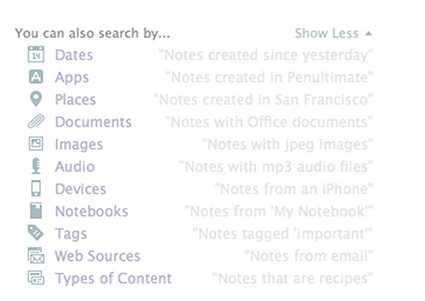
With Descriptive Search, those using Evernote on a Mac can use plain language to describe what is being sought. You can search by location you visited on a specific trip, by dates you know you were doing whatever is being sought, by type of device you used to upload the information and more. Click here for a video overview of the Descriptive Search functionality.

Still, within that same search field, Evernote offers codes or equations you can use to focus in on certain aspects of the content for which you are searching. Here are some examples:
  • created:20150115 finds notes created on January 15, 2015
  • updated:20150327 finds notes updated on March 27, 2015
  • intitle:"coffee" finds notes with coffee in their titles
  • resource:image/* searches for notes that include images
  • notebook:"Receipts" finds notes in the Receipts notebook
  • tag:"Mobile" finds notes tagged with Mobile
  • any:"New York" searches for notes that have New OR York in them, unlike how typing New York on its own in the search box will pull up notes that have both New AND York in them
  • todo:true finds notes with a checkbox that is checked
  • todo:false finds notes that contain an unchecked checkbox
  • todo:* searches for all notes that contain any checkbox at all
  • source:mobile finds all notes created on a mobile device

Many of my clients extend the power of Evernote for quickly finding what's needed via the Atlas and Shortcuts. By clicking the word Atlas in your Evernote account, you see a map and can locate any note based off the location in which it was added to your database. Likewise, under word Shortcut, you can access any note or notebook you've added to the shortlist of which content you access most frequently and, therefore, want most easily accessible. It is quite simple to add content to your Shortcuts by simply dragging a note or notebook atop the Shortcuts name and, then, dropping it into that section; however, I highly encourage you to keep your list of Shortcut content short so it doesn't become cumbersome to scroll through these options.

Above all else, though, I think Evernote's recent additions of Context and Augmented Intelligence empower me to most easily find whatever I might need quickly. If you are using Evernote Premium, it is with Context that you are given related notes from you own account, people from your LinkedIn network related to that note's content and relevant content for free from trusted news sources, like The Wall Street Journal, Fast Company, Inc Magazine, Pando Daily, CrunchBase, TechCrunch, Forbes and Lifehacker. On Evernote Business, the Context functionality adds related notes from team members, others in your company who many know more about the topic at hand and content from Factiva's web content. Context dramatically extends my ability to get work done within my Evernote workspace. Further, via Augmented Intelligence, my Evernote database is incorporating what it learns from how I use the tool to better provide me with what content it determines would be helpful, and it is quite fascinating. For example, if I've been adding content to specific notebooks, those notebooks will appear atop my list of notebook options when adding new notes on the go.

How do you find what you need quickly in your Evernote database? Do you utilize any of these tactics or are there any you'll be incorporating in your daily work habits?

Friday, March 20, 2015

Evernote's Tools Empower Your Paperless Productivity

While we do not live in a society that fully supports efforts to go paperFREE, there are plenty of strong solutions to better enable and support a paperLESS existence. Among those options, I really like what is provided by Evernote's suite of productivity apps. Today, let's take a deeper look at what's available.

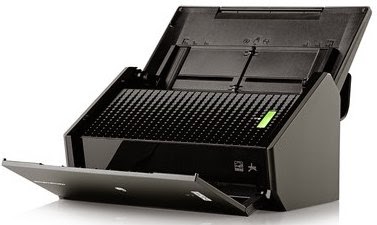
If you like using a physical scanner, Fujitsu ScanSnap document scanners offer one-button ease of
use, no matter whether you're scanning from the road or your desktop. Now, thanks to the partnership that Fujitsu has developed with Evernote, pushing your scan button on a Fujitsu ScanSnap device makes your documents instantly available and searchable across all your computers and mobile devices. Use any Fujitsu ScanSnap device to scan directly into Evernote, choosing your destination notebook; Evernote synchronizes your content across devices and updates your content for image recognition so you can quickly find what you need from anywhere.

Alternatively, if you prefer the simplicity of an app, Scannable captures the paper in your life quickly, easily and clearly, transforming the content into high-quality scans to be saved or shared immediately. When you have the Scannable app open and hover over what is to be scanned, it instantly recognizes business cards, receipts, full-size documents and Post-It notes, scanning the content without you having to push any buttons; then, scans are automatically cropped and enhanced so you get crystal clear files to quickly find or share as needed. For a video demo, click here.

Recently, I got a note from one of my clients, which I think highlights the vast usefulness of this tool. As she stated, "I thought I learned so much about Evernote from the earlier classes I took, but, when I took the workshop you presented to the National Association of Women Business Owners, you taught me about Scannable and, once again, changed my life. I have used it to scan in important documents that immediately needed to be emailed. I can scan anywhere, and the documents are permanently saved in my Evernote so I have them when and where I need them." The benefits of the Scannable app are limitless!

Further, even without any physical scanner or additional app, you can easily utilize your mobile device's camera to upload a photo of your Post-It note, document, business card or receipt directly from within your installed Evernote app. Just like a scan from the Fujitsu ScanSnap or Scannable app, each of these photos is processed for one of Evernote's most popular features: the ability to search for text within images. When a note is sent to Evernote via synchronization, the system searches for content in the file types of PNG, JPG or GIF, which are sent to a different set of servers whose sole job is to perform Optical Character Recognition (OCR). The results of OCR for any image are added to its note in the form of hidden metadata, which is indexed and available for searching. The accuracy of the text recognition is dependent on the quality of the photo, and it can take anywhere from a few minutes to a few hours for images to be processed for OCR. Still, the ability to search for text in pictures is so very cool!

Beyond how Evernote's OCR technology empowers your paperless abilities, using any of the aforementioned options to upload images of others' business cards can boost your productivity further. Via the Evernote suite of apps and its partnership with LinkedIn, business cards become business relationships. Scannable transforms cards into rich contacts with LinkedIn details, photos and the ability to save it all in your phone's contacts. Taking a photo from your phone's camera allows you to connect with that person on LinkedIn as well as save the contact to your phone's database. The content of the business card becomes actionable to further build that connection, taking you beyond the piece of paper.

Do you utilize Evernote for empowering paperless productivity? What types of paper do you convert to electronic in your Evernote database? Are there tips in this post you'll implement soon?